
Fortinet white logo
Fortinet white logo

Administration Guide

API access keys

API access keys

FortiEndpoint supports an option for the administrator to define an access code to identify an instance. A Fabric device can establish connection to a FortiEndpoint instance by providing one of the following in the SNI:

  • FortiCloud account ID. The connection succeeds if the FortiCloud account has only one FortiEndpoint instance and there is no organizational unit structure.
  • FortiCloud account ID and FortiEndpoint access key

This feature supports the following key types:

  • EMS API access key. Only a primary account can create EMS API access keys. These keys do not expire.
  • FortiGate access key. This feature requires FortiOS 7.4.4 or later.
To create an EMS API access key:
  1. In FortiEndpoint, go to Access Key > EMS API Access.
  2. Click Create New Key.
  3. In the Name field, enter a unique name, then click OK.
  4. Once the key is created, copy it to a safe location, as it does not display again after you close the dialog. Click Close.
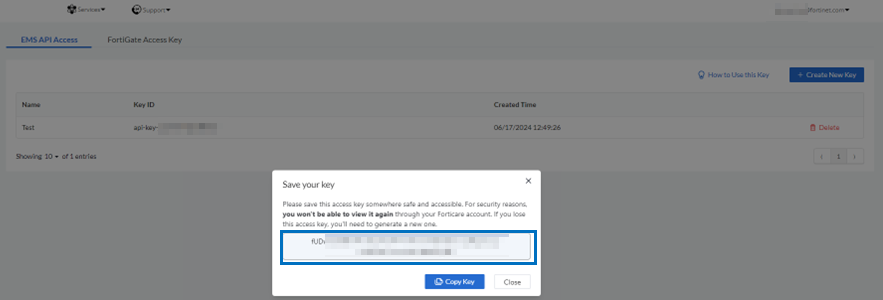
  5. The EMS API keys display in the EMS API Access table. Note that the key ID is not the same as the generated API key that you copied in step 4. To view information about the keys, click How to Use this Key.
To create a FortiGate access key:
  1. In FortiEndpoint, go to Access Key > FortiGate Access Key.
  2. Click Create New Key.
  3. In the Name field, enter a unique name, then click OK.
  4. Once the key is created, copy it to a safe location, as it does not display again after you close the dialog. Click Close.
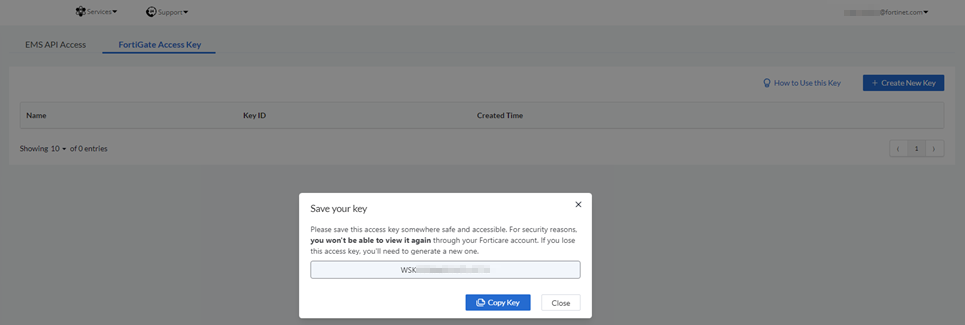
  5. The FortiGate keys display in the FortiGate Access Key table. Note that the key ID is not the same as the generated API key that you copied in step 4. To view information about the keys, click How to Use this Key.

  6. On the FortiGate, configure the key on the EMS Fabric connector:

    config endpoint-control fctems edit 1 set status enable set name "ems-cloud" set fortinetone-cloud-authentication enable set cloud-authentication-access-key "<FortiGate key>" next end

  7. In EMS, authorize the FortiGate to complete the connection. Standalone FortiGates or separate virtual domains from the same FortiGate can establish Fabric connection with FortiEndpoint.

API access keys

API access keys

FortiEndpoint supports an option for the administrator to define an access code to identify an instance. A Fabric device can establish connection to a FortiEndpoint instance by providing one of the following in the SNI:

  • FortiCloud account ID. The connection succeeds if the FortiCloud account has only one FortiEndpoint instance and there is no organizational unit structure.
  • FortiCloud account ID and FortiEndpoint access key

This feature supports the following key types:

  • EMS API access key. Only a primary account can create EMS API access keys. These keys do not expire.
  • FortiGate access key. This feature requires FortiOS 7.4.4 or later.
To create an EMS API access key:
  1. In FortiEndpoint, go to Access Key > EMS API Access.
  2. Click Create New Key.
  3. In the Name field, enter a unique name, then click OK.
  4. Once the key is created, copy it to a safe location, as it does not display again after you close the dialog. Click Close.

  5. The EMS API keys display in the EMS API Access table. Note that the key ID is not the same as the generated API key that you copied in step 4. To view information about the keys, click How to Use this Key.
To create a FortiGate access key:
  1. In FortiEndpoint, go to Access Key > FortiGate Access Key.
  2. Click Create New Key.
  3. In the Name field, enter a unique name, then click OK.
  4. Once the key is created, copy it to a safe location, as it does not display again after you close the dialog. Click Close.

  5. The FortiGate keys display in the FortiGate Access Key table. Note that the key ID is not the same as the generated API key that you copied in step 4. To view information about the keys, click How to Use this Key.

  6. On the FortiGate, configure the key on the EMS Fabric connector:

    config endpoint-control fctems edit 1 set status enable set name "ems-cloud" set fortinetone-cloud-authentication enable set cloud-authentication-access-key "<FortiGate key>" next end

  7. In EMS, authorize the FortiGate to complete the connection. Standalone FortiGates or separate virtual domains from the same FortiGate can establish Fabric connection with FortiEndpoint.