

Collection profiles
Threat Hunting Collection Profiles control the type of activity data that is collected for the Threat Hunting feature (which is described in Threat Hunting). Activity data that is collected is stored on the Repository server.
To access Threat Hunting settings, select Profiles > EDR > Collection profiles.
The following page displays:
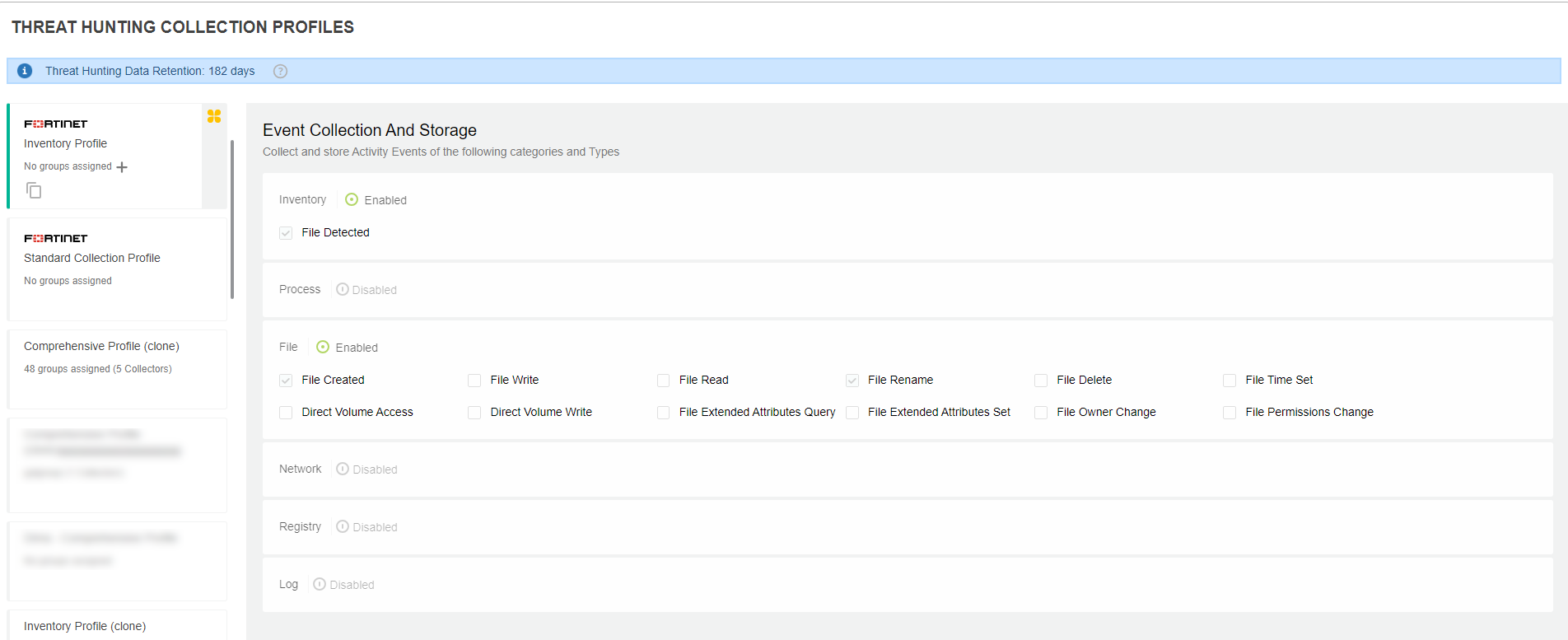
The left side of the page shows a list of profiles. A profile defines the activity event categories and actions to be collected. EDR comes with several predefined profiles, which cannot be modified. In addition to the pre-defined profiles, you can define your own custom profiles by cloning an existing profile.
The default collection profile for Collector groups is Inventory Profile, which is indicated by the Default Collection Profile ( ) icon). To change the default profile, hover over to the top-right corner of the target profile card and click the Set profile as the default profile (
 ) icon.
You can also assign a collection profile to one or more Collector groups. See Assigning a Collector group to a profile.
The pane on the right side of the page lists all activity event categories and their associated actions. These categories are the same as those described on Threat Hunting. Selecting a profile on the left displays the categories and actions defined for that profile in the right pane. Check the checkboxes of the actions for which EDR will collect activity data.