

Migrating from SSL VPN to ZTNA HTTPS access proxy
ZTNA can be used to replace VPN based teleworking solutions. Teleworking configurations that use SSL VPN tunnel or web portal mode access with LDAP user authentication can be migrated to ZTNA with HTTPS access proxy.
Scenarios
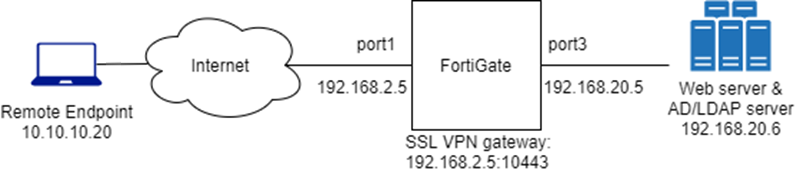
SSL VPN tunnel mode access with LDAP user authentication
Remote users that are in the ALLOWED-VPN active directory group have access to a specific web server when they connect through the SSL VPN tunnel. The FortiGate enables split tunneling to the web server so that only traffic to that destination is routed through the tunnel. The web server hosts internal websites that are only accessible by employees.
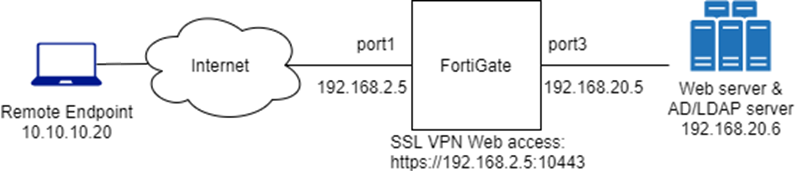
SSL VPN Web mode access with LDAP user authentication
Remote users that are in the ALLOWED-VPN active directory group have access to a specific web server when they connect through the SSL VPN web portal. The web server hosts internal websites that are only accessible by employees. The predefined bookmark to the internal website is the only site that allows remote access.
Configuration
To configure an LDAP server:
config user ldap
    edit "WIN2K16-KLHOME-LDAPS"
        set server "192.168.20.6"
        set server-identity-check disable
        set cnid "sAMAccountName"
        set dn "dc=KLHOME,dc=local"
        set type regular
        set username "KLHOME\\Administrator"
        set password **********
        set secure ldaps
        set ca-cert "CA_Cert_1"
        set port 636
    next
end
To configure a user group:
config user group
    edit "KLHOME-ALLOWED-VPN"
        set member "WIN2K16-KLHOME-LDAPS"
        config match
            edit 1
                set server-name "WIN2K16-KLHOME-LDAPS"
                set group-name "CN=ALLOWED-VPN,DC=KLHOME,DC=local"
            next
        end
    next
end
To configure the tunnel mode portal and SSL VPN settings:
config vpn ssl web portal
    edit "tunnel-access"
        set tunnel-mode enable
        set ip-pools "SSLVPN_TUNNEL_ADDR1"
    next
end
config vpn ssl settings
    set servercert "Fortinet_Factory"
    set tunnel-ip-pools "SSLVPN_TUNNEL_ADDR1"
    set tunnel-ipv6-pools "SSLVPN_TUNNEL_IPv6_ADDR1"
    set source-interface "port1"
    set source-address "all"
    set source-address6 "all"
    set default-portal "no-access"
    config authentication-rule
        edit 1
            set groups "KLHOME-ALLOWED-VPN"
            set portal "tunnel-access"
        next
    end
end
To configure the web mode portal and SSL VPN settings:
config vpn ssl web portal
    edit "web-access"
        set web-mode enable
        set user-bookmark disable
        config bookmark-group
            edit "gui-bookmarks"
                config bookmarks
                    edit "winserver"
                        set url "https://192.168.20.6"
                    next
                end
            next
        end
        set display-connection-tools disable
    next
end
config vpn ssl settings
    set servercert "Fortinet_Factory"
    set tunnel-ip-pools "SSLVPN_TUNNEL_ADDR1"
    set tunnel-ipv6-pools "SSLVPN_TUNNEL_IPv6_ADDR1"
    set source-interface "port1"
    set source-address "all"
    set source-address6 "all"
    set default-portal "no-access"
    config authentication-rule
        edit 1
            set groups "KLHOME-ALLOWED-VPN"
            set portal "web-access"
        next
    end
end
To configure a firewall address and policy:
config firewall address
    edit "winserver"
        set subnet 192.168.20.6 255.255.255.255
    next
end
config firewall policy
    edit 32
        set name "SSLVPNtoWinserver"
        set srcintf "ssl.root"
        set dstintf "port3"
        set srcaddr "all"
        set dstaddr "winserver"
        set action accept
        set schedule "always"
        set service "ALL"
        set logtraffic all
        set nat enable
        set groups "KLHOME-ALLOWED-VPN"
    next
end
With both the SSL VVPN tunnel and web portals, the remote user can connect through the SSL VPN and access the website at https://192.168.20.6. To monitor their access, go to Dashboard > Network and expand the SSL-VPN widget.
Migrating to ZTNA HTTPS access proxy
Both the SSL VPN tunnel and web portals can be migrated into a ZTNA configuration using the same LDAP server and user group for authentication. The ZTNA solution provides multi‑factor authentication using the client certificate, and additional security posture checks.
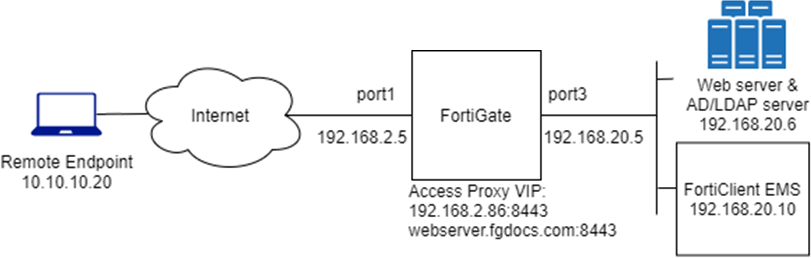
Instead of connecting to the SSL VPN tunnel or web portal, the remote user connects to the HTTPS access proxy that forwards traffic to the web server after authentication and security posture checks are completed. This provides granular control over who can access the web resource using role-based access control. It also gives the user transparent access to the website using only their browser.
For more information, see ZTNA HTTPS access proxy example and ZTNA HTTPS access proxy with basic authentication example.