

SD-WAN segmentation over a single overlay
SD-WAN, VPN, and BGP configurations support L3 VPN segmentation over a single overlay. In these configurations, a hub and spoke SD-WAN deployment requires that branch sites, or spokes, are able to accommodate multiple companies or departments, and each company's subnet is separated by a different VRF. A subnet on one VRF cannot communicate with a subnet on another VRF between different branches, but can communicate with the same VRF.
SD-WAN options
VRF-aware SD-WAN health checks
SD-WAN on the originating spoke can tag the health check probes with the correct VRF when transmitting to a multi-VRF tunnel. The hub can then forward the probes to the correct health check server in the same VRF as the hub.
config system sdwan
   config health-check
       edit <name>
           set vrf <vrf id>
           set source <address>
       next
   end
end
|
vrf <vrf id> |
Virtual Routing Forwarding ID. |
|
source <address> |
Source IP address used in the health-check packet to the server. |
Overlay stickiness
When a hub has multiple overlays, traffic received on one overlay should egress on the same overlay when possible. The service-sla-tie-break option ensures overlay stickiness. In SD‑WAN service rules, options are available to ensure that traffic received in a zone stays in that zone.
config system sdwan
    config zone
        edit <name>
            set service-sla-tie-break input-device
        next
    end
    config service
        edit <id>
            set input-zone <zone>
            set tie-break input-device
        next
    end
end
|
service-sla-tie-break input-device |
Members that meet the SLA are selected by matching the input device. |
|
input-zone <zone> |
Source input-zone name. |
|
tie-break input-device |
Members that meet the SLA are selected by matching the input device. |
IPsec options
Configurable rate limit for shortcut offers sent by the hub
By default, the hub sends a shortcut offer to a spoke every five seconds. If the hub continues to send offers that keep failing, and there are a large number of spokes, this can cause a high load on the hub. This setting makes the interval between shortcut offers configurable.
config vpn ipsec phase1-interface
    edit <name>
        set auto-discovery-offer-interval <interval>
    next
end
|
auto-discovery-offer-interval <interval> |
Interval between shortcut offer messages, in seconds (1 - 300, default = 5). |
Segmentation over a single overlay
Segmentation requires that VRF info is encapsulated within the IPsec VPN tunnel. This setting enables multi-VRF IPSEC tunnels. It is only applicable for forwarding traffic, and cannot be used for local-out traffic.
config vpn ipsec phase1-interface
    edit <name>
        set encapsulation vpn-id-ipip
    next
end
|
encapsulation vpn-id-ipip |
VPN ID with IPIP encapsulation. |
VPN configuration for BGP
The role of a VRF can be specified, along with other VRF details. Up to 252 VRFs can be configured per VDOM for any device.
config router bgp
    config vrf
        edit <vrf>
            set role {standalone | ce | pe}
            set rd <string>
            set export-rt <route_target>
            set import-rt <route_target>
            set import-route-map <route_map>
            config leak-target
                edit <vrf>
                    set route-map <route-map>
                    set interface <interface>
                next
            end
        next
    end
end
|
role {standalone | ce | pe} |
VRF role: standalone, customer edge (CE), or provider edge (PE). |
|
rd <string> |
Route Distinguisher: AA|AA:NN. This option is only available when the role is CE. |
|
export-rt <route_target> |
List of export route target. This option is only available when the role is CE. |
|
import-rt <route_target> |
List of import route target. This option is only available when the role is CE. |
|
import-route-map <route_map> |
Import route map. This option is only available when the role is CE. |
|
route-map <route-map> |
Route map of VRF leaking. |
|
interface <interface> |
Interface that is used to leak routes to the target VRF. |

|
In FortiOS 7.0, |
Display BGP routes by VRF and neighbor
# diagnose ip router bgp set-filter vrf <vrf>
# diagnose ip router bgp set-filter neighbor <neighbor address>
# diagnose ip router bgp set-filter reset
# execute router clear bgp vpnv4 unicast soft {in | out}
# get router info filter show
# get router info filter vrf {vrf | all}
Examples
In example 1, multiple companies (or departments of a company) share the ADVPN. Company A and company B each have two branches in two different locations. Company A's branches (A-1 and A-2) can talk to each other using the VPN shortcut, but not to company B's branches (B-1 and B-2). Likewise, company B's branches can talk to each other using the VPN shortcut, but not to company A's branches. Traffic can share the tunnels and shortcuts, but cannot be mixed up.
Example 2 shows that performance SLA health checks can be sent from a spoke's VRF to the loopback on the hub that is in the same VRF.
Example 3 shows that when traffic is ingress on the hub on one overlay, it will preferably egress on the same overlay.
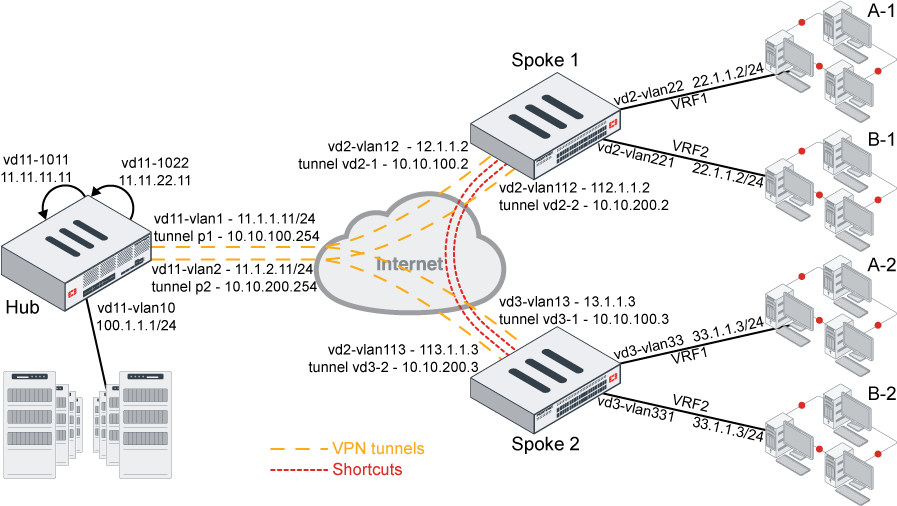
Example 1
In this example, two spokes each have two tunnels to the hub.
-
Each spoke has two VRFs behind it that can use the same IP address or subnets.
-
The computers in VRF1 behind spoke 1 can talk to the computers in VRF1 behind spoke 2, but not to any of the computers in the VRF2s behind either spoke.
-
The computers in VRF2 behind spoke 1 can talk to the computers in VRF2 behind spoke 2, but not to any of the computers in the VRF1s behind either spoke.
To configure the hub:
config router bgp
    set as 65505
    set router-id 11.11.11.11
    set ibgp-multipath enable
    set additional-path enable
    set additional-path-vpnv4 enable
    set cluster-id 11.12.13.14
    set additional-path-select 3
    config neighbor-group
        edit "gr1"
            set capability-graceful-restart enable
            set capability-default-originate enable
            set next-hop-self-rr enable
            set soft-reconfiguration-vpnv4 enable
            set remote-as 65505
            set additional-path both
            set additional-path-vpnv4 both
            set adv-additional-path 3
            set route-reflector-client enable
            set route-reflector-client-vpnv4 enable
        next
        edit "gr2"
            set capability-graceful-restart enable
            set capability-default-originate enable
            set next-hop-self-rr enable
            set soft-reconfiguration-vpnv4 enable
            set remote-as 65505
            set additional-path both
            set additional-path-vpnv4 both
            set adv-additional-path 3
            set route-reflector-client enable
            set route-reflector-client-vpnv4 enable
        next
    end
    config neighbor-range
        edit 1
            set prefix 10.10.100.0 255.255.255.0
            set neighbor-group "gr1"
        next
        edit 2
            set prefix 10.10.200.0 255.255.255.0
            set neighbor-group "gr2"
        next
    end
    config network
        edit 12
            set prefix 11.11.11.11 255.255.255.255
        next
        edit 22
            set prefix 11.11.22.11 255.255.255.255
        next
        edit 10
            set prefix 100.1.1.0 255.255.255.0
        next
        edit 33
            set prefix 11.1.1.0 255.255.255.0
        next
    end
    config vrf
        edit "0"
            set role pe
        next
        edit "1"
            set role ce
            set rd "1:1"
            set export-rt "1:1"
            set import-rt "1:1"
        next
        edit "2"
            set role ce
            set rd "2:1"
            set export-rt "2:1"
            set import-rt "2:1"
        next
    end
end
config vpn ipsec phase1-interface
edit "p1"
set type dynamic
set interface "vd11-vlan1"
set peertype any
set net-device disable
set proposal aes128-sha1
set add-route disable
set dpd on-idle
set dhgrp 5
set auto-discovery-sender enable
set auto-discovery-offer-interval 10
set encapsulation vpn-id-ipip
set psksecret **********
set dpd-retryinterval 60
next
edit "p2"
set type dynamic
set interface "vd11-vlan2"
set peertype any
set net-device disable
set proposal aes128-sha1
set add-route disable
set dpd on-idle
set dhgrp 5
set auto-discovery-sender enable
set auto-discovery-offer-interval 10
set encapsulation vpn-id-ipip
set psksecret **********
set dpd-retryinterval 60
next
endconfig vpn ipsec phase2-interface
edit "p1"
set phase1name "p1"
set proposal aes128-sha1
set dhgrp 5
next
edit "p2"
set phase1name "p2"
set proposal aes128-sha1
set dhgrp 5
next
end
To configure a spoke:
config router bgp
    set as 65505
    set router-id 2.2.2.2
    set ebgp-multipath enable
    set ibgp-multipath enable
    set network-import-check disable
    set additional-path enable
    set additional-path6 enable
    set additional-path-vpnv4 enable
    set recursive-next-hop enable
    set graceful-restart enable
    set additional-path-select 4
    config neighbor
        edit "10.10.100.254"
            set capability-dynamic enable
            set capability-graceful-restart-vpnv4 enable
            set soft-reconfiguration enable
            set soft-reconfiguration-vpnv4 enable
            set remote-as 65505
            set additional-path both
            set additional-path-vpnv4 both
            set adv-additional-path 3
        next
        edit "10.10.200.254"
            set capability-dynamic enable
            set capability-graceful-restart-vpnv4 enable
            set soft-reconfiguration enable
            set soft-reconfiguration-vpnv4 enable
            set remote-as 65505
            set additional-path both
            set additional-path-vpnv4 both
            set adv-additional-path 3
        next
    end
    config network
        edit 3
            set prefix 22.1.1.0 255.255.255.0
        next
        edit 4
            set prefix 12.12.12.0 255.255.255.0
        next
    end
    config vrf
        edit "0"
            set role pe
        next
        edit "1"
            set role ce
            set rd "1:1"
            set export-rt "1:1"
            set import-rt "1:1"
        next
        edit "2"
            set role ce
            set rd "2:1"
            set export-rt "2:1"
            set import-rt "2:1"
        next
    end
end
config vpn ipsec phase1-interface
    edit "vd2-1"
        set interface "vd2-vlan12"
        set peertype any
        set net-device enable
        set proposal aes128-sha1
        set add-route disable
        set dhgrp 5
        set idle-timeout enable
        set idle-timeoutinterval 5
        set auto-discovery-receiver enable
        set encapsulation vpn-id-ipip
        set remote-gw 11.1.1.11
        set psksecret **********
    next
    edit "vd2-2"
        set interface "vd2-vlan112"
        set peertype any
        set net-device enable
        set proposal aes128-sha1
        set add-route disable
        set dhgrp 5
        set auto-discovery-receiver enable
        set encapsulation vpn-id-ipip
        set remote-gw 11.1.2.11
        set psksecret **********
    next
end
config vpn ipsec phase2-interface
    edit "vd2-1"
        set phase1name "vd2-1"
        set proposal aes128-sha1
        set dhgrp 5
        set auto-negotiate enable
    next
    edit "vd2-2"
        set phase1name "vd2-2"
        set proposal aes128-sha1
        set dhgrp 5
        set auto-negotiate enable
    next
end
config system sdwan
    set status enable
    config zone
        edit "virtual-wan-link"
        next
        edit "SASE"
        next
        edit "zon2"
        next
    end
    config members
        edit 1
            set interface "vd2-1"
            set cost 10
        next
        edit 2
            set interface "vd2-2"
            set cost 20
        next
    end
    config health-check
        edit "ping"
            set server "11.11.11.11"
            set members 1 2
            config sla
                edit 1
                    set latency-threshold 200
                    set jitter-threshold 50
                next
            end
        next
        edit "1"
            set server "22.1.1.2"
            set vrf 1
            set members 1 2
        next
    end
    config service
        edit 2
            set mode sla
            set dst "100-200"
            config sla
                edit "ping"
                    set id 1
                next
            end
            set priority-members 2
            set use-shortcut-sla disable
        next
        edit 1
            set name "test-tag"
            set mode sla
            set dst "001-100"
            config sla
                edit "ping"
                    set id 1
                next
            end
            set priority-members 1 2
        next
    end
end
To check the spoke 1 routes:
# get router info routing-table bgp
Routing table for VRF=0
B*      0.0.0.0/0 [200/0] via 10.10.100.254 (recursive via vd2-1 tunnel 11.1.1.11 vrf 0), 04:42:57, [1/0]
                  [200/0] via 10.10.200.254 (recursive via vd2-2 tunnel 11.1.2.11 vrf 0), 04:42:57, [1/0]
B       1.1.1.1/32 [200/0] via 11.1.1.1 [2] (recursive via 12.1.1.1, vd2-vlan12), 04:42:57, [1/0]
B       1.222.222.222/32 [200/0] via 11.1.1.1 [2] (recursive via 12.1.1.1, vd2-vlan12), 04:42:57, [1/0]
B       11.11.11.11/32 [200/0] via 10.10.100.254 (recursive via vd2-1 tunnel 11.1.1.11 vrf 0), 04:42:57, [1/0]
                       [200/0] via 10.10.200.254 (recursive via vd2-2 tunnel 11.1.2.11 vrf 0), 04:42:57, [1/0]
B       33.1.1.0/24 [200/0] via 10.10.100.254 [2] (recursive via vd2-1 tunnel 11.1.1.11 vrf 0), 04:42:57, [1/0]
                    [200/0] via 10.10.200.254 [2] (recursive via vd2-2 tunnel 11.1.2.11 vrf 0), 04:42:57, [1/0]
B       100.1.1.0/24 [200/0] via 10.10.100.254 (recursive via vd2-1 tunnel 11.1.1.11 vrf 0), 04:42:57, [1/0]
                     [200/0] via 10.10.200.254 (recursive via vd2-2 tunnel 11.1.2.11 vrf 0), 04:42:57, [1/0]

Routing table for VRF=1
B V     33.1.1.0/24 [200/0] via 10.10.100.3 [2] (recursive via vd2-1 tunnel 11.1.1.11 vrf 0), 04:42:57, [1/0]
                    [200/0] via 10.10.200.3 [2] (recursive is directly connected, vd2-2_0), 04:42:57, [1/0]

Routing table for VRF=2
B V     33.1.1.0/24 [200/0] via 10.10.100.3 [2] (recursive via vd2-1 tunnel 11.1.1.11 vrf 0), 04:42:56, [1/0]
                    [200/0] via 10.10.200.3 [2] (recursive is directly connected, vd2-2_0), 04:42:56, [1/0]
VRF1 routes:
# get router info filter vrf 1
# get router info routing-table bgp
Routing table for VRF=1
B V     33.1.1.0/24 [200/0] via 10.10.100.3 [2] (recursive via vd2-1 tunnel 11.1.1.11 vrf 0), 04:44:11, [1/0]
                    [200/0] via 10.10.200.3 [2] (recursive is directly connected, vd2-2_0), 04:44:11, [1/0]
To test the configuration on shortcut 1:
-
From VRF1 of spoke 1 ping VRF1 of spoke 2 and from VRF2 of spoke 1 ping VRF2 spoke 2. Both VRF1 and VRF2 source and destination IP addresses are the same, so you can see how the traffic is isolated
-
Check sessions on spoke 1:
The output
vd=<vdom ID>:<VRF ID>indicates that sessions are created in and stay in the corresponding VRFs.-
User at 22.1.1.22 in VRF1 on spoke 1 pings 33.1.1.33 in VRF1 on spoke2.
# diagnose sys session list
session info: proto=1 proto_state=00 duration=21 expire=42 timeout=0 flags=00000000 socktype=0 sockport=0 av_idx=0 use=3
origin-shaper=
reply-shaper=
per_ip_shaper=
class_id=0 ha_id=0 policy_dir=0 tunnel=/ vlan_cos=0/255
state=may_dirty
statistic(bytes/packets/allow_err): org=420/5/1 reply=420/5/1 tuples=2
tx speed(Bps/kbps): 0/0 rx speed(Bps/kbps): 0/0
orgin->sink: org pre->post, reply pre->post dev=89->131/131->89 gwy=10.10.200.3/22.1.1.22
hook=pre dir=org act=noop 22.1.1.22:48417->33.1.1.33:8(0.0.0.0:0)
hook=post dir=reply act=noop 33.1.1.33:48417->22.1.1.22:0(0.0.0.0:0)
src_mac=02:4c:a5:fc:6a:7f
misc=0 policy_id=1 pol_uuid_idx=566 auth_info=0 chk_client_info=0 vd=1:1
serial=00092eee tos=ff/ff app_list=0 app=0 url_cat=0
sdwan_mbr_seq=0 sdwan_service_id=1
rpdb_link_id=ff000001 ngfwid=n/a
npu_state=0x5040001 no_offload
no_ofld_reason:  disabled-by-policy non-npu-intf
-
User at 22.1.1.22 in VRF2 on spoke 1 pings 33.1.1.33 in VRF2 on spoke2:
# diagnose sys session list
session info: proto=1 proto_state=00 duration=4 expire=56 timeout=0 flags=00000000 socktype=0 sockport=0 av_idx=0 use=3
origin-shaper=
reply-shaper=
per_ip_shaper=
class_id=0 ha_id=0 policy_dir=0 tunnel=/ vlan_cos=0/255
state=may_dirty
statistic(bytes/packets/allow_err): org=168/2/1 reply=168/2/1 tuples=2
tx speed(Bps/kbps): 39/0 rx speed(Bps/kbps): 39/0
orgin->sink: org pre->post, reply pre->post dev=113->131/131->113 gwy=10.10.200.3/22.1.1.22
hook=pre dir=org act=noop 22.1.1.22:55841->33.1.1.33:8(0.0.0.0:0)
hook=post dir=reply act=noop 33.1.1.33:55841->22.1.1.22:0(0.0.0.0:0)
src_mac=02:4c:a5:fc:6a:7f
misc=0 policy_id=1 pol_uuid_idx=566 auth_info=0 chk_client_info=0 vd=1:2
serial=00092f77 tos=ff/ff app_list=0 app=0 url_cat=0
sdwan_mbr_seq=0 sdwan_service_id=1
rpdb_link_id=ff000001 ngfwid=n/a
npu_state=0x5040001 no_offload
no_ofld_reason:  disabled-by-policy non-npu-intf
-
-
Check sessions on spoke 2:
The output
vd=<vdom ID>:<VRF ID>indicates that sessions are created in and stay in the corresponding VRFs.-
User at 22.1.1.22 in VRF1 on spoke 1 pings 33.1.1.33 in VRF1 on spoke 2:
# diagnose sys session list
session info: proto=1 proto_state=00 duration=11 expire=49 timeout=0 flags=00000000 socktype=0 sockport=0 av_idx=0 use=3
origin-shaper=
reply-shaper=
per_ip_shaper=
class_id=0 ha_id=0 policy_dir=0 tunnel=/ vlan_cos=0/255
state=may_dirty npu
statistic(bytes/packets/allow_err): org=168/2/1 reply=168/2/1 tuples=2
tx speed(Bps/kbps): 14/0 rx speed(Bps/kbps): 14/0
orgin->sink: org pre->post, reply pre->post dev=132->92/92->132 gwy=33.1.1.33/10.10.200.2
hook=pre dir=org act=noop 22.1.1.22:27733->33.1.1.33:8(0.0.0.0:0)
hook=post dir=reply act=noop 33.1.1.33:27733->22.1.1.22:0(0.0.0.0:0)
misc=0 policy_id=1 pol_uuid_idx=630 auth_info=0 chk_client_info=0 vd=6:1
serial=000a29fd tos=ff/ff app_list=0 app=0 url_cat=0
rpdb_link_id=00000000 ngfwid=n/a
npu_state=0x4000001 no_offload
npu info: flag=0x00/0x82, offload=0/0, ips_offload=0/0, epid=0/0, ipid=0/0, vlan=0x0000/0x0000
vlifid=0/0, vtag_in=0x0000/0x0000 in_npu=0/0, out_npu=0/0, fwd_en=0/0, qid=0/0
no_ofld_reason:  disabled-by-policy
-
User at 22.1.1.22 in VRF2 on spoke 1 pings 33.1.1.33 in VRF2 on spoke 2:
# diagnose sys session list
session info: proto=1 proto_state=00 duration=17 expire=43 timeout=0 flags=00000000 socktype=0 sockport=0 av_idx=0 use=3
origin-shaper=
reply-shaper=
per_ip_shaper=
class_id=0 ha_id=0 policy_dir=0 tunnel=/ vlan_cos=0/255
state=may_dirty npu
statistic(bytes/packets/allow_err): org=168/2/1 reply=168/2/1 tuples=2
tx speed(Bps/kbps): 9/0 rx speed(Bps/kbps): 9/0
orgin->sink: org pre->post, reply pre->post dev=132->115/115->132 gwy=33.1.1.33/10.10.200.2
hook=pre dir=org act=noop 22.1.1.22:24917->33.1.1.33:8(0.0.0.0:0)
hook=post dir=reply act=noop 33.1.1.33:24917->22.1.1.22:0(0.0.0.0:0)
dst_mac=02:4c:a5:fc:6a:7f
misc=0 policy_id=1 pol_uuid_idx=630 auth_info=0 chk_client_info=0 vd=6:2
serial=000a29ca tos=ff/ff app_list=0 app=0 url_cat=0
rpdb_link_id=00000000 ngfwid=n/a
npu_state=0x4000001 no_offload
npu info: flag=0x00/0x82, offload=0/0, ips_offload=0/0, epid=0/0, ipid=0/0, vlan=0x0000/0x0000
vlifid=0/0, vtag_in=0x0000/0x0000 in_npu=0/0, out_npu=0/0, fwd_en=0/0, qid=0/0
no_ofld_reason:  disabled-by-policy
-
To test the configuration on shortcut 2:
-
From VRF1 of spoke 1 ping VRF1 of spoke 2 and from VRF2 of spoke 1 ping VRF2 spoke 2. Both VRF1 and VRF2 source and destination IP addresses are the same, so you can see how the traffic is isolated
-
Check sessions on spoke 1:
The output
vd=<vdom ID>:<VRF ID>indicates that sessions are created in and stay in the corresponding VRFs.-
User at 22.1.1.22 in VRF1 on spoke 1 pings 33.1.1.133 in VRF1 on spoke 2:
# diagnose sys session listsession info: proto=1 proto_state=00 duration=17 expire=45 timeout=0 flags=00000000 socktype=0 sockport=0 av_idx=0 use=3
origin-shaper=
reply-shaper=
per_ip_shaper=
class_id=0 ha_id=0 policy_dir=0 tunnel=/ vlan_cos=0/255
state=may_dirty
statistic(bytes/packets/allow_err): org=336/4/1 reply=336/4/1 tuples=2
tx speed(Bps/kbps): 19/0 rx speed(Bps/kbps): 19/0
orgin->sink: org pre->post, reply pre->post dev=89->137/137->89 gwy=10.10.200.3/22.1.1.22
hook=pre dir=org act=noop 22.1.1.22:25968->33.1.1.133:8(0.0.0.0:0)
hook=post dir=reply act=noop 33.1.1.133:25968->22.1.1.22:0(0.0.0.0:0)
src_mac=02:4c:a5:fc:6a:7f
misc=0 policy_id=1 pol_uuid_idx=566 auth_info=0 chk_client_info=0 vd=1:1
serial=000aa475 tos=ff/ff app_list=0 app=0 url_cat=0
sdwan_mbr_seq=0 sdwan_service_id=2
rpdb_link_id=ff000002 ngfwid=n/a
npu_state=0x5040001 no_offload
no_ofld_reason:  disabled-by-policy non-npu-intf
-
User at 22.1.1.22 in VRF2 on spoke 1 pings 33.1.1.133 in VRF2 on spoke 2:
# diagnose sys session listsession info: proto=1 proto_state=00 duration=8 expire=53 timeout=0 flags=00000000 socktype=0 sockport=0 av_idx=0 use=3
origin-shaper=
reply-shaper=
per_ip_shaper=
class_id=0 ha_id=0 policy_dir=0 tunnel=/ vlan_cos=0/255
state=may_dirty
statistic(bytes/packets/allow_err): org=252/3/1 reply=252/3/1 tuples=2
tx speed(Bps/kbps): 30/0 rx speed(Bps/kbps): 30/0
orgin->sink: org pre->post, reply pre->post dev=113->137/137->113 gwy=10.10.200.3/22.1.1.22
hook=pre dir=org act=noop 22.1.1.22:28528->33.1.1.133:8(0.0.0.0:0)
hook=post dir=reply act=noop 33.1.1.133:28528->22.1.1.22:0(0.0.0.0:0)
src_mac=02:4c:a5:fc:6a:7f
misc=0 policy_id=1 pol_uuid_idx=566 auth_info=0 chk_client_info=0 vd=1:2
serial=000aa49f tos=ff/ff app_list=0 app=0 url_cat=0
sdwan_mbr_seq=0 sdwan_service_id=2
rpdb_link_id=ff000002 ngfwid=n/a
npu_state=0x5040001 no_offload
no_ofld_reason:  disabled-by-policy non-npu-intf
-
-
Check sessions on spoke 2:
The output
vd=<vdom ID>:<VRF ID>indicates that sessions are created in and stay in the corresponding VRFs.-
User at 22.1.1.22 in VRF1 on spoke 1 pings 33.1.1.133 in VRF1 on spoke 2:
# diagnose sys session list
session info: proto=1 proto_state=00 duration=24 expire=38 timeout=0 flags=00000000 socktype=0 sockport=0 av_idx=0 use=3
origin-shaper=
reply-shaper=
per_ip_shaper=
class_id=0 ha_id=0 policy_dir=0 tunnel=/ vlan_cos=0/255
state=may_dirty npu
statistic(bytes/packets/allow_err): org=336/4/1 reply=336/4/1 tuples=2
tx speed(Bps/kbps): 13/0 rx speed(Bps/kbps): 13/0
orgin->sink: org pre->post, reply pre->post dev=138->92/92->138 gwy=33.1.1.133/10.10.200.2
hook=pre dir=org act=noop 22.1.1.22:25968->33.1.1.133:8(0.0.0.0:0)
hook=post dir=reply act=noop 33.1.1.133:25968->22.1.1.22:0(0.0.0.0:0)
misc=0 policy_id=1 pol_uuid_idx=630 auth_info=0 chk_client_info=0 vd=6:1
serial=000aa476 tos=ff/ff app_list=0 app=0 url_cat=0
rpdb_link_id=00000000 ngfwid=n/a
npu_state=0x4000001 no_offload
npu info: flag=0x00/0x82, offload=0/0, ips_offload=0/0, epid=0/0, ipid=0/0, vlan=0x0000/0x0000
vlifid=0/0, vtag_in=0x0000/0x0000 in_npu=0/0, out_npu=0/0, fwd_en=0/0, qid=0/0
no_ofld_reason:  disabled-by-policy
-
User at 22.1.1.22 in VRF2 on spoke 1 pings 33.1.1.133 in VRF2 on spoke2:
# diagnose sys session list
session info: proto=1 proto_state=00 duration=15 expire=46 timeout=0 flags=00000000 socktype=0 sockport=0 av_idx=0 use=3
origin-shaper=
reply-shaper=
per_ip_shaper=
class_id=0 ha_id=0 policy_dir=0 tunnel=/ vlan_cos=0/255
state=may_dirty npu
statistic(bytes/packets/allow_err): org=252/3/1 reply=252/3/1 tuples=2
tx speed(Bps/kbps): 16/0 rx speed(Bps/kbps): 16/0
orgin->sink: org pre->post, reply pre->post dev=138->115/115->138 gwy=33.1.1.133/10.10.200.2
hook=pre dir=org act=noop 22.1.1.22:28528->33.1.1.133:8(0.0.0.0:0)
hook=post dir=reply act=noop 33.1.1.133:28528->22.1.1.22:0(0.0.0.0:0)
misc=0 policy_id=1 pol_uuid_idx=630 auth_info=0 chk_client_info=0 vd=6:2
serial=000aa4a0 tos=ff/ff app_list=0 app=0 url_cat=0
rpdb_link_id=00000000 ngfwid=n/a
npu_state=0x4000001 no_offload
npu info: flag=0x00/0x82, offload=0/0, ips_offload=0/0, epid=0/0, ipid=0/0, vlan=0x0000/0x0000
vlifid=0/0, vtag_in=0x0000/0x0000 in_npu=0/0, out_npu=0/0, fwd_en=0/0, qid=0/0
no_ofld_reason:  disabled-by-policy
-
Example 2
In this example, SLA health checks are sent from a spoke's VRF to the loopback on the hub that is in the same VRF.
To configure the health check:
config system sdwan
    config health-check
        edit "1"
            set server "11.11.22.11"
            set vrf 1
            set source 22.1.1.2
            set members 1 2
            config sla
                edit 1
                    set latency-threshold 200
                    set jitter-threshold 50
                next
            end
        next
    end
end
To check the health check status:
# diagnose sys sdwan health-check status  1
Health Check(1):
Seq(1 vd2-1): state(alive), packet-loss(0.000%) latency(0.023), jitter(0.002), mos(4.404), bandwidth-up(0), bandwidth-dw(0), bandwidth-bi(0) sla_map=0x1
Seq(2 vd2-2): state(alive), packet-loss(0.000%) latency(0.022), jitter(0.002), mos(4.404), bandwidth-up(0), bandwidth-dw(0), bandwidth-bi(0) sla_map=0x1
Example 3
In this example, when traffic from spoke 1 arrives at the hub on tunnel 1, it will egress the hub on tunnel 1 to go to other spokes. If traffic arrives on tunnel 2, it will egress on tunnel 2, and not tunnel 1.
To configure SD-WAN on the hub:
config system sdwan
    set status enable
    config zone
        edit "virtual-wan-link"
            set service-sla-tie-break input-device
        next
    end
    config members
        edit 1
            set interface "p1"
        next
        edit 2
            set interface "p2"
        next
    end
    config health-check
        edit "1"
            set server "22.1.1.2"
            set members 1 2
            config sla
                edit 1
                next
            end
        next
    end
    config service
        edit 1
            set mode sla
            set dst "all"
            config sla
                edit "1"
                    set id 1
                next
            end
            set priority-members 1 2
            set tie-break input-device
        next
    end
end
To verify that traffic stays in the same overlay on ingress and egress on the hub:
-
Confirm that the SD-WAN service rule has
Tie breakset toinput-deviceso that, when SLAs are met on all of the members, traffic prefers to egress on the same member as the input device:# diagnose sys sdwan service Service(1): Address Mode(IPV4) flags=0x200 use-shortcut-sla Tie break: input-device Gen(1), TOS(0x0/0x0), Protocol(0: 1->65535), Mode(sla), sla-compare-order Members(2): 1: Seq_num(1 p1), alive, sla(0x1), gid(0), cfg_order(0), local cost(0), selected 2: Seq_num(2 p2), alive, sla(0x1), gid(0), cfg_order(1), local cost(0), selected Dst address(1): 0.0.0.0-255.255.255.255 -
Use
diagnose sniffer packetcommands to verify that traffic ingress and egress are on the same overlay.