

VCI pattern matching for DHCP assignment
VCIs (vendor class identifiers) are supported in DHCP to allow VCI pattern matching as a condition for IP or DHCP option assignment. A single IP address, IP ranges of a pool, and dedicated DHCP options can be mapped to a specific VCI string.
config system dhcp server
    edit <id>
        config ip-range
            edit <id>
                set vci-match {enable | disable}
                set vci-string <string>
            next
        end
        config options
            edit <id>
                set vci-match {enable | disable}
                set vci-string <string>
            next
        end
    next
end
|
vci-match {enable | disable} |
Enable/disable VCI matching. When enabled, only DHCP requests with a matching VCI are served with this range. |
|
vci-string <string> |
Set the VCI string. Enter one or more VCI strings in quotation marks separated by spaces. |
Example
In this example, any DHCP client that matches the FortiGate-201F VCI will get their IP from the pool of 10.2.2.133-10.2.2.133, and options 42 (NTP servers) and 150 (TFTP server address). Any DHCP client that matches the FortiGate-101F VCI will get their IP from the default pool (10.2.2.132-10.2.2.132/10.2.2.134-10.2.2.254) and only get the 150 option.
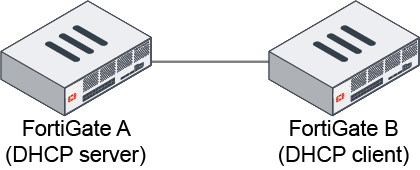
To configure VCI pattern matching on FortiGate A:
config system dhcp server
    edit 1
        set dns-service default
        set default-gateway 10.2.2.131
        set netmask 255.255.255.0
        set interface "port3"
        config ip-range
            edit 1
                set start-ip 10.2.2.132
                set end-ip 10.2.2.132
            next
            edit 2
                set start-ip 10.2.2.133
                set end-ip 10.2.2.133
                set vci-match enable
                set vci-string "FortiGate-201F"
            next
            edit 3
                set start-ip 10.2.2.134
                set end-ip 10.2.2.254
            next
        end
        config options
            edit 1
                set code 42
                set type ip
                set vci-match enable
                set vci-string "FortiGate-201F"
                set ip "8.8.8.8"
            next
            edit 2
                set code 150
                set type ip
                set ip "172.16.200.55"
            next
        end
        set vci-match enable
        set vci-string "FortiGate-201F" "FortiGate-101F"
    next
end