
Fortinet white logo
Fortinet white logo

Administration Guide

Subresource Integrity (SRI) Check

Subresource Integrity (SRI) Check

The Subresource Integrity (SRI) Check feature allows FortiWeb to enforce integrity validation for externally loaded resources such as JavaScript and CSS files. It works by ensuring that the contents of these resources match a known cryptographic hash before the browser executes them. This protects applications from executing modified, tampered, or malicious third-party content—whether the change results from a CDN compromise, unauthorized update, or man-in-the-middle attack.
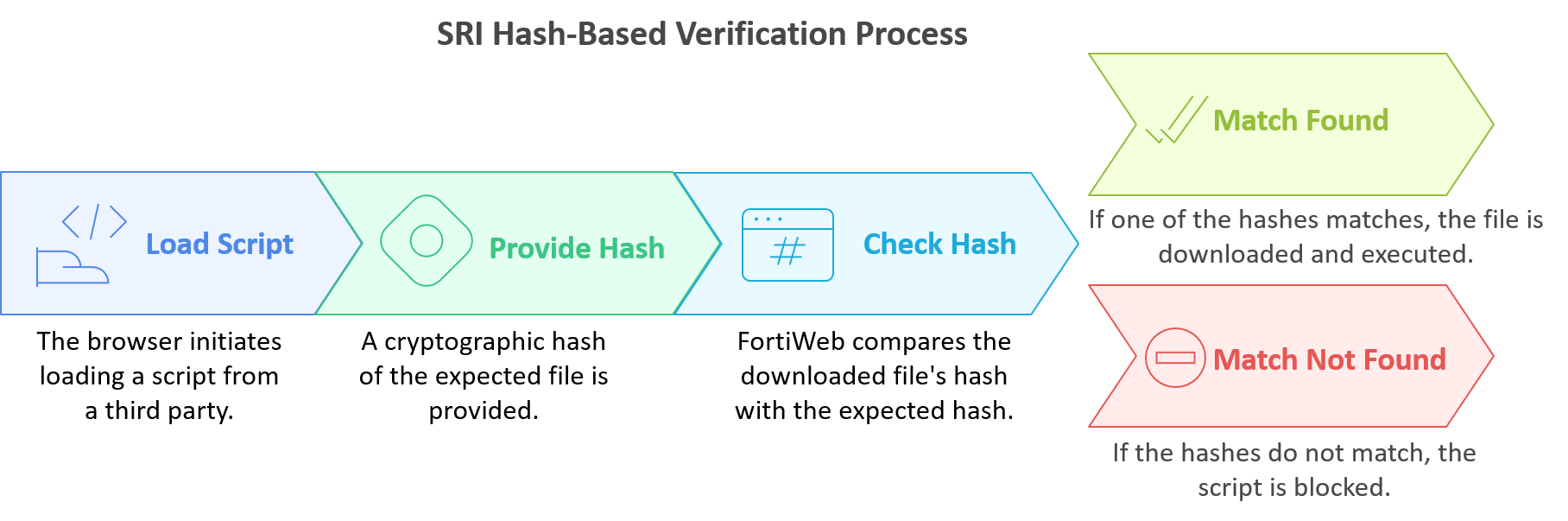
When Subresource Integrity Check is enabled, FortiWeb injects integrity and cross-origin attributes into the appropriate HTML tags (e.g., <script> and <link>). These attributes instruct the browser to validate the file’s integrity before allowing it to execute. If the content does not match the expected hash, the browser blocks the resource—preventing unauthorized scripts from running and preserving application integrity.

Subresource Integrity Check plays a critical role in mitigating OWASP client-side risks such as JavaScript drift, use of vulnerable or outdated components, and third-party supply chain attacks. It is especially effective when used alongside Client-Side Protection and HTTP Header Security, which together provide full lifecycle protection across browser-based attack surfaces.

To configure Subresource Integrity Check, you must define one or more Subresource Integrity Rules, each specifying a resource URL, expected hash, and crossorigin behavior. These rules are grouped into a Subresource Integrity Policy, which is then applied through a Web Protection Profile and activated via a Server Policy. The following sections describe how to configure both components.

Subresource Integrity (SRI) Check

Subresource Integrity (SRI) Check

The Subresource Integrity (SRI) Check feature allows FortiWeb to enforce integrity validation for externally loaded resources such as JavaScript and CSS files. It works by ensuring that the contents of these resources match a known cryptographic hash before the browser executes them. This protects applications from executing modified, tampered, or malicious third-party content—whether the change results from a CDN compromise, unauthorized update, or man-in-the-middle attack.

When Subresource Integrity Check is enabled, FortiWeb injects integrity and cross-origin attributes into the appropriate HTML tags (e.g., <script> and <link>). These attributes instruct the browser to validate the file’s integrity before allowing it to execute. If the content does not match the expected hash, the browser blocks the resource—preventing unauthorized scripts from running and preserving application integrity.

Subresource Integrity Check plays a critical role in mitigating OWASP client-side risks such as JavaScript drift, use of vulnerable or outdated components, and third-party supply chain attacks. It is especially effective when used alongside Client-Side Protection and HTTP Header Security, which together provide full lifecycle protection across browser-based attack surfaces.

To configure Subresource Integrity Check, you must define one or more Subresource Integrity Rules, each specifying a resource URL, expected hash, and crossorigin behavior. These rules are grouped into a Subresource Integrity Policy, which is then applied through a Web Protection Profile and activated via a Server Policy. The following sections describe how to configure both components.