
Fortinet white logo
Fortinet white logo

Administration Guide

Replacement Message Support at HTTP Content Routing Policy Level (8.0.0)

Replacement Message Support at HTTP Content Routing Policy Level (8.0.0)

FortiWeb now supports defining replacement messages at the HTTP Content Routing (CR) policy level. This enhancement enables the system to return distinct error pages based on the specific CR policy matched by incoming traffic. It improves response granularity, simplifies troubleshooting, and enhances user feedback in deployments with complex routing rules.

Benefits
  • Improved troubleshooting clarity – Pinpoints which CR policy or server pool caused the error.

  • More precise user messaging – Customizes error pages for specific application paths or services.

  • Seamless module integration – Automatically applied by all WAF modules that support replacement messages.

  • Preserves compatibility – Falls back to the server policy replacement message when no CR-level message is configured.

In previous versions, replacement messages could only be defined at the server policy level. This limitation meant all routing policies shared the same error page, regardless of which backend pool failed. The new support for CR-level messages allows better control and visibility across routing paths under a shared policy.

Configuration

GUI

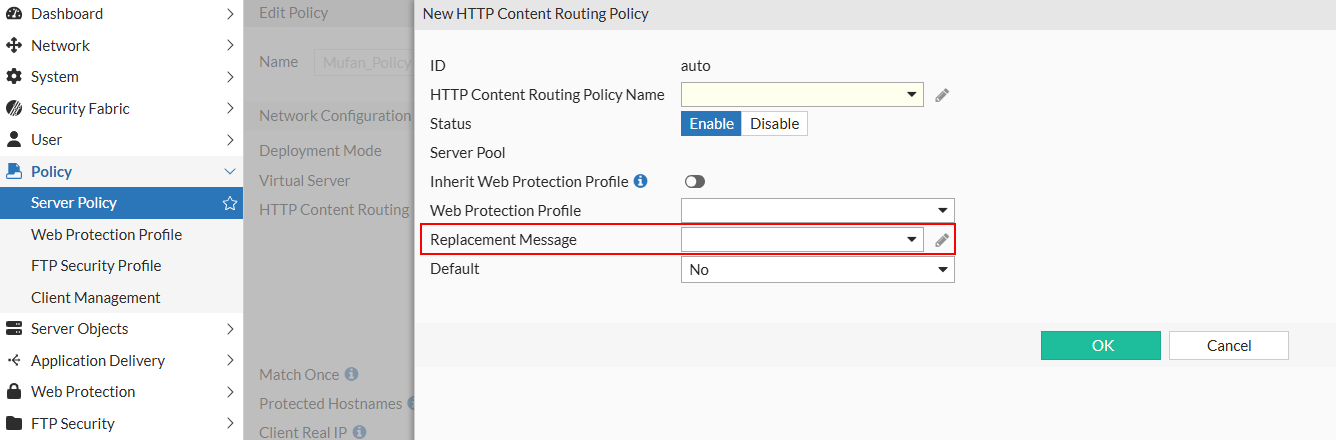
When configuring an HTTP Content Routing Policy in the Server Policy, select a predefined replacement message from the Replacement Message dropdown. This setting is optional. If no value is selected, FortiWeb will default to the replacement message configured at the server policy level.
CLI
config server-policy policy 
  edit <policy_name>
    config http-content-routing-list
      edit <entry_id>
        set replacemsg "<replacement_message_name>"

If the replacemsg option is not set for the CR entry, the system will use the server policy–level replacement message.

No additional changes are required in individual WAF modules. Any module that invokes replacement messages will automatically apply the message based on the applicable CR context.

Replacement Message Support at HTTP Content Routing Policy Level (8.0.0)

Replacement Message Support at HTTP Content Routing Policy Level (8.0.0)

FortiWeb now supports defining replacement messages at the HTTP Content Routing (CR) policy level. This enhancement enables the system to return distinct error pages based on the specific CR policy matched by incoming traffic. It improves response granularity, simplifies troubleshooting, and enhances user feedback in deployments with complex routing rules.

Benefits
  • Improved troubleshooting clarity – Pinpoints which CR policy or server pool caused the error.

  • More precise user messaging – Customizes error pages for specific application paths or services.

  • Seamless module integration – Automatically applied by all WAF modules that support replacement messages.

  • Preserves compatibility – Falls back to the server policy replacement message when no CR-level message is configured.

In previous versions, replacement messages could only be defined at the server policy level. This limitation meant all routing policies shared the same error page, regardless of which backend pool failed. The new support for CR-level messages allows better control and visibility across routing paths under a shared policy.

Configuration

GUI

When configuring an HTTP Content Routing Policy in the Server Policy, select a predefined replacement message from the Replacement Message dropdown. This setting is optional. If no value is selected, FortiWeb will default to the replacement message configured at the server policy level.

CLI
config server-policy policy 
  edit <policy_name>
    config http-content-routing-list
      edit <entry_id>
        set replacemsg "<replacement_message_name>"

If the replacemsg option is not set for the CR entry, the system will use the server policy–level replacement message.

No additional changes are required in individual WAF modules. Any module that invokes replacement messages will automatically apply the message based on the applicable CR context.