Fortinet white logo
Fortinet white logo

Administration Guide

FortiAI Example Tasks

FortiAI Example Tasks

The FortiAI Assistant supports a variety of tasks that help you investigate web application traffic and access FortiWeb product knowledge using natural-language queries. Each of the following examples demonstrates a specific capability, with a sample prompt and a description of the assistant’s behavior.

tooltip icon

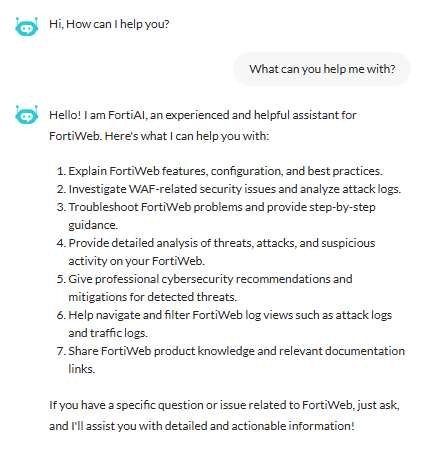
You can prompt FortiAI for help at any time. For example, try asking:

“What can you help me with?”

FortiAI will respond with a list of supported capabilities specific to FortiWeb.

Example 1: Performing log analysis and filtering

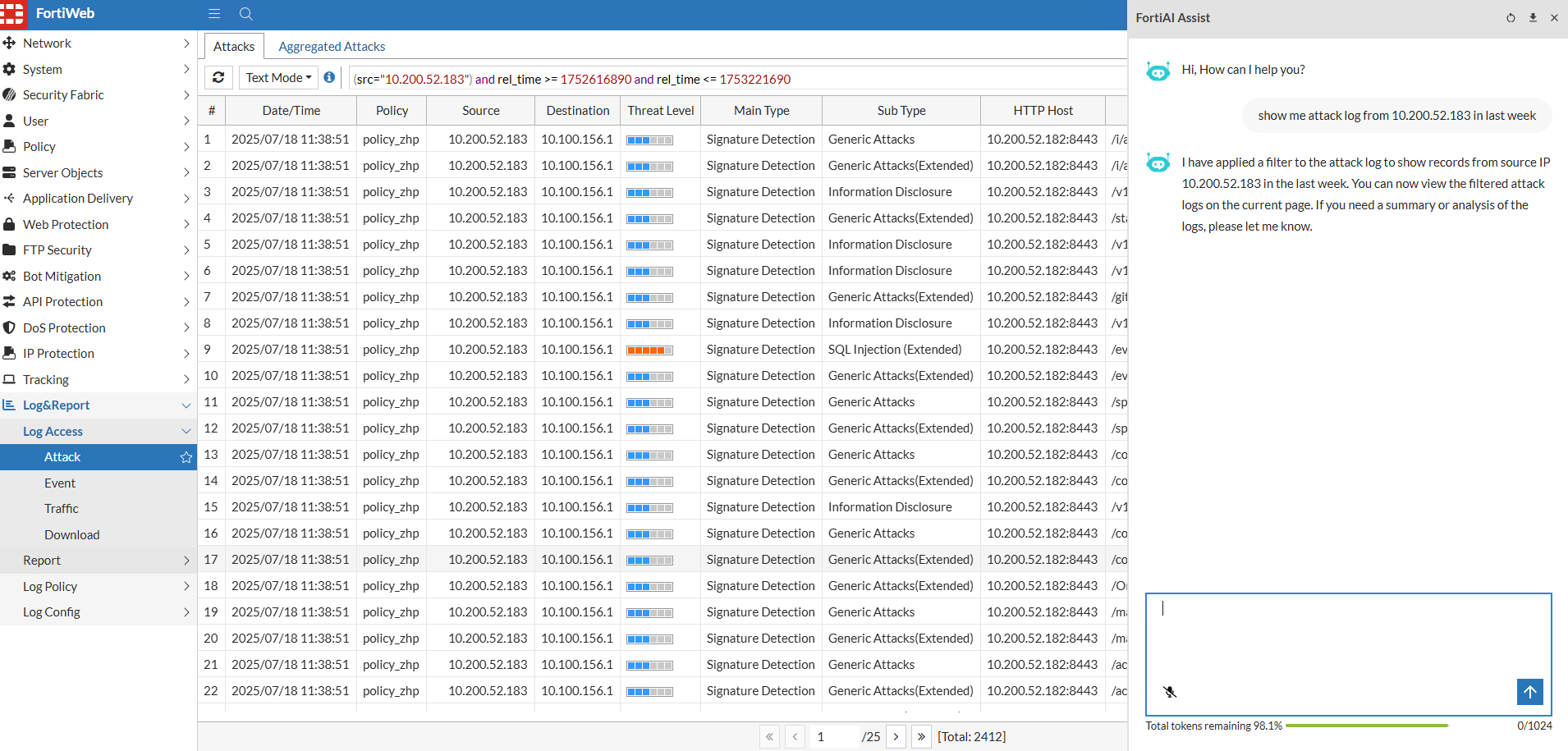
FortiAI can guide you through analyzing logs and applying filters to narrow your search. You can query based on source IP, attack type, policy name, or other log attributes, and limit the results to a specific time range. This helps identify suspicious behavior without manually building filters.

Prompt:

"show me attack log from 10.200.52.183 in last week"

What FortiAI does:

FortiAI redirects you to the Attack Log page and applies a filter for the specified IP address and time range. The filtered results help you quickly investigate recent activity from a specific client or source.
Example 2: Summarizing top attack types

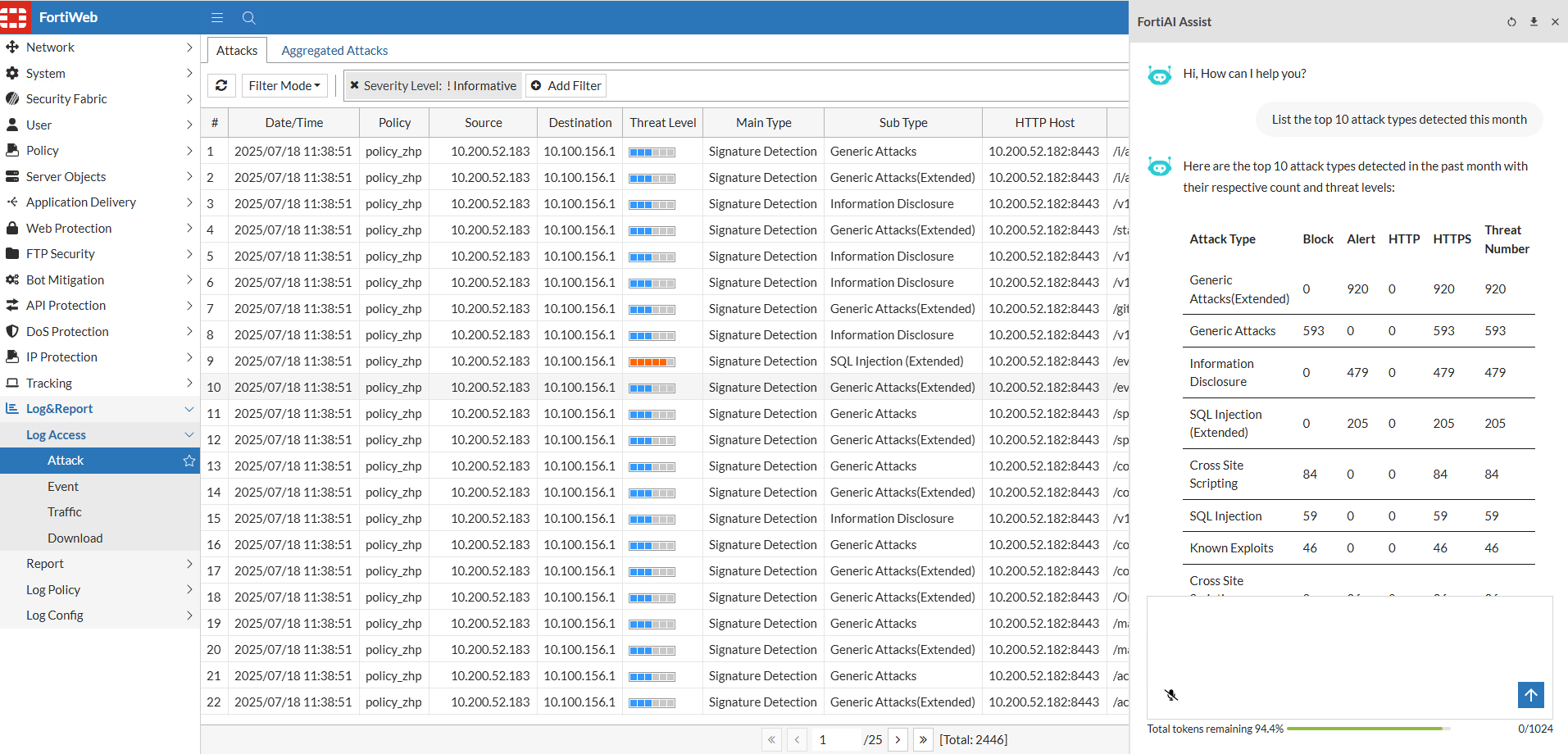
FortiAI can generate summaries of attack data over a chosen period. This is useful for identifying the most frequently triggered protections and understanding threat trends across your applications.

Prompt:

"List the top 10 attack types detected this month"

What FortiAI does:

The assistant analyzes recent logs and groups entries by attack type (e.g., SQL injection, XSS, command injection). It returns a ranked list of the most common attack categories along with the number of detections for each.
Example 3: Analyzing logs on the current page

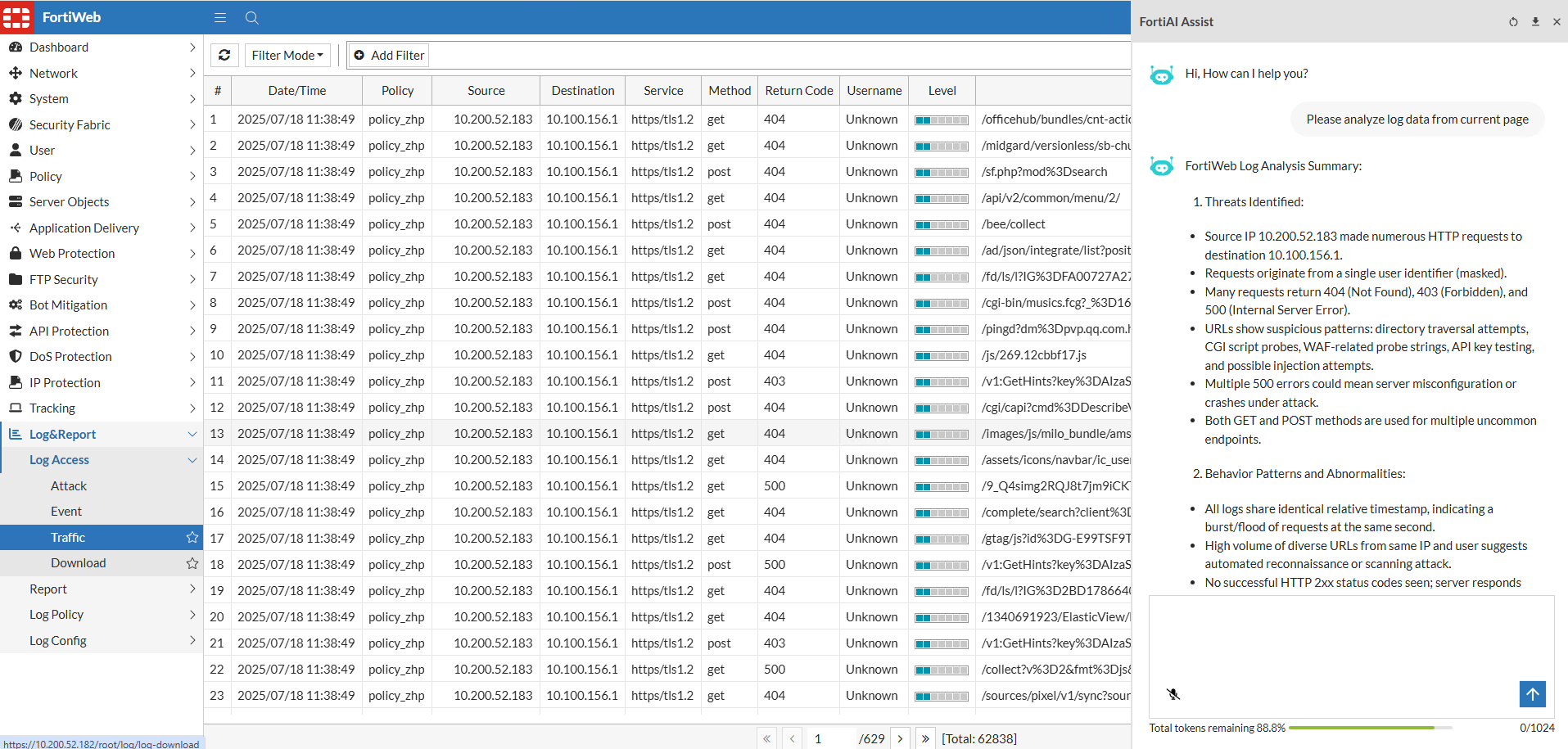
If you're already reviewing logs in FortiWeb, FortiAI can help you interpret the data currently displayed. This is useful for interactive threat hunting or traffic inspection.

Prompt:

“Please analyze log data from current page”

What FortiAI does:

FortiAI analyzes the logs on your current view—such as recent attack events or traffic flows—and summarizes trends, frequent sources, or notable patterns. This helps you make sense of large volumes of entries more quickly.
Example 4: Checking external IP reputation

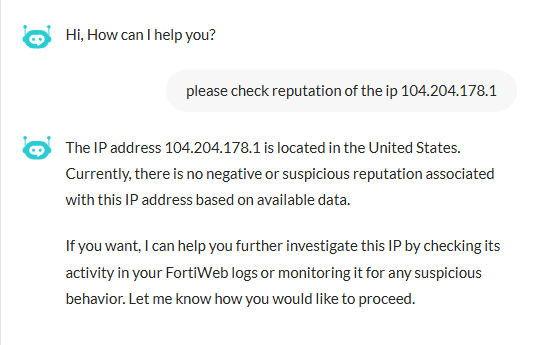
When investigating suspicious traffic, FortiAI can help you assess the risk level of a source IP by retrieving reputation data from FortiGuard.

Prompt:

“Please check reputation of the IP 104.204.178.1”

What FortiAI does:

FortiAI queries the FortiGuard IP Reputation service and returns the reputation score and any associated threat categories for the given IP address. This helps you determine whether to block, monitor, or allow traffic from that source.
Example 5: Requesting configuration guidance

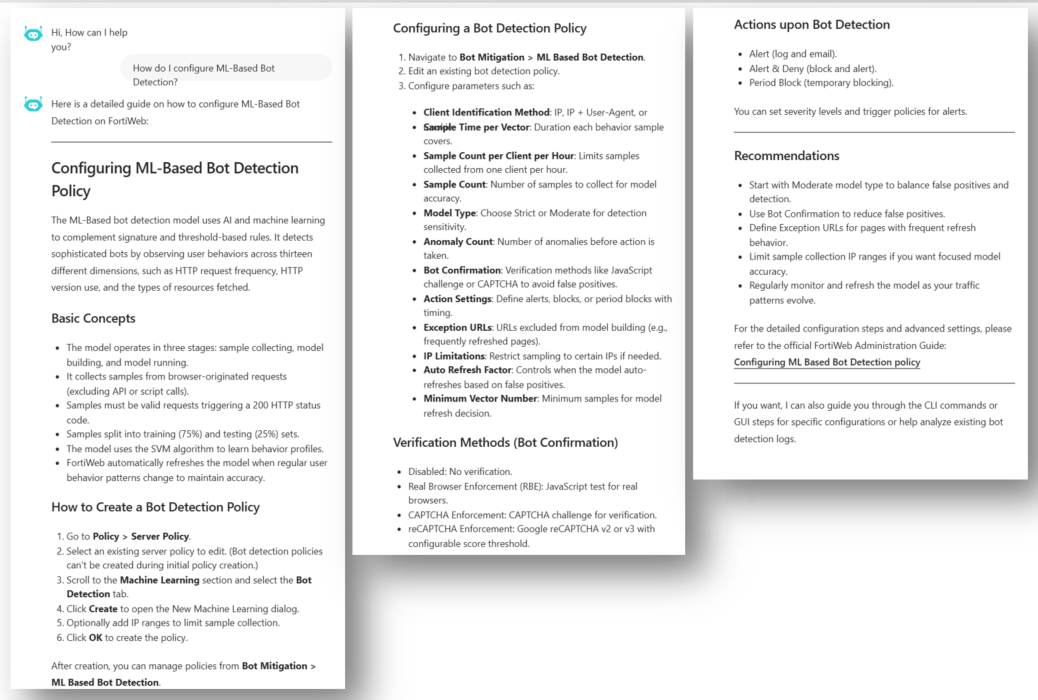
FortiAI can provide step-by-step configuration guidance by pulling relevant information from FortiWeb’s documentation. This is helpful when you are setting up a new feature and want a quick overview of how to begin.

Prompt:

“How do I configure ML-Based Bot Detection?”

What FortiAI does:

The assistant searches internal documentation and returns a concise explanation of the configuration process. It may also include a link to the full instructions in the Administration Guide or CLI Reference.
Example 6: Asking about feature functionality

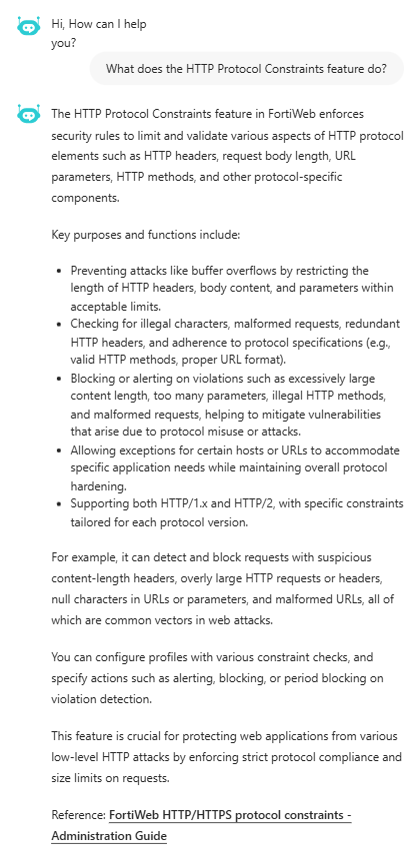
If you're unsure what a FortiWeb feature does, FortiAI can explain it based on the official product documentation. This can help you understand options in the GUI or decide whether to enable a specific setting.

Prompt:

“What does the HTTP Protocol Constraints feature do?”

What FortiAI does:

FortiAI provides an overview of the feature’s purpose and how it contributes to application-layer security. It may explain its role in request validation and include a reference to more detailed documentation.
Example 7: Analyzing an individual Attack log

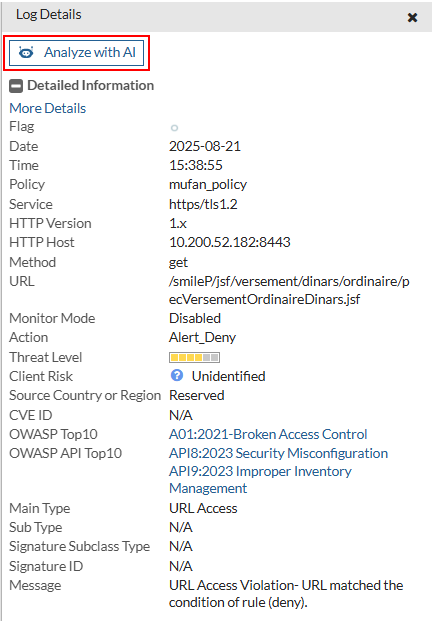
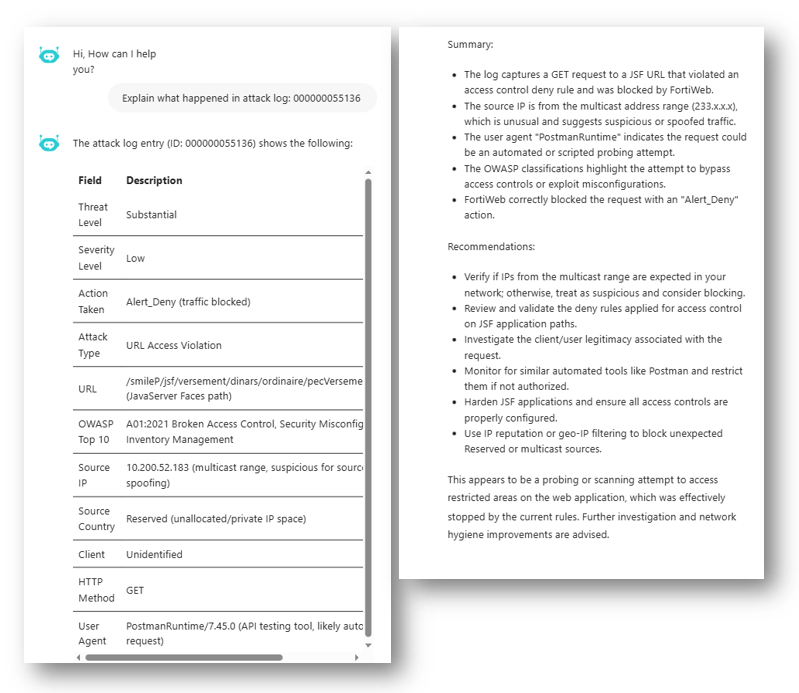
If you want to understand the details of a specific log entry, FortiAI can analyze it directly from the Log Details page. This can help you determine what the event means, its potential impact, and how to respond.

Action:

Click Analyze with AI from the Log Details page of the attack log entry.
What FortiAI does:

FortiAI analyzes the selected log using its unique MSG ID and provides a plain-language summary of the attack, an assessment of risks, and actionable recommendations for remediation or configuration changes.
FortiAI Example Tasks

FortiAI Example Tasks

The FortiAI Assistant supports a variety of tasks that help you investigate web application traffic and access FortiWeb product knowledge using natural-language queries. Each of the following examples demonstrates a specific capability, with a sample prompt and a description of the assistant’s behavior.

tooltip icon

You can prompt FortiAI for help at any time. For example, try asking:

“What can you help me with?”

FortiAI will respond with a list of supported capabilities specific to FortiWeb.

Example 1: Performing log analysis and filtering

FortiAI can guide you through analyzing logs and applying filters to narrow your search. You can query based on source IP, attack type, policy name, or other log attributes, and limit the results to a specific time range. This helps identify suspicious behavior without manually building filters.

Prompt:

"show me attack log from 10.200.52.183 in last week"

What FortiAI does:

FortiAI redirects you to the Attack Log page and applies a filter for the specified IP address and time range. The filtered results help you quickly investigate recent activity from a specific client or source.

Example 2: Summarizing top attack types

FortiAI can generate summaries of attack data over a chosen period. This is useful for identifying the most frequently triggered protections and understanding threat trends across your applications.

Prompt:

"List the top 10 attack types detected this month"

What FortiAI does:

The assistant analyzes recent logs and groups entries by attack type (e.g., SQL injection, XSS, command injection). It returns a ranked list of the most common attack categories along with the number of detections for each.

Example 3: Analyzing logs on the current page

If you're already reviewing logs in FortiWeb, FortiAI can help you interpret the data currently displayed. This is useful for interactive threat hunting or traffic inspection.

Prompt:

“Please analyze log data from current page”

What FortiAI does:

FortiAI analyzes the logs on your current view—such as recent attack events or traffic flows—and summarizes trends, frequent sources, or notable patterns. This helps you make sense of large volumes of entries more quickly.

Example 4: Checking external IP reputation

When investigating suspicious traffic, FortiAI can help you assess the risk level of a source IP by retrieving reputation data from FortiGuard.

Prompt:

“Please check reputation of the IP 104.204.178.1”

What FortiAI does:

FortiAI queries the FortiGuard IP Reputation service and returns the reputation score and any associated threat categories for the given IP address. This helps you determine whether to block, monitor, or allow traffic from that source.

Example 5: Requesting configuration guidance

FortiAI can provide step-by-step configuration guidance by pulling relevant information from FortiWeb’s documentation. This is helpful when you are setting up a new feature and want a quick overview of how to begin.

Prompt:

“How do I configure ML-Based Bot Detection?”

What FortiAI does:

The assistant searches internal documentation and returns a concise explanation of the configuration process. It may also include a link to the full instructions in the Administration Guide or CLI Reference.

Example 6: Asking about feature functionality

If you're unsure what a FortiWeb feature does, FortiAI can explain it based on the official product documentation. This can help you understand options in the GUI or decide whether to enable a specific setting.

Prompt:

“What does the HTTP Protocol Constraints feature do?”

What FortiAI does:

FortiAI provides an overview of the feature’s purpose and how it contributes to application-layer security. It may explain its role in request validation and include a reference to more detailed documentation.

Example 7: Analyzing an individual Attack log

If you want to understand the details of a specific log entry, FortiAI can analyze it directly from the Log Details page. This can help you determine what the event means, its potential impact, and how to respond.

Action:

Click Analyze with AI from the Log Details page of the attack log entry.

What FortiAI does:

FortiAI analyzes the selected log using its unique MSG ID and provides a plain-language summary of the attack, an assessment of risks, and actionable recommendations for remediation or configuration changes.