

Custom Tracking (8.0.3)
FortiWeb 8.0.3 introduces Custom Tracking, a feature that lets you define how FortiWeb identifies users or sessions by selecting the HTTP attributes that matter in your application. Instead of relying on cookies or source IP, FortiWeb can now build tracking IDs from custom headers, parameters, cookies, or response values.
This capability is designed for environments where applications provide their own identifiers that traditional tracking cannot capture. By aligning tracking with the fields your application already uses, Custom Tracking improves request correlation and strengthens visibility across WAF modules and logs.
Enhancements
-
New Custom Tracking Policy that allows users to build a custom tracking ID based on the specific headers, parameters, or response values used by their application.
-
A dedicated Custom Tracking Monitor displays active tracking IDs and their associated metadata, helping administrators observe tracked activity in real time.
Custom Tracking Policy Configuration
The new Custom Tracking Policy defines the HTTP attributes FortiWeb uses to construct a tracking ID. These attributes can be drawn from the request or the response, and FortiWeb combines the extracted values into a normalized, ordered key that uniquely identifies the user or session. Each policy supports up to eight match conditions and is applied through the Web Protection Profile, ensuring that tracking aligns with the traffic inspected by the associated server policy.
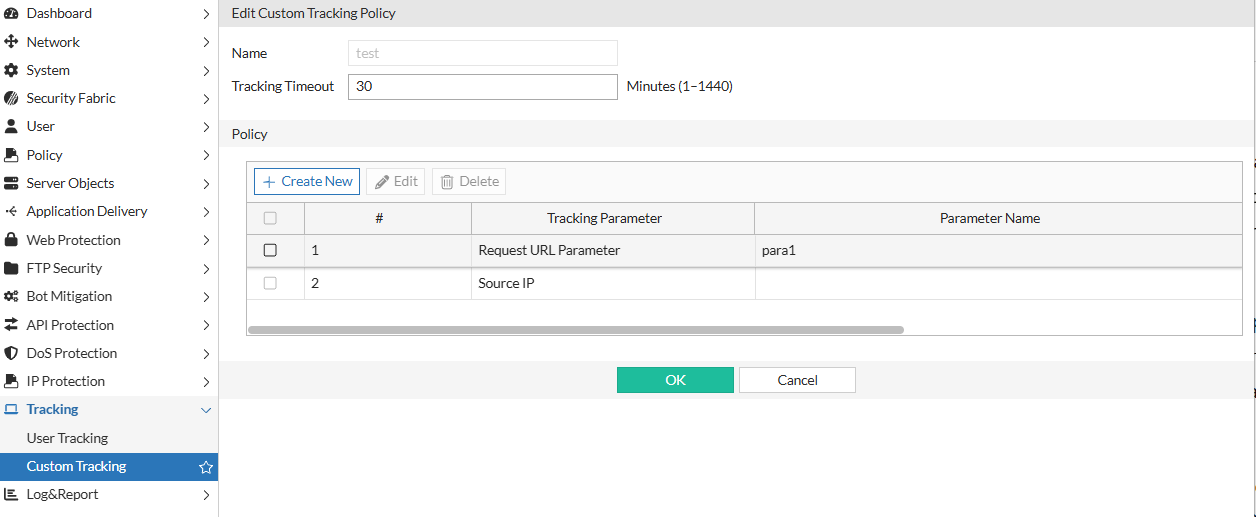
Tracking Parameters
The Custom Tracking Policy supports the following tracking parameters. Each parameter type contributes differently to the tracking ID and includes specific constraints for how it can be used in a policy:
|
Tracking Parameter |
How It Is Used |
Rules and Constraints |
|---|---|---|
| Source IP | Uses the client IP address to help identify the requester. | Can appear only once. No name or pattern required. |
| URL Path | Matches or extracts portions of the request path. | Supports plain or regex matching. Regex cannot be empty. |
| Request URL Parameter | Extracts a value from the query string. | Requires a non-empty parameter name. Name cannot be reused. Supports plain or regex. |
| Request Body Parameter | Extracts a value from the request body. | Requires a non-empty parameter name. Name cannot be reused. Supports plain or regex. |
| Request Cookie | Uses a cookie value supplied by the application. | Requires a non-empty cookie name. Name cannot be reused. Supports plain or regex. |
| Request Header | Uses a request header such as X-User-ID or Authorization. | Requires a non-empty header name. Name cannot be reused. Supports plain or regex. |
| Response Header | Extracts a value from response headers. | Requires a non-empty header name. Supports plain or regex. |
| Response Code | Matches the HTTP response status returned to the client. | Can appear only once. Requires a min and max code range. No regex or name. |
Tracking ID Generation
For each relevant request or response, FortiWeb extracts the configured parameter values, normalizes them, orders them in a fixed sequence, and generates a deterministic hash key. This ensures that tracking IDs remain stable even when header ordering or request formatting varies.
Two CLI-only options refine when FortiWeb creates tracking IDs:
-
track-only-when-all-matched (default enabled): Generate an ID only when all match conditions are present.
-
bypass-when-none-matched (default enabled): Skip ID creation when none of the selected attributes appear.
CLI command:
config waf custom-tracking policy
    edit <policy_name>
        set tracking-timeout <integer>
        set track-only-when-all-matched {enable|disable}
        set bypass-when-none-matched {enable|disable}
        config match-condition
            edit <id>
                set match-target <parameter>
                set target-name <string>
                set target-value-type {plain|regular}
                set target-value-regex <string>
                set response-code-min <int>
                set response-code-max <int>
            next
        end
    next
end
Custom Tracking Monitor
FortiWeb adds a new monitoring view that provides real-time visibility into all active custom tracking IDs. The monitor shows how each ID was formed, how long it has been active, and how it is being used across traffic flows. This helps administrators understand traffic patterns, validate policy behavior, and troubleshoot how identifiers appear in requests and responses.
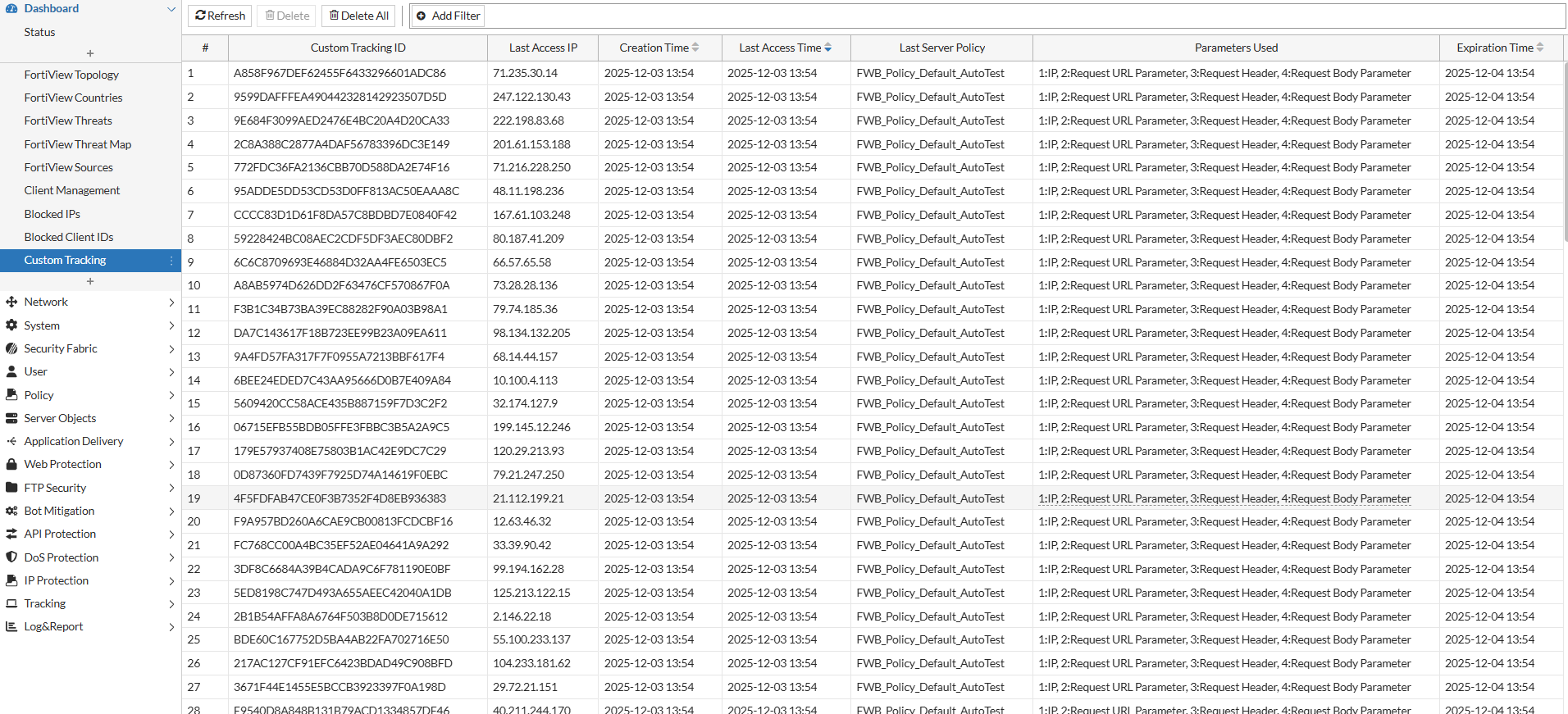
Each entry in the Custom Tracking Monitor includes:
-
Custom Tracking ID — The generated identifier created from the configured tracking parameters.
-
Last Access IP — The most recent client IP associated with this tracking ID, useful for understanding who is generating activity.
-
Creation Time — When the tracking ID was first generated.
-
Last Access Time — The most recent request associated with this ID, helping identify active or dormant IDs.
-
Last Server policy — The Web Protection Profile and server policy under which the tracking ID was generated.
-
Parameters Used — The specific headers, cookies, parameters, or response values that contributed to the tracking ID. This helps confirm whether the expected attributes are present in traffic.
-
Expiration Time — When the ID will be evicted from the in-memory hash table if no new activity occurs.
In addition to the detailed view, administrators can:
-
Filter by Custom Tracking ID, Last Server Policy, or Last Access IP to narrow the results.
-
Sort by Creation Time, Last Access Time, or Expiration Time to prioritize either new or recently active IDs.
-
Delete selected IDs or clear all tracked entries when needed for testing or troubleshooting.
Attack and traffic logs also record the custom_tracking_id when available, allowing events to be traced back to entries in the monitor for full request correlation.
Limitations
Custom Tracking is designed for real-time visibility and correlation, and it has the following operational constraints:
-
Tracking IDs are not persistent.
They are stored in memory and are removed after restart or timeout. This module is intended for live monitoring rather than long-term history.
-
No scoring or automated actions.
Unlike Client Management, Custom Tracking IDs are not used to apply behavior scores or automatic mitigation.
-
Capacity depends on platform resources.
The number of IDs that can be tracked at once varies by model and deployment size. High-volume environments may reach the ID limit sooner.