

Automation Rolling Window Enhancements (8.0.3)
FortiWeb 8.0.3 adds support for Rolling Window conditions in automation triggers. This enhancement allows administrators to control how frequently an automation action fires by requiring a specific number of trigger events to occur within a defined time period. This is useful in scenarios where high-volume events, such as repeated sandbox verdicts or frequent log entries, would otherwise cause an automation action to execute too often. With time-bounded occurrence tracking, automation workflows now activate only when event frequency exceeds a meaningful threshold.
Enhancements
-
Rolling Window Time — defines the time interval in which events are counted.
-
Number of Occurrences — specifies how many events must occur within the window before the trigger activates.
-
Works per trigger, allowing each automation rule to apply its own frequency condition.
Configuration Updates
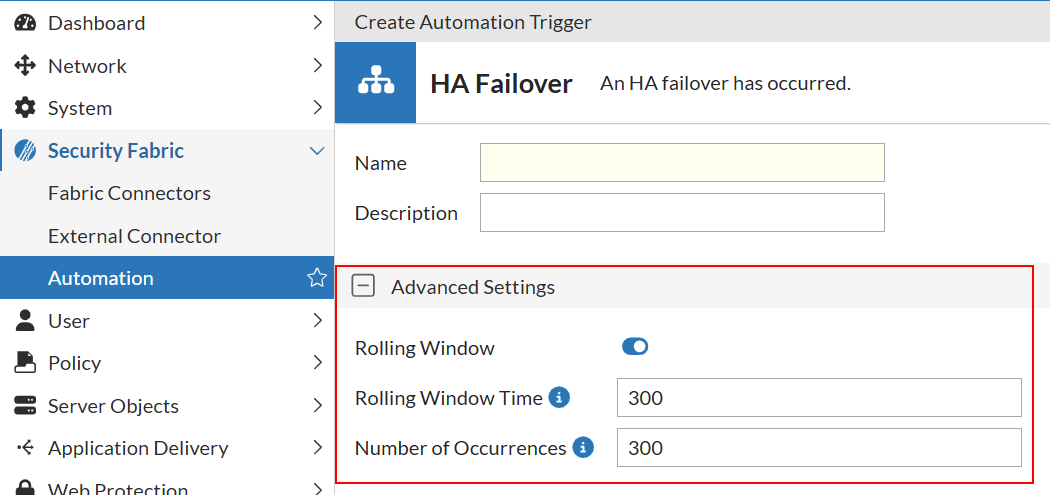
A new Advanced Settings section is added to Security Fabric > Automation > Triggers.
When configuring a trigger, administrators can now enable a Rolling Window and define how event frequency is evaluated.
|
Setting |
Description |
|---|---|
| Rolling Window | Enables or disables the Rolling Window mechanism for the selected trigger. When disabled, the trigger activates whenever its condition is met, with no rate-based control. |
| Rolling Window Time | The time interval, in seconds, during which FortiWeb counts trigger events. Only events that occur within this window contribute to the occurrence threshold. |
| Number of Occurrences | The number of events that must occur within the Rolling Window for the automation trigger to activate. |
These options appear only when configuring an automation trigger and apply independently to each trigger.