
Fortinet white logo
Fortinet white logo

Administration Guide

Updated Label for Authorization Header Validation in Custom Rules (8.0.0)

Updated Label for Authorization Header Validation in Custom Rules (8.0.0)

FortiWeb 8.0.0 improves the clarity of custom rule configuration by renaming the Misformatted Basic Scheme Check option to Auth Scheme Check when evaluating the Authorization header. This change better reflects common usage patterns, as the Authorization header often carries schemes beyond Basic, such as Bearer, JWT, and AWS4-HMAC-SHA256.

The Auth Scheme Check option is available when Predefined Header Name is set to Authorization and both Missing Header Name Check and Empty Header Value Check are disabled. When this option is selected, FortiWeb expects authentication scheme validation to be handled by an associated Lua script configured in the policy.
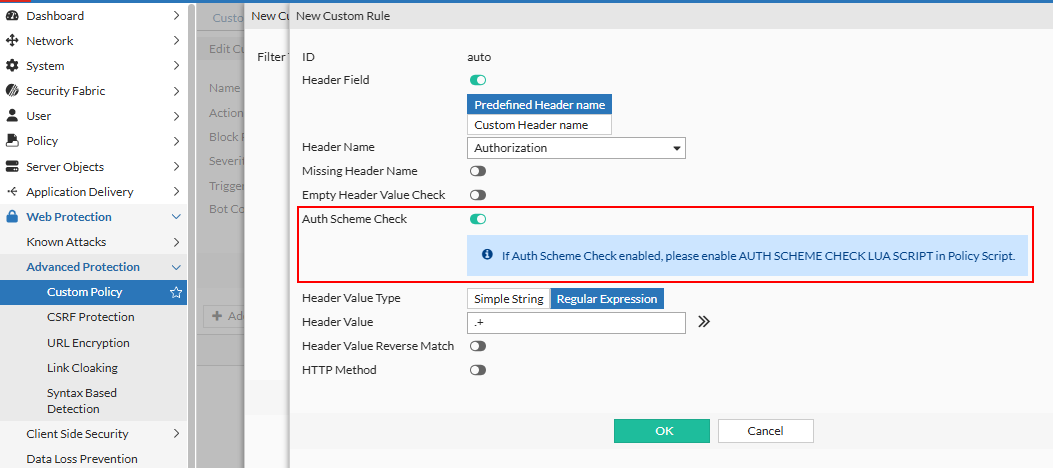
This is a labeling and UI logic enhancement only—underlying detection behavior is driven by the custom policy script associated with the rule.

When Auth Scheme Check is enabled, ensure the Lua script AUTH SCHEME CHECK is enabled in the server policy. Without the AUTH SCHEME CHECK script enabled, basic format values as well as the newly supported JWT format values cannot be decoded.

Benefits:
  • Clarifies the intended use of the setting for Authorization header validation.

  • Supports a wider range of authentication schemes through policy script extensibility.

  • Aligns the GUI with modern API authentication practices without introducing new enforcement logic by default.

Updated Label for Authorization Header Validation in Custom Rules (8.0.0)

Updated Label for Authorization Header Validation in Custom Rules (8.0.0)

FortiWeb 8.0.0 improves the clarity of custom rule configuration by renaming the Misformatted Basic Scheme Check option to Auth Scheme Check when evaluating the Authorization header. This change better reflects common usage patterns, as the Authorization header often carries schemes beyond Basic, such as Bearer, JWT, and AWS4-HMAC-SHA256.

The Auth Scheme Check option is available when Predefined Header Name is set to Authorization and both Missing Header Name Check and Empty Header Value Check are disabled. When this option is selected, FortiWeb expects authentication scheme validation to be handled by an associated Lua script configured in the policy.

This is a labeling and UI logic enhancement only—underlying detection behavior is driven by the custom policy script associated with the rule.

When Auth Scheme Check is enabled, ensure the Lua script AUTH SCHEME CHECK is enabled in the server policy. Without the AUTH SCHEME CHECK script enabled, basic format values as well as the newly supported JWT format values cannot be decoded.

Benefits:
  • Clarifies the intended use of the setting for Authorization header validation.

  • Supports a wider range of authentication schemes through policy script extensibility.

  • Aligns the GUI with modern API authentication practices without introducing new enforcement logic by default.