

Installing and connecting DC PSUs ground and to DC power
The following procedure describes how to connect a FortiSwitch-AX9004G DC PSU to ground and to DC power.
-
When connecting a DC PSU, always connect the PSU to ground before connecting power cables.
-
Turn off the breaker to stop supplying power to the DC PSU before connecting or disconnecting the DC Power cable.
You need the following equipment to connect the FortiSwitch-AX9004G DC PSUs to DC power:
- An electrostatic discharge (ESD) preventive wrist strap with connection cord.
- One of the DC power cables supplied with your DC PSU.
To connect a DC PSU to DC power
- Attach the ESD wrist strap to your wrist and to an ESD socket or to a bare metal surface on the chassis or frame.
- Remove a PSU from its packaging.
- Loosen the retention screws, pull the handle, and insert the PSU into the chassis, sliding it fully into the slot.
-
While keeping the handle pulled out, push the PSU in and tighten the retention screw.
Do not push the PSU in with the handle closed and do not use excessive force.
- Make sure that the PSU and power cords are not energized.
-
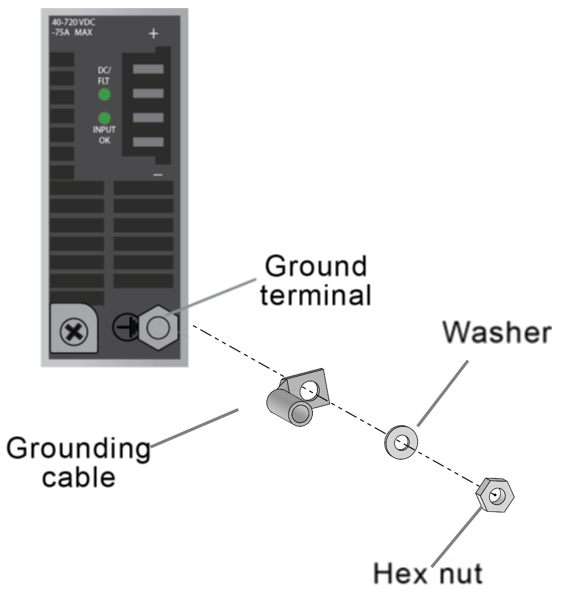
Remove the hex nut and washer from the ground terminal of the DC Power Supply.
-
Secure the grounding cable with the hex nut.
Tighten the hexagon nut to a torque of 5±0.5 N・m ( 51±5 kgf・cm ). Applying more torque can damage the equipment.
-
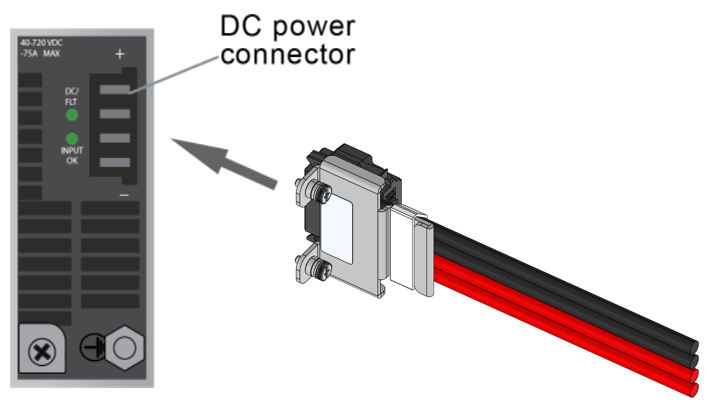
Plug the power cable into the PSU connector.
Slide the connector in until the release tab clicks, locking the cable in place.
-
Tighten the bracket mounting screw.
- Turn on power to the PSU.
- Verify that the PSU status LED is solid green meaning that the PSU is powered up and operating normally.
- Repeat to install and connect all of the required PSUs.