
Fortinet white logo
Fortinet white logo
1.0.0

Cooling fans, cooling air flow, and minimum clearance

Cooling fans, cooling air flow, and minimum clearance

The FortiSwitch-AX9004G chassis supports up to three hot-swappable cooling fan units installed in the back. Each fan unit includes three fans that operate together. When the fan unit LED is green, all three fans are operating normally. If the LED turns red or goes off, one or more of the fans is not working and the fan unit should be replaced.

During normal chassis operation, all three fan units are active and the fan speed is controlled by active supervisor. If a single fan unit fails, the active supervisor sends a warning message indicating that a fan unit has failed. The active supervisor maintains sufficient cooling by running the still operating fans at full speed to make up the airflow loss caused by the failed fan unit. The failed fan unit should be replaced as soon as possible.

If a second fan unit fails, the chassis can continue to operate but the chassis may experience high temperature warnings. Maintaining a lower ambient temperature can reduce the chance of overheating.

Fan units are hot swappable. You can replace a failed fan unit while the chassis is operating. To replace a fan unit, unscrew the four retention screws and use the handles to pull the fan unit out of the chassis. See Replacing a fan unit.

Install a replacement fan unit by sliding it into place in the empty slot and tightening the retention screws. As you slide the new fan into place it will power up and the fan unit LED will light.

The other fan units will continue to operate and cool the chassis as a fan unit is being removed and replaced. However an open fan unit slot will result in less air flow through the chassis so do not delay installing the replacement fan unit.

The active supervisor monitors the internal temperature of the chassis and adjusts the operating speed of the cooling fans as required. When the chassis is first powered on, all cooling fans run at full speed. Once the active supervisor is up and running, it reduces cooling fan speeds to maintain an optimum temperature in the chassis.

During normal operation, all fan units are active. If cooling requirements increase, the fan speed will increase.

Cooling Fan unit
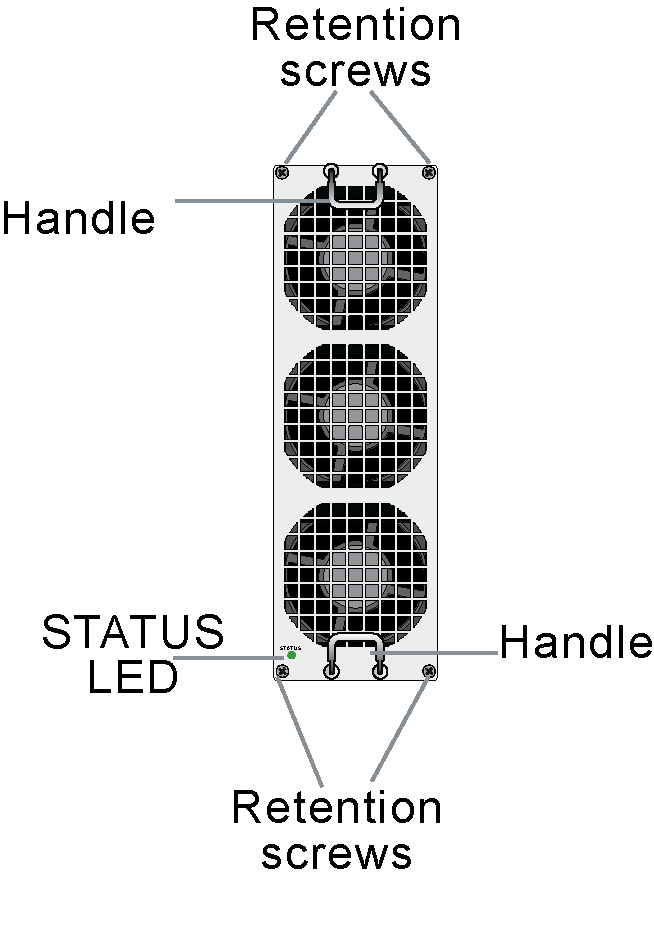
Fan unit STATUS LED

STATUS LED

Description

Off

The fan unit is powered off or the unit has failed.

Green

Normal operation

Red

Fault detected.

Cooling fans, cooling air flow, and minimum clearance

Cooling fans, cooling air flow, and minimum clearance

The FortiSwitch-AX9004G chassis supports up to three hot-swappable cooling fan units installed in the back. Each fan unit includes three fans that operate together. When the fan unit LED is green, all three fans are operating normally. If the LED turns red or goes off, one or more of the fans is not working and the fan unit should be replaced.

During normal chassis operation, all three fan units are active and the fan speed is controlled by active supervisor. If a single fan unit fails, the active supervisor sends a warning message indicating that a fan unit has failed. The active supervisor maintains sufficient cooling by running the still operating fans at full speed to make up the airflow loss caused by the failed fan unit. The failed fan unit should be replaced as soon as possible.

If a second fan unit fails, the chassis can continue to operate but the chassis may experience high temperature warnings. Maintaining a lower ambient temperature can reduce the chance of overheating.

Fan units are hot swappable. You can replace a failed fan unit while the chassis is operating. To replace a fan unit, unscrew the four retention screws and use the handles to pull the fan unit out of the chassis. See Replacing a fan unit.

Install a replacement fan unit by sliding it into place in the empty slot and tightening the retention screws. As you slide the new fan into place it will power up and the fan unit LED will light.

The other fan units will continue to operate and cool the chassis as a fan unit is being removed and replaced. However an open fan unit slot will result in less air flow through the chassis so do not delay installing the replacement fan unit.

The active supervisor monitors the internal temperature of the chassis and adjusts the operating speed of the cooling fans as required. When the chassis is first powered on, all cooling fans run at full speed. Once the active supervisor is up and running, it reduces cooling fan speeds to maintain an optimum temperature in the chassis.

During normal operation, all fan units are active. If cooling requirements increase, the fan speed will increase.

Cooling Fan unit

Fan unit STATUS LED

STATUS LED

Description

Off

The fan unit is powered off or the unit has failed.

Green

Normal operation

Red

Fault detected.