Fortinet white logo
Fortinet white logo

User Guide

NetFlow

NetFlow

NetFlow is a network monitoring protocol widely used for collecting and analyzing IP traffic. It provides visibility into network usage, application behavior, and potential threats by exporting flow records to a collector.

Starting from version 2.3.0, FortiNDR Cloud sensor can operate as a NetFlow collector, enabling network devices to send flow data for behavioral analysis and threat detection.

To use this feature, point your flow exporters to FortiNDR Cloud sensor collector’s IP and port. The sensor listens on UDP/2055 (NetFlow v5, v9, IPFIX) and UDP/6343 (SFlow) by default, with ports configurable as needed.

To view the complete list of NetFlow fields, see NetFlow fields.

Note

A separate Log Ingestion license is required to collect NetFlow data. Without this license, the data will not be visible in the portal.

Note

Refer to your NetFlow exporter configuration to verify supported transport protocols (UDP) and ensure inbound firewall rules allow traffic on the configured NetFlow(s) Flow ports.

Configuring NetFlow for FortiNDR Cloud

To verify the sensor status:
  1. Log into the sensor console using:
    • Username: config
    • Password: (The password set during initial installation)
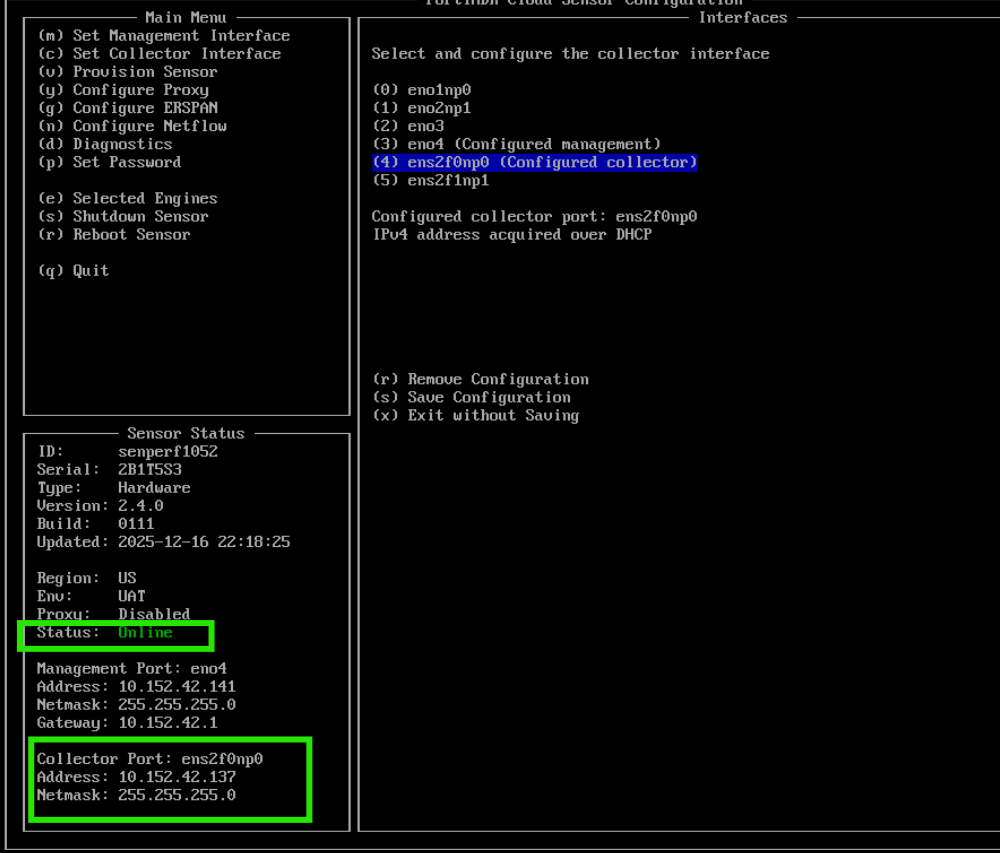
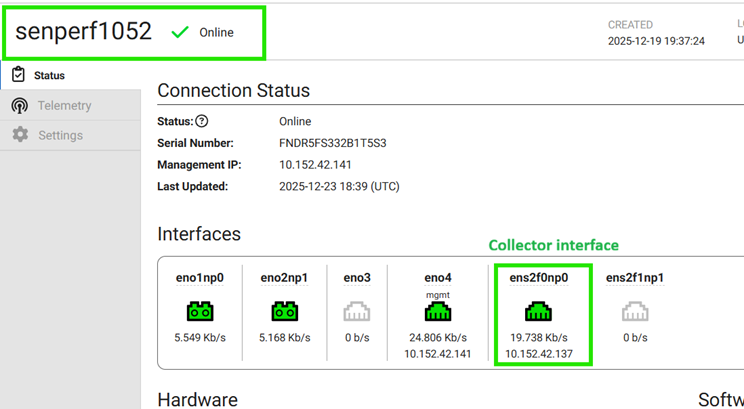
  2. Confirm that the sensor is Online and the collector interface is up with an IP address. See Collector interface.
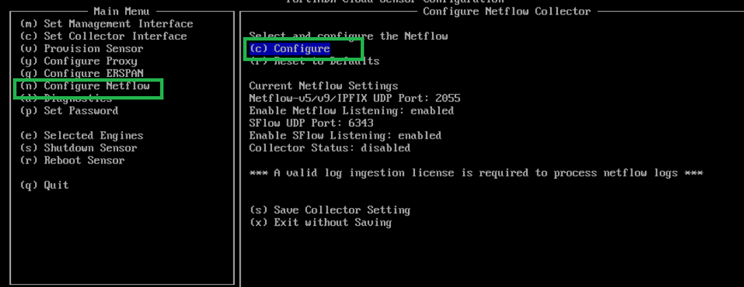
  3. From the sensor config menu, select Configure Netflow (or press n). Then select Configure (or press c).
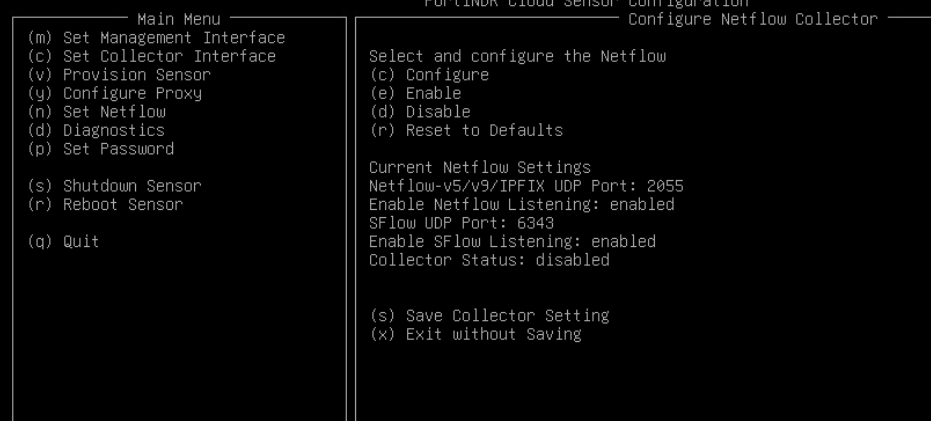
  4. Review the default NetFlow settings.

    • UDP/2055: Netflow v5, v9, IPFIX

    • UDP/6343: SFlow

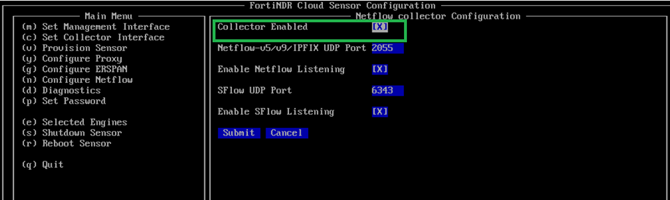
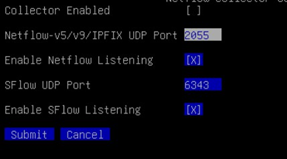
  5. If changes are required, select Configure (press c), adjust the port or listening status, and select Submit. Ensure Collector Enabled is checked
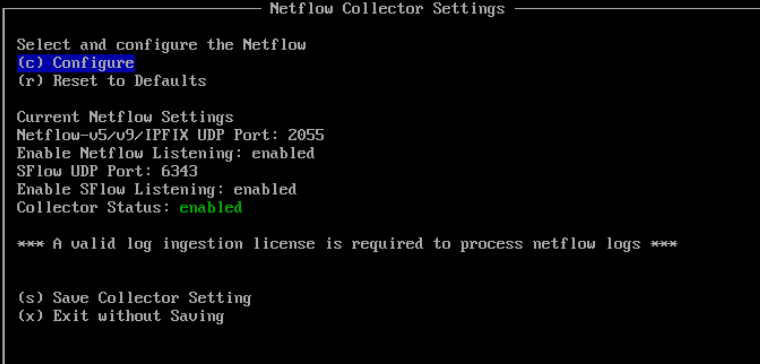
  6. The menu will redirect back to the Netflow config menu. To save changes, select Save Collector Setting (press s).
Related Videos

sidebar video

FortiNDR Cloud: Detecting Threats from FortiSwitch Netflow data

  • 43 views
  • 3 months ago

NetFlow

NetFlow

NetFlow is a network monitoring protocol widely used for collecting and analyzing IP traffic. It provides visibility into network usage, application behavior, and potential threats by exporting flow records to a collector.

Starting from version 2.3.0, FortiNDR Cloud sensor can operate as a NetFlow collector, enabling network devices to send flow data for behavioral analysis and threat detection.

To use this feature, point your flow exporters to FortiNDR Cloud sensor collector’s IP and port. The sensor listens on UDP/2055 (NetFlow v5, v9, IPFIX) and UDP/6343 (SFlow) by default, with ports configurable as needed.

To view the complete list of NetFlow fields, see NetFlow fields.

Note

A separate Log Ingestion license is required to collect NetFlow data. Without this license, the data will not be visible in the portal.

Note

Refer to your NetFlow exporter configuration to verify supported transport protocols (UDP) and ensure inbound firewall rules allow traffic on the configured NetFlow(s) Flow ports.

Configuring NetFlow for FortiNDR Cloud

To verify the sensor status:
  1. Log into the sensor console using:
    • Username: config
    • Password: (The password set during initial installation)
  2. Confirm that the sensor is Online and the collector interface is up with an IP address. See Collector interface.

  3. From the sensor config menu, select Configure Netflow (or press n). Then select Configure (or press c).

  4. Review the default NetFlow settings.

    • UDP/2055: Netflow v5, v9, IPFIX

    • UDP/6343: SFlow

  5. If changes are required, select Configure (press c), adjust the port or listening status, and select Submit. Ensure Collector Enabled is checked

  6. The menu will redirect back to the Netflow config menu. To save changes, select Save Collector Setting (press s).