

Advanced Query Concepts
Putting it all together
The following query searches for outbound traffic from an internal network to external destinations. It also looks for traffic that is going through a proxy server that acts as an intermediary between a device and the internet.
// Outbound traffic
(
http:src.internal = true
OR http:source IN ("Zscaler")
)
AND (
dst.internal = false
OR (
// Not internal IP address
host.internal != true
// Proxied traffic
AND uri.scheme != null
)
)
| Outbound Traffic | The query is looking for traffic that is leaving the internal network. |
| Conditions for Source |
|
| Conditions for Destination |
|
Array matching
Array matching
The following table provides example queries for array matching where answers.ip is the array field:
|
Show me events where at least one answer value is: |
Query |
|---|---|
| 8.8.8.8 |
answers.ip = 8.8.8.8 |
| not 8.8.8.8 |
answers.ip != 8.8.8.8 |
| 8.8.8.8 and one is not 8.8.8.8 |
answers.ip = 8.8.8.8 AND answers.ip != 8.8.8.8 |
Excluding values in DNS queries
The != operator will not exclude values in a DNS query ( answers.ip != 8.8.8.8). Instead, you will need to use the EXCLUDE condition:
event_type = "dns"
EXCLUDE answers.ip = 8.8.8.8
Using Curly Braces for multiple Conditions
Curly braces {} are used to group multiple conditions together in an array of objects, such as intel and files. This helps to specify detailed criteria for your queries.
Format:
<array of objects field> {
<subfield> <operator> <value>
…
}
Examples:
In the following example, the query will return results for both confidence and severity.
|
High-Confidence and High-Severity Intel Matches |
|
|---|---|
| Query | Show me events with a high-confidence intel match and a high-severity intel match. |
| Syntax |
intel.confidence = "high" AND intel.severity = "high" |
In the following example, the curly braces {} help to group the conditions together, making it clear that both conditions must be met within the same intel object.
|
High-Confidence and High-Severity Intel Matches |
|
|---|---|
| Query | Show me events with a high-confidence intel match and a high-severity intel match. |
| Syntax |
intel { confidence = "high" AND severity = "high" } |
Aggregations
An aggregation is achieved by adding GROUP BY at the end of the query, this allows for summarizing data, typically resulting in event counts by default. The portal provides both visual and tabular representations of these results.
Aggregations can include up to two unambiguous fields, with default limits of 100 and 10, respectively, which can be adjusted but must not exceed a product of 10,000. High-entropy fields like uuid and flow_id cannot be used. Functions such as SUM, MIN, and MAX are available.
Example:
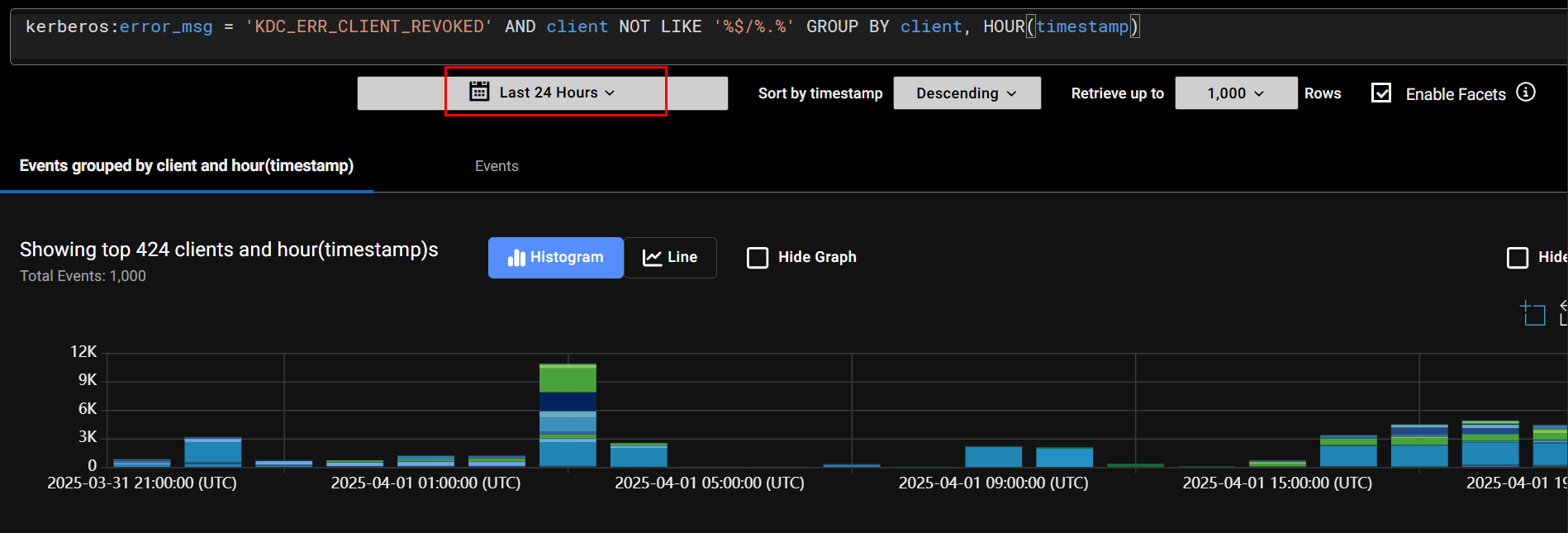
The following query identifies Kerberos authentication errors where the client's credentials have been revoked and groups the results by the client name.
kerberos:error_msg = 'KDC_ERR_CLIENT_REVOKED' AND client NOT LIKE '%$/%.%' GROUP BY client LIMIT 10
| Kerberos Error Message |
This error indicates that the client's credentials have been revoked by the Key Distribution Center (KDC). |
| Client Filtering |
Typically, in Kerberos, machine accounts end with a dollar sign, so this filter is excluding machine accounts. |
| Grouping and Limiting |
|
The query results will look like this:
De Morgan’s Law
You cannot use the NOT operator to negate a group of clauses directly. This means you cannot write a query like:
NOT (
    dst.ip = 8.8.8.8
    AND host = "dns.google.com"
)
Instead, you need to apply the NOT operator to each clause individually and then combine them using the OR operator. The equivalent query would be:
NOT dst.ip = 8.8.8.8
OR NOT host = "dns.google.com"
This way, the query will return results where either the dst.ip is not 8.8.8.8 or the host is not dns.google.com. This ensures that at least one of the conditions is not met.

|
De Morgan’s Law does not apply to array fields. An array field is an array of values as opposed to a number or a string. The answers.ip = 8.8.8.8 answers.ip != 8.8.8.8 |