Device enrichment
You can enhance device identification using Device Enrichment. When configured, it retrieves hostname information from Windows Active Directory (AD) and DNS servers in the target network. Once enabled, the enrichment process runs on the schedule defined in the enrichment settings.
After a cycle completes, the process schedules the next cycle based on the profile settings. If the current cycle is still running when the next scheduled cycle is due, the system skips that cycle.
Once the profile is configured, it retrieves a list of devices and their names, performs DNS queries to resolve corresponding IP addresses, and sends detailed information for each device, including its name, IP address, operating system, and other attributes.
Only one sensor can be used for Device Enrichment per account.
Sensor requirements:
- Sensors running 2.4.0 or higher.
Network Requirements:
Active Directory and DNS queries originate from the sensor’s management interface. Ensure that firewall policies allow the sensor’s management IP to access the following:
- The LDAP server on port 389 or 636
- The DNS server on port 53 (or the configured DNS port)
Failure to allow these connections will prevent Active Directory synchronization.
To configure Active Directory:
- Click the gear icon at the top-right of the portal and select Account Management.
- Click Settings.
- Scroll down to Device Enrichment Configuration and click Configure.
- Configure the Basic Settings.
Setting
Description
Sensor ID
Select a Sensor from the dropdown.
Enabled
Toggle ON to enable.
LDAP Server
The IP address of the LDAP server.
Use SSL
Toggle ON to enable Secure Sockets Layer (SSL) encryption.
LDAP Port
The port used to communicate with the LDAP server. By default, FortiNDR Cloud uses port 636 .
- If Use SSL is enabled, FortiNDR Cloud communicates over port 636 (LDAPS).
- If Use SSL is disabled, it uses port 389 (LDAP).
Base DN
Enter the distinguished name (DN) of the part of the LDAP directory tree within which FortiNDR Cloud will search for user objects, such
as ou=People,dc=example,dc=com.Search DN
The base distinguished name (DN) in the LDAP directory where search operations start.
Bind DN
The LDAP user and its LDAP directory tree location for binding.
For example,
CN=fndr_svc,CN=testUser,DC= example-domain,DC= com.Bind Password
The password for the LDAP user account for binding. For example,
DC= example-domain,DC= com.Search Scope
The method of retrieving the information from the tree:
- Base: Only retrieve information from the base level of the directory tree specified in search base
- One Level: Only retrieve information from the search base and one level down.
- Sub_tree: Retrieve everything underneath the specified search base.
DNS Address
The IP address of the DNS server used to resolve domain names during Active Directory queries.
By default, DNS queries use port 53. If the DNS server uses a non-standard port, specify it in the following format “DNS_IP:DNS_PORT”.
Run Start Time
The time of day when the Active Directory synchronization or data collection process begins.
Run Interval Hours
The frequency (in hours) at which the Active Directory synchronization or data collection process repeats.
- Configure the Advanced Settings.
Setting
Description
Allow Insecure LDAP Toggle ON to enable LDAP connections without SSL/TLS encryption.
LDAP Timeout Seconds The maximum time (in seconds) FortiNDR Cloud waits for an LDAP query to complete before timing out.
DNS Lookup Interval Seconds The frequency (in seconds) DNS lookups are performed during Active Directory operations.
DNS Lookup Size The number of DNS records retrieved in a single lookup.
DNS Lookup Retries The number of retry attempts for DNS lookups if the initial attempt fails.
DNS Timeout Seconds The maximum time (in seconds) FortiNDR Cloud waits for a DNS query to complete before timing out.
- Click Save.
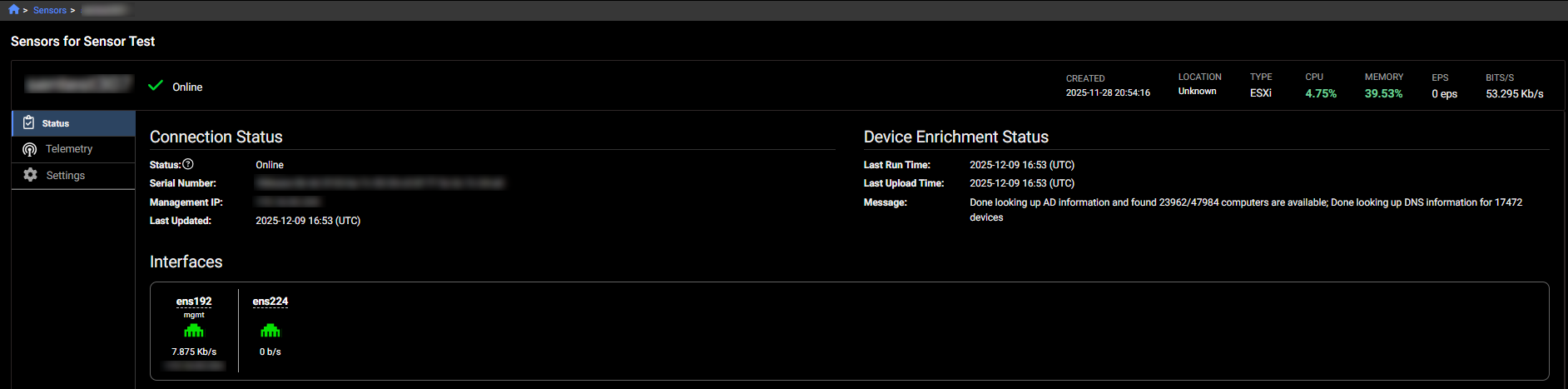
Device Enrichment Status
To view the Device Enrichment Status, go the Sensor's details page. See Sensor details.