
Fortinet white logo
Fortinet white logo

Administration Guide

Adding a FortiExtender

Adding a FortiExtender

To add a FortiExtender to the FortiGate, create a virtual FortiExtender interface, then add a FortiExtender and assign the interface to the modem. Like other interface types, the FortiExtender interface can be used in static routes, SD-WAN (see Manage dual FortiExtender devices), policies, and other functions.

To create a virtual FortiExtender interface in the GUI:
  1. Go to Network > Interfaces and click Create New > FortiExtender.

  2. Enter a name for the interface.

  3. Configure the remaining settings as needed. See Interface settings for more details.
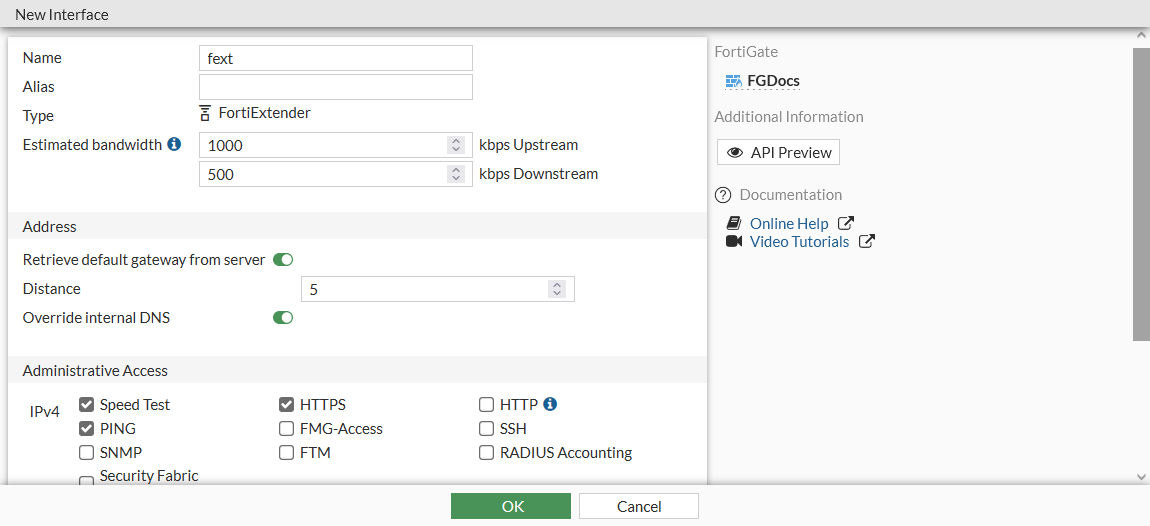
  4. Click OK.

To add a FortiExtender in the GUI:
  1. Go to Network > FortiExtender and click Create New > Extenders.

  2. Enter your FortiExtender's serial number in the Serial number field.

  3. Optionally, set an Alias for the FortiExtender.

  4. In the State section, enable Authorized.

  5. Set Interface to the FortiExtender interface.

  6. Configure the remaining setting as required. See the FortiExtender Administration Guide (FGT-Managed) for more information.
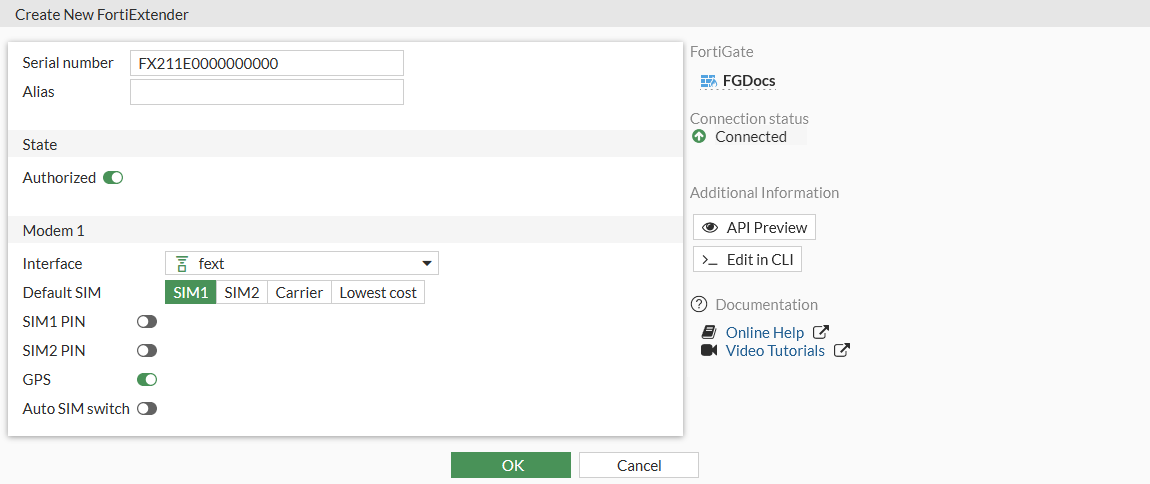
  7. Click OK.

  8. In the extenders list, right-click on the FortiExtender and select Diagnostics and Tools to review the modem and SIM status, and other details about the FortiExtender.

To create a virtual FortiExtender interface in the CLI:
config system interface
    edit "fext"
        set vdom "root"
        set mode dhcp
        set allowaccess ping https speed-test
        set type fext-wan
        set role wan
        set snmp-index 18
        set estimated-upstream-bandwidth 1000
        set estimated-downstream-bandwidth 500
    next
end
To configure the FortiExtender in the CLI:
config extension-controller extender
    edit "FX211E"
        set authorized enable
        set extension-type wan-extension
        set profile <profile>
        config wan-extension
            set modem1-extension "fext"
        end
    next
end
Note

The device-id is automatically configured by the FortiGate.

To verify the modem settings in the CLI:
get extender modem-status FX211E0000000000 1
Modem 0:
    physical_port:       2-1.2
    manufacture:         Sierra Wireless, Incorporated
    product:             Sierra Wireless, Incorporated
    ....

Adding a FortiExtender

Adding a FortiExtender

To add a FortiExtender to the FortiGate, create a virtual FortiExtender interface, then add a FortiExtender and assign the interface to the modem. Like other interface types, the FortiExtender interface can be used in static routes, SD-WAN (see Manage dual FortiExtender devices), policies, and other functions.

To create a virtual FortiExtender interface in the GUI:
  1. Go to Network > Interfaces and click Create New > FortiExtender.

  2. Enter a name for the interface.

  3. Configure the remaining settings as needed. See Interface settings for more details.

  4. Click OK.

To add a FortiExtender in the GUI:
  1. Go to Network > FortiExtender and click Create New > Extenders.

  2. Enter your FortiExtender's serial number in the Serial number field.

  3. Optionally, set an Alias for the FortiExtender.

  4. In the State section, enable Authorized.

  5. Set Interface to the FortiExtender interface.

  6. Configure the remaining setting as required. See the FortiExtender Administration Guide (FGT-Managed) for more information.

  7. Click OK.

  8. In the extenders list, right-click on the FortiExtender and select Diagnostics and Tools to review the modem and SIM status, and other details about the FortiExtender.

To create a virtual FortiExtender interface in the CLI:
config system interface
    edit "fext"
        set vdom "root"
        set mode dhcp
        set allowaccess ping https speed-test
        set type fext-wan
        set role wan
        set snmp-index 18
        set estimated-upstream-bandwidth 1000
        set estimated-downstream-bandwidth 500
    next
end
To configure the FortiExtender in the CLI:
config extension-controller extender
    edit "FX211E"
        set authorized enable
        set extension-type wan-extension
        set profile <profile>
        config wan-extension
            set modem1-extension "fext"
        end
    next
end
Note

The device-id is automatically configured by the FortiGate.

To verify the modem settings in the CLI:
get extender modem-status FX211E0000000000 1
Modem 0:
    physical_port:       2-1.2
    manufacture:         Sierra Wireless, Incorporated
    product:             Sierra Wireless, Incorporated
    ....