

Hold down time to support SD-WAN service strategies
In a hub and spoke SD-WAN topology with shortcuts created over ADVPN, a downed or recovered shortcut can affect which member is selected by an SD-WAN service strategy. When a downed shortcut tunnel recovers and the shortcut is added back into the service strategy, the shortcut is held at a low priority until the hold down time has elapsed.
By default, the hold down time is zero seconds. It can be set to 0 - 10000000 seconds.
The hold down time also applies to the primary VPN tunnels between hub and spoke devices.
To configure the hold down time:
config system sdwan
    config service
        edit 1
            set hold-down-time <integer>
        next
    end
end
Example
In this example, the hold down time is set to 15 seconds, and then the SD-WAN service is looked at before and after the hold down elapses after a downed shortcut recovers.
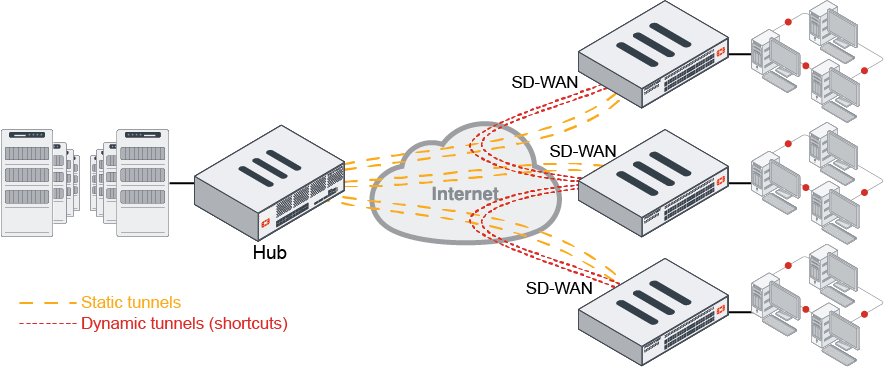
To configure the hold down time:
config system sdwan
    config service
        edit 1
            set hold-down-time 15
        next
    end
end
To view which SD-WAN member is selected before and after the hold down time elapses:
Before the hold down time has elapsed:
# diagnose sys sdwan service4
Service(1): Address Mode(IPV4) flags=0x200
  Gen(34), TOS(0x0/0x0), Protocol(0: 1->65535), Mode(priority), link-cost-factor(packet-loss), link-cost-threshold(0), heath-check(ping)
Hold down time(15) seconds, Hold start at 2003 second, now 2010
  Member sub interface(4):
    1: seq_num(1), interface(vd2-1):
       1: vd2-1_0(86)
    3: seq_num(2), interface(vd2-2):
       1: vd2-2_0(88)

  Members(4):
    1: Seq_num(1 vd2-1), alive, packet loss: 27.000%, selected
    2: Seq_num(2 vd2-2_0), alive, packet loss: 0.000%, selected
    3: Seq_num(2 vd2-2), alive, packet loss: 0.000%, selected
    4: Seq_num(1 vd2-1_0), alive, packet loss: 61.000%, selected
  Dst address(1):
        33.1.1.101-33.1.1.200
After the hold down time has elapsed:
# diagnose sys sdwan service4
Service(1): Address Mode(IPV4) flags=0x200
  Gen(35), TOS(0x0/0x0), Protocol(0: 1->65535), Mode(priority), link-cost-factor(packet-loss), link-cost-threshold(0), heath-check(ping)
Hold down time(15) seconds, Hold start at 2018 second, now 2019
  Member sub interface(4):

    2: seq_num(2), interface(vd2-2):
       1: vd2-2_0(88)
    3: seq_num(1), interface(vd2-1):
       1: vd2-1_0(86)
  Members(4):
    1: Seq_num(2 vd2-2_0), alive, packet loss: 0.000%, selected
    2: Seq_num(2 vd2-2), alive, packet loss: 0.000%, selected
    3: Seq_num(1 vd2-1), alive, packet loss: 24.000%, selected
    4: Seq_num(1 vd2-1_0), alive, packet loss: 44.000%, selected
  Dst address(1):
        33.1.1.101-33.1.1.200\