

Build and Customize Dashboards, Templates, and Widgets
This chapter focuses on dashboards, templates and widgets, which are essential components in designing the FortiSOAR user interface
Dashboards
A Dashboard is generally the default landing and home page for users logging into FortiSOAR.

|
By default, FortiSOAR includes the System Dashboard, which is displayed on all users when they log into FortiSOAR for the first time. Only users who have a minimum of Read and Update permission on the |
FortiSOAR also includes predefined dashboards containing collections of graphs and charts that visually represent activity in modules, such as the Alerts and Incidents modules. For example, the Open Alerts By Severity and Alerts By Type charts in the 'Alerts' module provide quick insight into alert distribution and severity: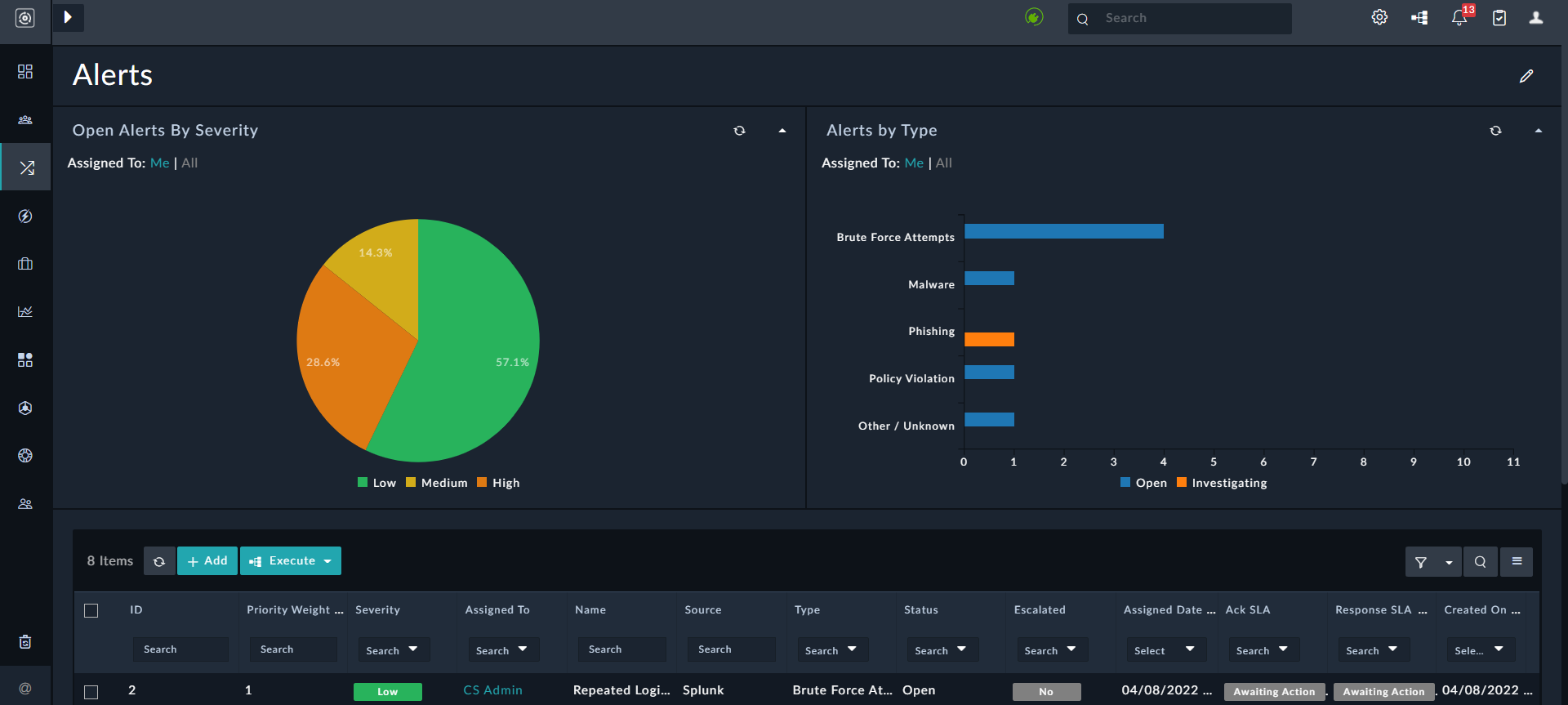
You can customize dashboard graphs and charts to meet your team’s or organization’s needs using the templates and widgets described in this chapter.
|
|
Dashboards and reports are optimized for performance. Only required content is loaded, and lazy loading ensures faster rendering. |
Templates
The FortiSOAR system interface uses 'View Templates',which are JSON definitions that structure the interface with widgets. System View Templates (SVTs) are pre-defined blueprints for designing and customizing user interface views and are an essential part of how users interact with modules. These templates define the layout, structure, and presentation of data within modules like Incidents, Alerts, or custom modules created by users. Users can modify these templates to suit their needs and define multiple SVTs in the detailed view of module records. SVTs are system-wide, meaning the same template is displayed on all interfaces. For example, the Incidents screen will be identical for all users.
Widgets
Widgets render information for the visual display inside View Template. Widget types vary such that specific widgets only correspond to certain view types. For example, the detail view has some exclusive widgets, such as Visual Correlation, Comments, Timeline, etc.
|
|
The |
Default Widgets
FortiSOAR installs several widgets by default, including:
- Language Pack: This widget supports internationalization by including the languages supported by FortiSOAR. Do not uninstall or modify this widget, as doing so may cause translation issues resulting in the FortiSOAR UI displaying in English, the default fallback language.
- Access Control: This widget is used to manage user and team access to records.
- Mobile Settings This widget allows users to customize their mobile user interface.
- Data Visualization: This widget uses advanced tools to visually present complex datasets, helping uncover patterns, relationships, and insights that traditional charts may not reveal.
- Picklist as Phases: This widget displays picklist values as phases in a flow diagram, with each phase representing a specific stage in the process.
For a comprehensive list of widgets and detailed information about each, see the FortiSOAR Content Hub.
Widget Library
In addition to the default widgets, you can install and configure additional widgets—such as AI Assistant, C3 Charts, and more—from the Widget Library to suit your specific needs. You can also develop custom widgets for specialized use cases. For more information, see the Widget Library chapter.