

IPsec IKEv2 VPN 2FA with EAP and certificate authentication
IPsec IKEv2 VPNs now support certificate authentication and EAP authentication at the same time from a dialup FortiClient. With the eap-cert-auth setting enabled, FortiGate will validate the X.509 certificate sent from FortiClient when establishing a IKEv2 tunnel. After it is authenticated, FortiGate will continue to perform EAP authentication.
config vpn ipsec phase1-interface
    edit <tunnel>
        set eap enable
        set eap-cert-auth {*disable | enable}
        set peer <user peer>
    next
end
|
Setting |
Description |
|---|---|
|
eap enable |
Enable EAP to perform user authentication. |
|
eap-cert-auth {*disable | enable} |
Enable/Disable certificate authentication in addition to EAP (default = disable). |
|
peer <user peer> |
When eap-cert-auth is enabled, the peer certificate is validated if |
Example
In this example, FortiClient is configured to use an X.509 certificate and EAP to perform certificate and user authentication. The certificate is issued by a CA that is trusted by the FortiGate.
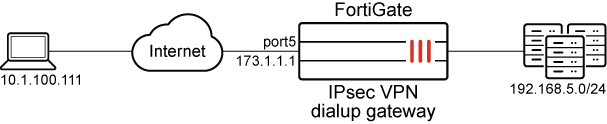
To configure FortiClient:
-
Go to Remote Access, click the sandwich menu, and select Add a new connection.
-
Configure the new VPN connection.
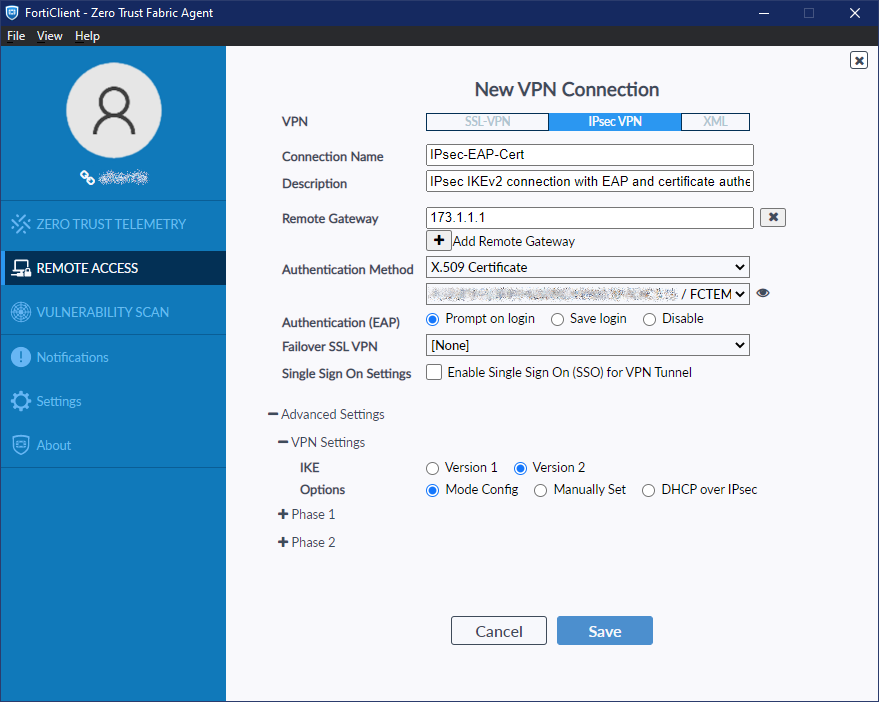
Field
Value
VPN
IPsec VPN
Connection Name
IPsec-EAP-Cert
Description
(Optional)
Remote Gateway
173.1.1.1
Authentication Method
X.509 Certificate
Authentication (EAP)
Prompt on login
Failover SSL VPN
[None]
Advanced Settings > VPN Settings
IKE
Version 2
Options
Mode Config
-
Click Save.
To configure local users and peer (certificate authentication):
config user group
    edit "local-group"
        set member "usera" "userc" "bi_local"
    next
end
config user peer
    edit "peer-test3"
        set ca "Eternity-CA"
        set subject "test3"
    next
end
A certificate issued by Eternity-CA with test3 in the subject will be trusted by the FortiGate.
To configure the IPsec VPN phase1:
config vpn ipsec phase1-interface
    edit "fct-eapcert"
        set type dynamic
        set interface "port5"
        set ike-version 2
        set authmethod signature
        set net-device disable
        set mode-cfg enable
        set proposal aes128-sha1 aes256-sha256
        set comments "VPN: fct3459 -- Created by VPN wizard"
        set dhgrp 20
        set eap enable
        set eap-identity send-request
        set eap-cert-auth enable
        set wizard-type dialup-forticlient
        set authusrgrp "local-group"
        set certificate "test1"
        set peer "peer-test3"
        set ipv4-start-ip 3.3.1.1
        set ipv4-end-ip 3.3.1.100
        set dns-mode auto
        set ipv4-split-include "fct3459_split1"
        set save-password enable
        set client-auto-negotiate enable
        set client-keep-alive enable
    next
end
The FortiGate will validate the client certificate based on the eap-cert-auth setting. The following examples show different outcomes from different configuration scenarios.
Scenario 1: eap-cert-auth is enabled and FortiGate receives a valid and trusted certificate
Using IKE debugs, we can observe the steps when FortiGate receives the connection request with the client certificate, validates it, and continues to perform EAP authentication before establishing the VPN connection.
# diagnose debug application ike -1
# diagnose debug enable
ike V=root:0:fct-eapcert:11: received FCT-UID : 4E98BCE511844FA8B161FA5DF047B12C
ike V=root:0:fct-eapcert:11: received peer identifier DER_ASN1_DN 'C = CA, ST = BC, L = Burnaby, O = Fortinet, OU = QA, CN = test3'
ike V=root:0:fct-eapcert:11: re-validate gw ID
ike V=root:0:fct-eapcert:11: gw validation OK
ike V=root:0:fct-eapcert:11: Validating X.509 certificate
ike V=root:0:fct-eapcert:11: peer cert, subject='test3', issuer='Eternity-CA'
ike V=root:0:fct-eapcert:11: peer ID verified
ike V=root:0:fct-eapcert:11: building fnbam peer candidate list
ike V=root:0:fct-eapcert:11: FNBAM_GROUP_NAME candidate 'peer-test3'
ike V=root:0:fct-eapcert:11: certificate validation before eap pending
ike V=root:0:fct-eapcert:11: fnbam reply 'peer-test3'
ike V=root:0:fct-eapcert:11: certificate validation complete
ike V=root:0:fct-eapcert:11: responder preparing EAP identity request
ike V=root:0:fct-eapcert:11: local cert, subject='test1', issuer='Eternity-CA'
ike 0:fct-eapcert:11: enc
…
ike V=root:0:fct-eapcert:11: sent IKE msg (AUTH_RESPONSE): 173.1.1.1:500->10.1.100.111:500, len=1420, vrf=0, id=e955507be9a857eb/b48a41c47db35bdb:00000001, oif=13
ike V=root:0: comes 10.1.100.111:500->173.1.1.1:500,ifindex=13,vrf=0,len=92....
…
ike V=root:0:fct-eapcert:11: responder received EAP msg
ike V=root:0:fct-eapcert:11: send EAP message to FNBAM
ike V=root:0:fct-eapcert:11: initiating EAP authentication
ike V=root:0:fct-eapcert: EAP user "bi_local"
ike V=root:0:fct-eapcert: auth group local-group
ike V=root:0:fct-eapcert: EAP 1600011514 pending
ike V=root:0:fct-eapcert:11 EAP 1600011514 result FNBAM_CHALLENGED
ike V=root:0:fct-eapcert: EAP challenged for user "bi_local"
ike V=root:0:fct-eapcert:11: responder preparing EAP pass through message
…
Checking the IPsec VPN tunnel list:
# diagnose vpn tunnel list
list all ipsec tunnel in vd 0
…
name=fct-eapcert_0 ver=2 serial=6 173.1.1.1:0->10.1.100.111:0 tun_id=3.3.1.1 tun_id6=::10.0.0.5 dst_mtu=1500 dpd-link=on weight=1
bound_if=13 lgwy=static/1 tun=intf mode=dial_inst/3 encap=none/74408 options[122a8]=npu rgwy-chg frag-rfc  run_state=0 role=primary accept_traffic=1 overlay_id=0
parent=fct-eapcert index=0
proxyid_num=1 child_num=0 refcnt=5 ilast=1 olast=13 ad=/0
stat: rxp=2 txp=97 rxb=16460 txb=53465
dpd: mode=on-demand on=1 idle=20000ms retry=3 count=0 seqno=0
natt: mode=none draft=0 interval=0 remote_port=0
fec: egress=0 ingress=0
proxyid=fct3459 proto=0 sa=1 ref=6 serial=1 add-route
  src: 0:0.0.0.0-255.255.255.255:0
  dst: 0:3.3.1.1-3.3.1.1:0
…
The result shows that the tunnel is established.
Scenario 2: eap-cert-auth is enabled and FortiGate receives an invalid certificate
In this example, a user peer object is used that does not trust the issuer Eternity-CA.
# diagnose debug application ike -1
# diagnose debug enable
ke V=root:0:fct-eapcert:9: received FCT-UID : 4E98BCE511844FA8B161FA5DF047B12C
ike V=root:0:fct-eapcert:9: received peer identifier DER_ASN1_DN 'C = CA, ST = BC, L = Burnaby, O = Fortinet, OU = QA, CN = test3'
ike V=root:0:fct-eapcert:9: re-validate gw ID
ike V=root:0:fct-eapcert:9: gw validation OK
ike V=root:0:fct-eapcert:9: Validating X.509 certificate
ike V=root:0:fct-eapcert:9: peer cert, subject='test3', issuer='Eternity-CA'
ike V=root:0:fct-eapcert:9: peer ID verified
ike V=root:0:fct-eapcert:9: building fnbam peer candidate list
ike V=root:0:fct-eapcert:9: FNBAM_GROUP_NAME candidate 'peer-test3'
ike V=root:0:fct-eapcert:9: certificate validation before eap pending
ike V=root:0:fct-eapcert:9: fnbam cert group matching failed
ike V=root:0:fct-eapcert:9: certificate validation failed
The result shows that the tunnel is not established.
Scenario 3: eap-cert-auth is disabled and FortiGate receives an invalid certificate
In this example, eap-cert-auth is disabled, so the incoming peer certificate is not validated.
# diagnose debug application ike -1
# diagnose debug enable
ike V=root:0:fct-eapcert:3: received FCT-UID : 4E98BCE511844FA8B161FA5DF047B12C
ike V=root:0:fct-eapcert:3: received peer identifier DER_ASN1_DN 'C = CA, ST = BC, L = Burnaby, O = Fortinet, OU = QA, CN = test3'
ike V=root:0:fct-eapcert:3: re-validate gw ID
ike V=root:0:fct-eapcert:3: gw validation OK
ike V=root:0:fct-eapcert:3: responder preparing EAP identity request
ike V=root:0:fct-eapcert:3: local cert, subject='test1', issuer='Eternity-CA'
ike 0:fct-eapcert:3: enc
…
ike V=root:0:fct-eapcert:3: responder received EAP msg
ike V=root:0:fct-eapcert:3: send EAP message to FNBAM
ike V=root:0:fct-eapcert:3: initiating EAP authentication
ike V=root:0:fct-eapcert: EAP user "bi_local"
ike V=root:0:fct-eapcert: auth group local-group
ike V=root:0:fct-eapcert: EAP 1600011502 pending
ike V=root:0:fct-eapcert:3 EAP 1600011502 result FNBAM_CHALLENGED
ike V=root:0:fct-eapcert: EAP challenged for user "bi_local"
ike V=root:0:fct-eapcert:3: responder preparing EAP pass through message
Checking the IPsec VPN tunnel list:
# diagnose vpn tunnel list
list all ipsec tunnel in vd 0
…
name=fct-eapcert_0 ver=2 serial=5 173.1.1.1:0->10.1.100.111:0 tun_id=3.3.1.1 tun_id6=::10.0.0.4 dst_mtu=1500 dpd-link=on weight=1
bound_if=13 lgwy=static/1 tun=intf mode=dial_inst/3 encap=none/74408 options[122a8]=npu rgwy-chg frag-rfc  run_state=0 role=primary accept_traffic=1 overlay_id=0
parent=fct-eapcert index=0
proxyid_num=1 child_num=0 refcnt=5 ilast=0 olast=0 ad=/0
stat: rxp=641 txp=747 rxb=16325 txb=471587
dpd: mode=on-demand on=1 idle=20000ms retry=3 count=0 seqno=0
natt: mode=none draft=0 interval=0 remote_port=0
fec: egress=0 ingress=0
proxyid=fct3459 proto=0 sa=1 ref=6 serial=1 add-route
  src: 0:0.0.0.0-255.255.255.255:0
  dst: 0:3.3.1.1-3.3.1.1:0
The result shows that the tunnel is established even though the client sent an untrusted certificate.