

External resources for DNS filter
External resources provides the ability to dynamically import an external block list into an HTTP server. This feature enables the FortiGate to retrieve a dynamic URL, domain name, IP address, or malware hash list from an external HTTP server periodically. The FortiGate uses these external resources as the web filter's remote categories, DNS filter's remote categories, policy address objects, or antivirus profile's malware definitions. If external resources are updated, FortiGate objects are also updated dynamically.
External resource is divided into four types:
- URL list (type = category)
- Domain name list (type = domain)
- IP address list (type = address)
- Malware hash list (type = malware)
Remote categories and external IP block list
The DNS filter profile can use two types of external resources: domain type (domain name list) and address type (IP address list).
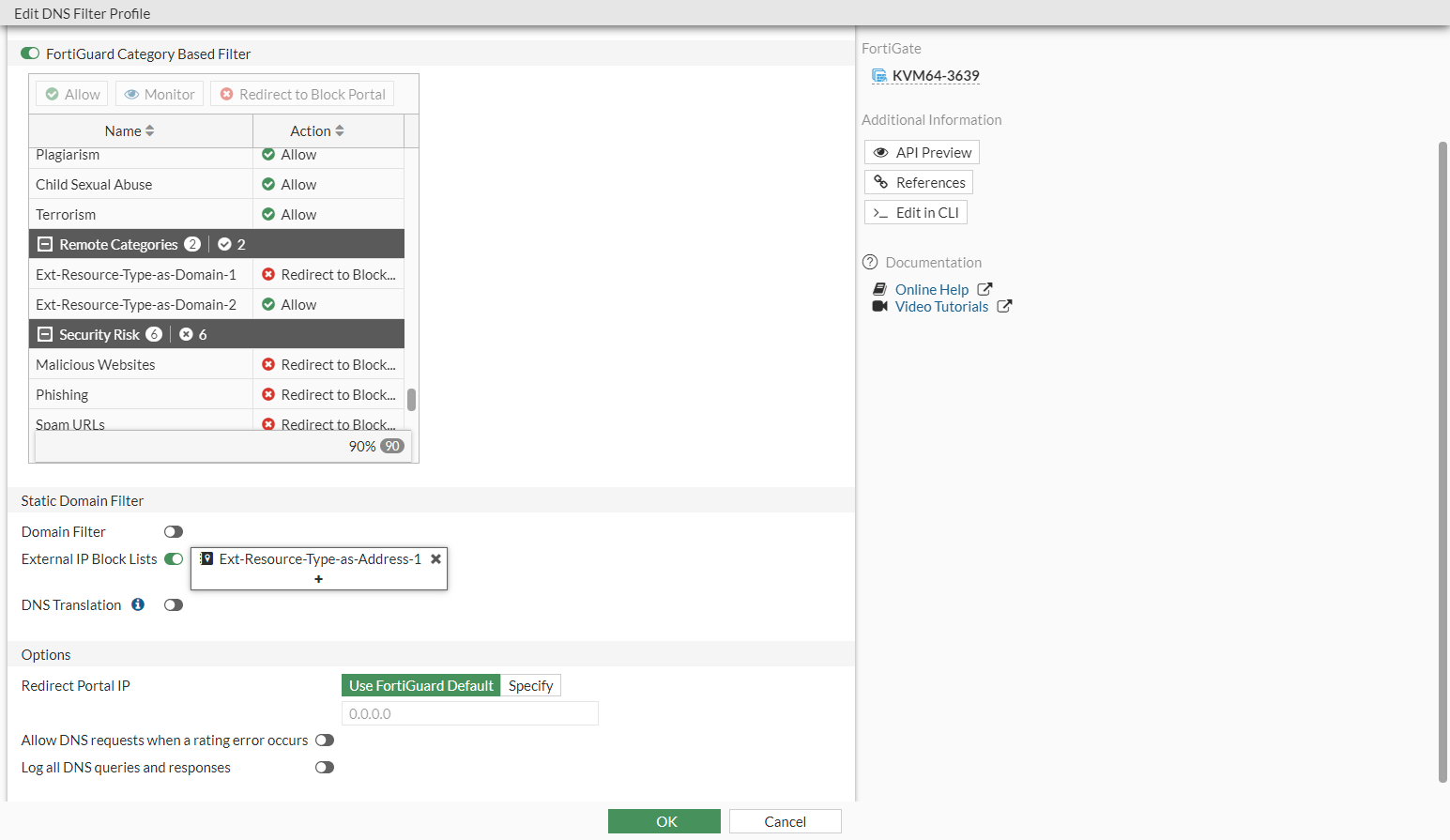
When a domain type external resource is configured, it is treated as a remote category in the DNS filter profile. If the domain name in DNS query matches the entry in this external resource file, it is treated as the remote category and follows the action configured for this category in DNS filter profile.
When an address type external resource is configured, it can be enabled as external-ip-blocklist in DNS filter profile. If a DNS resolved IP address in DNS response matches the entry in the external-ip-blocklist, this DNS query is blocked by the DNS filter.
For external resources file format and limits, see External resources file format.
Configuring external resources in the CLI
In the CLI, you can configure external resources files in an external HTTP server. Under global, configure the external resources file location and specify the resource type.
To configure external resources:
config system external-resource
   edit "Ext-Resource-Type-as-Domain-1"
      set type domain
      set category 194
      set resource "http://172.16.200.66/external-resources/Ext-Resource-Type-as-Domain-1.txt"
      set refresh-rate 1
   next
   edit "Ext-Resource-Type-as-Address-1"
      set status enable
      set type address
      set username ' '
      set password *********
      set comments ''
      set resource "http://172.16.200.66/external-resources/Ext-Resource-Type-as-Address-1.txt"
      set refresh-rate 1
   next
end
In each VDOM, the domain type external resource can be used in the DNS filter as remote category. In this example, the domain name list in the Ext-Resource-Type-as-Domain-1.txt file is treated as a remote category (category ID 194). The IP address list in the Ext-Resource-Type-as-Address-1.txt file can be applied in the DNS filter as an external-ip-blocklist. If the DNS resolved IP address matches any entry in the list in that file, the DNS query is blocked.
To configure the external IP block list and apply it to a policy:
config dnsfilter profile
   edit "default"
      set comment "Default dns filtering."
      config ftgd-dns
         config filters
            edit 1
               set category 194
               set action block
            next
            edit 2
               set category 12
            next
            edit 3
            next
         end
      end
      set block-botnet enable
      set external-ip-blocklist "Ext-Resource-Type-as-Address-1"
   next
end
config firewall policy
   edit 1
      set name "DNSFilter"
      set srcintf "port10"
      set dstintf "port9"
      set srcaddr "all"
      set dstaddr "all"
      set action accept
      set schedule "always"
      set service "ALL"
      set utm-status enable
      set logtraffic all
      set dnsfilter-profile "default"
      set profile-protocol-options "protocol"
      set ssl-ssh-profile "protocols"
      set nat enable
   next
end
Configuring external resources in the GUI
To configure, edit, or view the entries for external resources in the GUI:
- Go to Global > Security Fabric > External Connectors.
- Click Create New.
- In the Threat Feeds section, select Domain Name or IP Address.
- Enter the Resource Name, URL, location of the resource file, resource authentication credentials, and Refresh Rate.
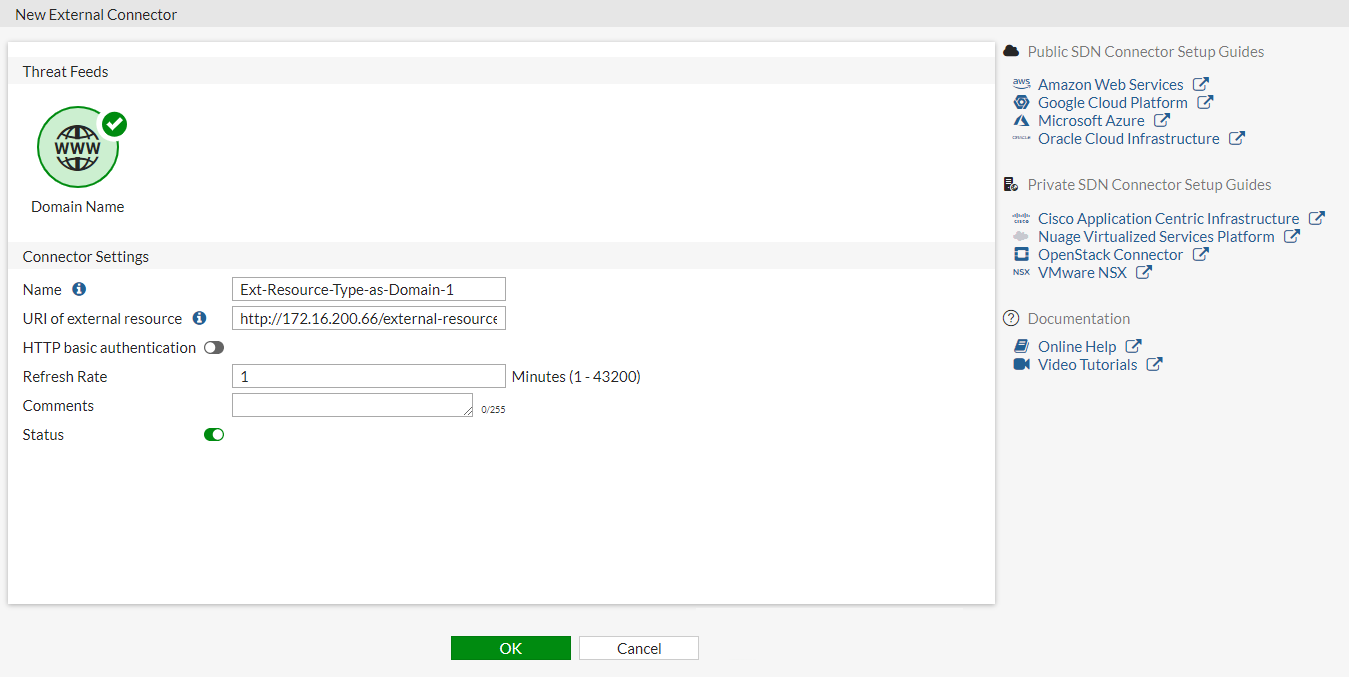
- Click OK.
- Double-click the Threat Feeds Object you just configured to open the Edit page.
- Click View Entries to view the entry list in the external resources file.
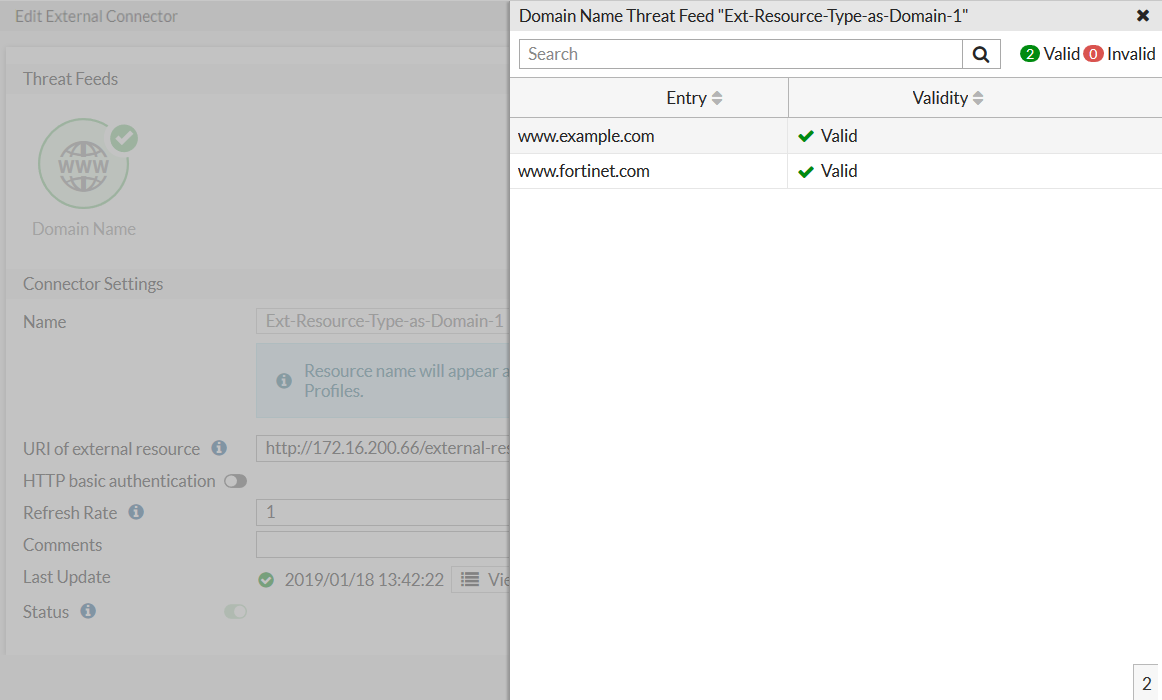
- Go to VDOM > Security Profiles > DNS Filter and open a DNS filter profile. The configured external resources displays, and you can apply it in each DNS filter profile (remote category or external IP block lists).
Log sample
Remote categories
Go to VDOM > Log & Report > DNS Query. Some domains that match the remote category list are rated as remote category, overriding their original domain rating.

Log example:
1: date=2019-01-18 time=13:49:12 logid="1501054802" type="utm" subtype="dns" eventtype="dns-response" level="notice" vd="vdom1" eventtime=1547848151 policyid=1 sessionid=82998 srcip=10.1.100.18 srcport=42985 srcintf="port10" srcintfrole="undefined" dstip=172.16.95.16 dstport=53 dstintf="port9" dstintfrole="undefined" proto=17 profile="default" xid=38234 qname="www.example.com" qtype="A" qtypeval=1 qclass="IN" ipaddr="93.184.216.34" msg="Domain is monitored" action="pass" cat=196 catdesc="Ext-Resource-Type-as-Domain-3"

2: date=2019-01-18 time=13:49:12 logid="1500054000" type="utm" subtype="dns" eventtype="dns-query" level="information" vd="vdom1" eventtime=1547848151 policyid=1 sessionid=82998 srcip=10.1.100.18 srcport=42985 srcintf="port10" srcintfrole="undefined" dstip=172.16.95.16 dstport=53 dstintf="port9" dstintfrole="undefined" proto=17 profile="default" xid=38234 qname="www.example.com" qtype="A" qtypeval=1 qclass="IN"
External IP block lists
Go to VDOM > Log & Report > DNS Query. If the DNS query resolved IP address matches the entry in the external-ip-blocklist, the DNS query is blocked.

Log example:
1: date=2019-01-18 time=13:50:53 logid="1501054400" type="utm" subtype="dns" eventtype="dns-response" level="warning" vd="vdom1" eventtime=1547848253 policyid=1 sessionid=83206 srcip=10.1.100.18 srcport=47281 srcintf="port10" srcintfrole="undefined" dstip=172.16.95.16 dstport=53 dstintf="port9" dstintfrole="undefined" proto=17 profile="default" xid=7501 qname="www.example.com" qtype="A" qtypeval=1 qclass="IN" msg="Domain was blocked because it is in the domain-filter list" action="redirect" domainfilteridx=0 domainfilterlist="Ext-Resource-Type-as-Address-1"

2: date=2019-01-18 time=13:50:53 logid="1500054000" type="utm" subtype="dns" eventtype="dns-query" level="information" vd="vdom1" eventtime=1547848253 policyid=1 sessionid=83206 srcip=10.1.100.18 srcport=47281 srcintf="port10" srcintfrole="undefined" dstip=172.16.95.16 dstport=53 dstintf="port9" dstintfrole="undefined" proto=17 profile="default" xid=7501 qname="www.example.com" qtype="A" qtypeval=1 qclass="IN"