
Fortinet white logo
Fortinet white logo

Administration Guide

Sending FortiADC Threat Telemetry to FortiGuard

Sending FortiADC Threat Telemetry to FortiGuard

FortiADC is designed to send threat telemetry data to FortiGuard to enhance threat intelligence and enable product-specific threat analysis. FortiGuard processes this data for analysis, including metrics on Antivirus, IPS, and other security statistics. The AV/IPS analysis has been standardized, allowing FortiADC to send IPS and Antivirus data to FortiGuard for comprehensive threat assessment.
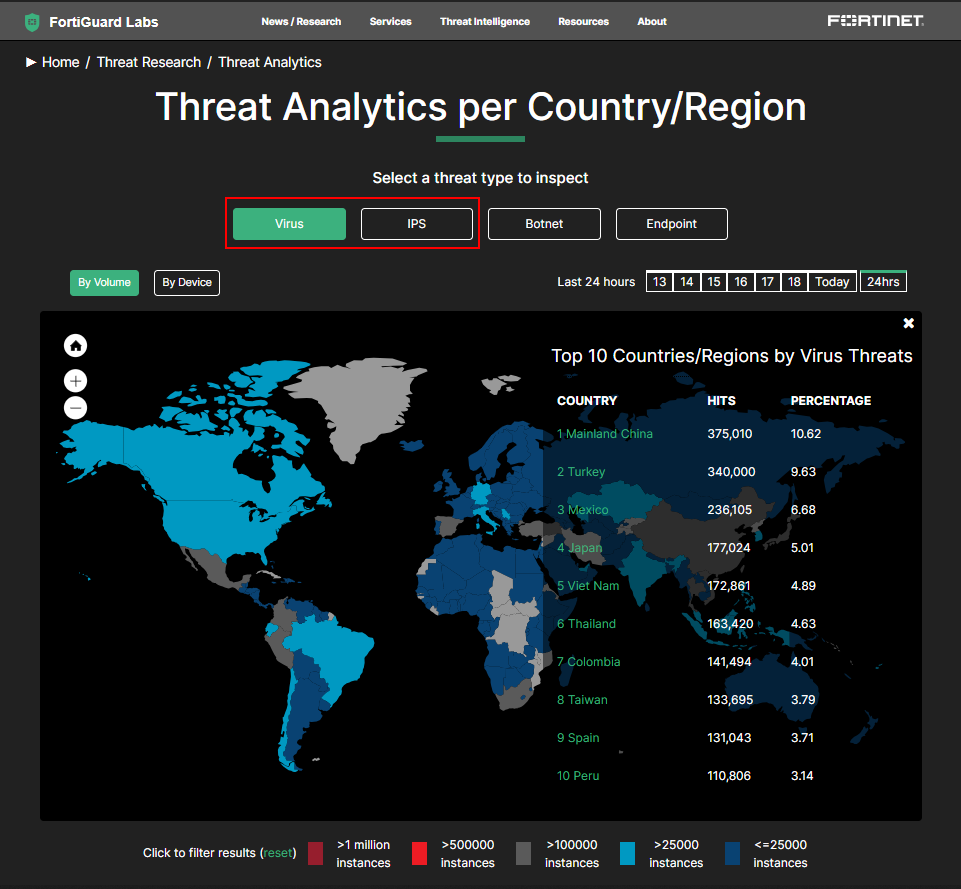
FortiADC Threat Telemetry Workflow

The FortiADC Threat Telemetry Workflow outlines the systematic process through which the IPS and AV engines detect rule matches, collect relevant statistics, and transmit this data to FortiGuard for comprehensive analysis.
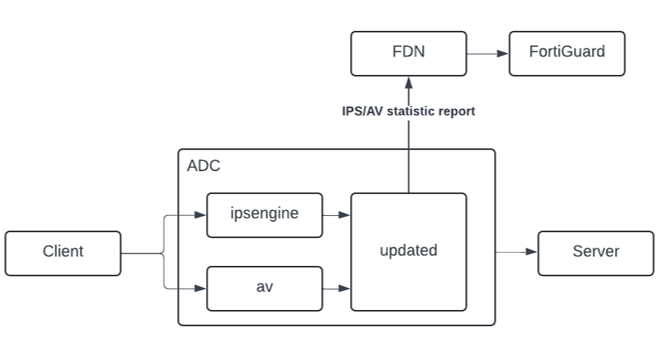
  1. Detection — The IPS or AV engine detects rule matches based on the configured threat protection policies.

  2. Data Transmission to Daemon — After detection, the IPS/AV engine sends the matched rule information to the updated daemon for further processing.

  3. Statistics Collection — If the option is enabled to send statistics, the daemon collects IPS/AV statistics, including details of the detected rule matches.

  4. Data Transmission to FortiGuard — The daemon sends the collected statistics to FortiGuard every 60 minutes by default. This reporting interval can be configured by the user through CLI.

  5. Data Processing — Once FortiGuard receives the IPS/AV statistics, it processes the data for analysis and generates a report.

  6. Portal Display — The processed data is then made available and displayed on the FortiGuard portal for user review.

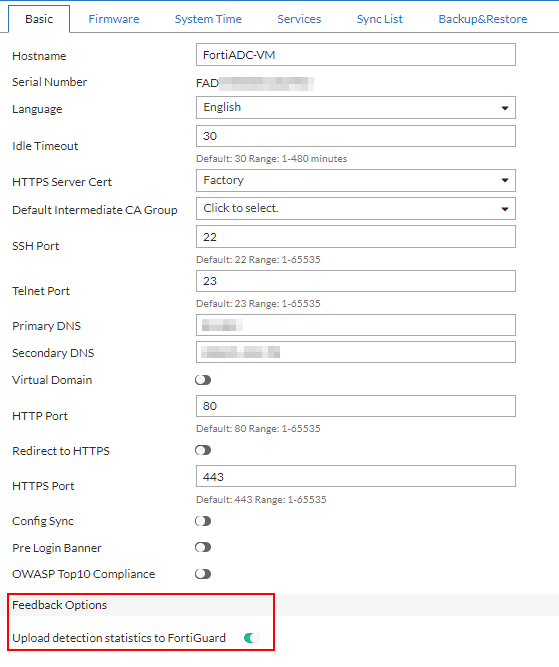
To enable FortiADC to transmit threat telemetry data to FortiGuard:
  1. Navigate to System > Settings.

  2. From the Basic tab, scroll down to locate the Feedback Options section.

  3. Enable the Upload detection statistics to FortiGuard option.
    Note: This option is enabled by default after upgrading to FortiADC version 7.6.1.
Users can configure the statistics collection interval from the CLI.

config system global
   set fds-statistics {enable|disable}
   set fds-statistics-period <integer>
end

fds-statistics

Enable or disable FortiADC detection statistics upload to FortiGuard. This is enabled by default.

fds-statistics-period

Specify the FortiGuard statistics collection period in minutes. The default value is 60 minutes, and the valid range is 1-1440 minutes.

Sending FortiADC Threat Telemetry to FortiGuard

Sending FortiADC Threat Telemetry to FortiGuard

FortiADC is designed to send threat telemetry data to FortiGuard to enhance threat intelligence and enable product-specific threat analysis. FortiGuard processes this data for analysis, including metrics on Antivirus, IPS, and other security statistics. The AV/IPS analysis has been standardized, allowing FortiADC to send IPS and Antivirus data to FortiGuard for comprehensive threat assessment.

FortiADC Threat Telemetry Workflow

The FortiADC Threat Telemetry Workflow outlines the systematic process through which the IPS and AV engines detect rule matches, collect relevant statistics, and transmit this data to FortiGuard for comprehensive analysis.

  1. Detection — The IPS or AV engine detects rule matches based on the configured threat protection policies.

  2. Data Transmission to Daemon — After detection, the IPS/AV engine sends the matched rule information to the updated daemon for further processing.

  3. Statistics Collection — If the option is enabled to send statistics, the daemon collects IPS/AV statistics, including details of the detected rule matches.

  4. Data Transmission to FortiGuard — The daemon sends the collected statistics to FortiGuard every 60 minutes by default. This reporting interval can be configured by the user through CLI.

  5. Data Processing — Once FortiGuard receives the IPS/AV statistics, it processes the data for analysis and generates a report.

  6. Portal Display — The processed data is then made available and displayed on the FortiGuard portal for user review.

To enable FortiADC to transmit threat telemetry data to FortiGuard:
  1. Navigate to System > Settings.

  2. From the Basic tab, scroll down to locate the Feedback Options section.

  3. Enable the Upload detection statistics to FortiGuard option.
    Note: This option is enabled by default after upgrading to FortiADC version 7.6.1.

Users can configure the statistics collection interval from the CLI.

config system global
   set fds-statistics {enable|disable}
   set fds-statistics-period <integer>
end

fds-statistics

Enable or disable FortiADC detection statistics upload to FortiGuard. This is enabled by default.

fds-statistics-period

Specify the FortiGuard statistics collection period in minutes. The default value is 60 minutes, and the valid range is 1-1440 minutes.