

Configuring real server SSL profiles
A real server SSL profile determines settings used in network communication on the FortiADC-server segment, in contrast to a virtual server profile, which determines the settings used in network communication on the client-FortiADC segment.
SSL profiles illustrates the basic idea of client-side and server-side profiles.
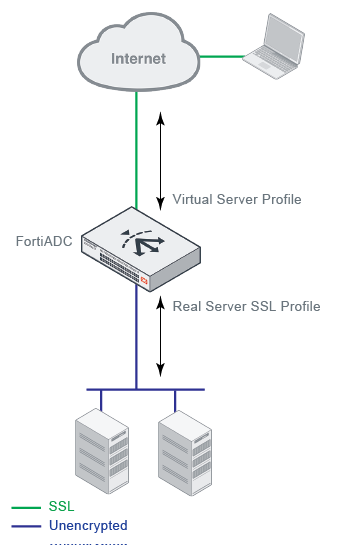
Predefined real server profiles provides a summary of the predefined profiles. You can select predefined profiles in the real server pool configuration, or you can create user-defined profiles.
| Profile | Defaults |
|---|---|
| LB_RS_SSL_PROF_DEFAULT |
|
| LB_RS_SSL_PROF_ECDSA |
|
| LB_RS_SSL_PROF_ECDSA_SSLV3 |
|
| LB_RS_SSL_PROF_ECDSA_TLS12 |
|
| LB_RS_SSL_PROF_ENULL |
Recommended for Microsoft Direct Access servers where the application data is already encrypted and no more encryption is needed. |
| LB_RS_SSL_PROF_HIGH |
|
| LB_RS_SSL_PROF_LOW_SSLV3 |
|
| LB_RS_SSL_PROF_MEDIUM |
|
| NONE |
|
Before you begin:
- You must have Read-Write permission for Load Balance settings.
To configure custom real server profiles:
- Go to Server Load Balance > Real Server Pool.
- Click the Server SSL tab.
- Click Create New to display the configuration editor.
- Complete the configuration as described in Real Server SSL Profile configuration guidelines.
- Save the configuration.

|
You can clone a predefined configuration object to help you get started with a user-defined configuration. To clone a configuration object, click the clone icon |
 that appears in the tools column on the configuration summary page.
| Settings | Guidelines |
|---|---|
| Name | Configuration name. Valid characters are A-Z, a-z, 0-9, _, and -. No spaces. You reference this name in the real server pool configuration.Note: After you initially save the configuration, you cannot edit the name. |
| SSL |
Enable/disable SSL for the connection between the FortiADC and the real server. |
| Note: The following fields become available only when SSL is enabled. See above. | |
|
Customized SSL Ciphers Flag |
Enable/disable use of user-specified cipher suites. When enabled, you must select a Customized SSL Cipher. See below. |
|
Customized SSL Ciphers |
If the customize cipher flag is enabled, specify a colon-separated, ordered list of cipher suites. An empty string is allowed. If empty, the default cipher suite list is used. The names you enter are validated against the form of the cipher suite short names published on the OpenSSL website: |
|
SSL Cipher Suite List |
Ciphers are listed from strongest to weakest:
*These ciphers are fully supported by hardware SSL (in 400F, 420F, 1200F, 2200F, 4200F and 5000F). Note: We recommend retaining the default list. If necessary, you can deselect the SSL ciphers that you do not want to support. |
|
TLSv1.3 Cipher Suite List |
TLSv1.3 ciphers are listed as following:
Note: This option only available if the TLSv1.3 is checked. |
| Allowed SSL Versions |
You have the following options:
Note:
|
| Certificate Verify |
Specify a Certificate Verify configuration object to validate server certificates. This Certificate Verify object must include a CA group and may include OCSP and CRL checks. Note: Certificate Verify objects with Client Authentication enabled can only be applied in Client SSL profiles. When applied to a Real Server SSL profile, these objects are invalid and will result in an error. |
|
Local Certificate |
Select a local certificate object. This should be the backend servers' certificate, NOT the appliance's GUI web server certificate. See Manage Certificates. |
|
Client Certificate Configuration Delegation(C3D) |
Available only if a Local Certificate is configured. When enabled, FortiADC re-issues a client certificate to the real server, allowing the backend server to enforce mTLS while permitting FortiADC to decrypt and re-encrypt traffic. Disabled by default. |
| C3D Local Signing CA |
Required when C3D is enabled. Specifies the local CA used to sign re-issued client certificates generated by FortiADC. |
| C3D Intermediate CA Group |
Optional when C3D is enabled. Specifies the intermediate CA chain presented with the re-issued client certificate. |
| SNI Forward Flag | Enable/disable forwarding the client SNI value to the server. The SNI value will be forwarded to the real server only when the client-side ClientHello message contains a valid SNI value; otherwise, nothing is forwarded. |
| Session Reuse Flag | Enable/disable SSL session reuse. |
| Session Reuse Limit | The default is 0 (disabled). The valid range is 0-1048576. |
| TLS Ticket Flag | Enable/disable TLS ticket-based session reuse. |
| Renegotiation |
This option controls how FortiADC responds to mid-stream SSL reconnection requests either initiated by real servers or forced by FortiADC. Note:
|
| Renegotiation Period |
Specify the interval from the initial connect time that FortiADC renegotiates an SSL session. The unit of measurement can be second (default), minute, or hour, e.g., 100s, 20m, or 1h. Note:
|
| Renegotiate Size |
Specify the amount (in MB) of application data that must have been transmitted over the secure connection before FortiADC initiates the renegotiation of an SSL session. Note: The default is 0, which disables the function. |
| Secure Renegotiation |
Select one of the following options:
|
| Renegotiation-Deny-Action |
This option becomes available when Renegotiation is disabled on the server side. In that case, you must select an action that FortiADC will take when denying an SSL renegotiation request:
|
|
RFC 7919 Comply |
Enable/disable parameters to comply with RFC 7919. |
|
Supported Groups |
The Supported Groups option is available if RFC 7919 Comply is enabled. Specify the supported group objects from the following:
At least one item from the FFDHE group must be selected. Note: The RFC 7919 Comply feature requires certain cipher selections to correspond with the Supported Group selection.
|