

DNS
Remote users use the DNS server in FortiSASE-Sovereign under Endpoint Management > DNS to resolve hostnames for internal and external domains.
Agent and agentless endpoints and endpoints connected to authorized Edge devices forward their DNS traffic to FortiSASE-Sovereign PoP FortiGates. FortiSASE-Sovereign performs transparent DNS redirection to redirect DNS traffic conditionally as desired.
-
Implicit DNS rules are predefined for agents and users connected to authorized Edge devices. FortiSASE-Sovereign uses these rules for resolving hostnames for external domains.
-
You can create split DNS or DNS redirection rules by clicking Create. FortiSASE uses these rules for resolving hostnames for internal domains.

By default, FortiSASE-Sovereign deployments use FortiGuard DNS as the default DNS server for the All implicit DNS rule. You can select any implicit DNS rule and click Edit to change the default DNS server.
You can configure Default DNS Server with one of the following options, then click OK to save the change:
|
DNS Server |
Description |
Primary and Secondary DNS Server IP Address |
|---|---|---|
| FortiGuard DNS | Use FortiGuard DNS. |
96.45.45.45 96.45.46.46 |
| Other DNS | Use a public DNS server other than FortiGuard DNS. |
IP addresses specific to public DNS server |
| CloudFlare | Use the CloudFlare public DNS server. |
1.1.1.1 1.0.0.1 |
| Custom | Enable to specify your own custom primary and secondary DNS servers. |
Specify IP address of primary and secondary DNS. |
|
|
Use the Google public DNS server. |
8.8.8.8 8.8.4.4 |
|
Quad 9 |
Use the Quad 9 public DNS server. |
9.9.9.9 149.112.112.112 |
For example, you can edit the implicit DNS rule to use a custom DNS server as follows:
To configure a custom DNS server:
-
Go to Endpoint Management > DNS, select the All implicit DNS rule, and click Edit.
-
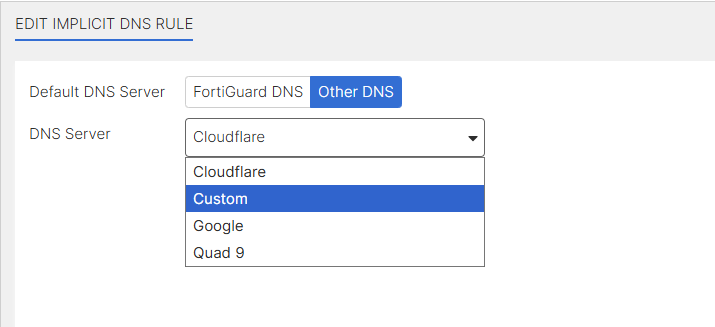
In the Edit Implicit DNS Rule page, for Default DNS Server, select Other DNS.
-
From the DNS Server dropdown, select Custom.
-
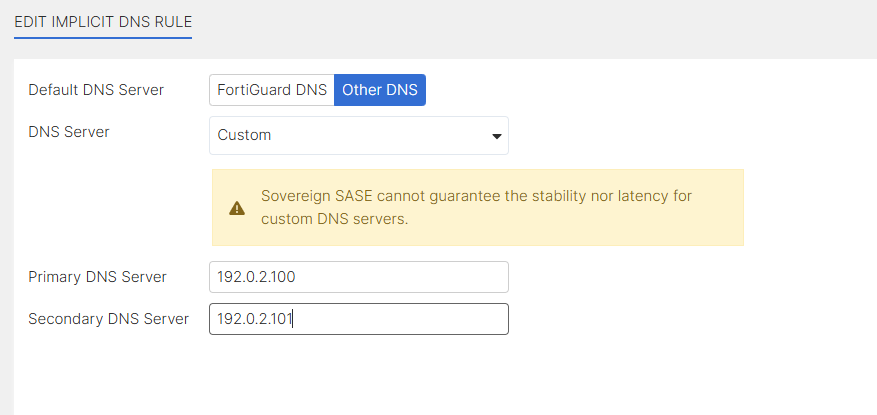
In the Primary DNS Server and Secondary DNS Server fields, enter the respective IP addresses for the servers of your choice.The screenshot uses IP addresses for documentation and should not be used in a production environment.
-
Click OK.
Using FortiGuard DNS or another public DNS service is sufficient for most secure internet access (SIA) use cases that simply require remote users to resolve hostnames for external domains.
Considerations
-
FortiGuard DNS servers do not support DNS over TCP. If you require DNS over TCP, edit implicit DNS rules from the default FortiGuard DNS server to other DNS servers that support DNS over TCP.
-
FortiSASE-Sovereign cannot guarantee the stability nor latency for custom DNS servers. These factors must be considered by the customer or provider maintaining the custom DNS servers.