

Region-based connectivity for FortiWeb Cloud Sandbox (7.6.3)
FortiWeb has enhanced its FortiSandbox Settings to support region-based server resolution when FortiSandbox Type is set to FortiWeb Cloud Sandbox. Administrators can now select a region from an available list, allowing FortiWeb to dynamically retrieve and establish a connection to the corresponding FortiSandbox Cloud server IP for that region.
FortiSandbox provides advanced threat detection by executing and analyzing potentially malicious files in a controlled environment. By integrating with FortiSandbox Cloud, FortiWeb enhances security against zero-day malware and other web-based threats.
Key Enhancements:
-
Configurable Region Selection – Allows administrators to specify a target region, ensuring FortiWeb connects to the appropriate FortiSandbox Cloud server within that region.
-
Dynamic Endpoint Resolution – FortiWeb retrieves the corresponding FortiSandbox Cloud server IP based on the selected region and initiates a secure connection.
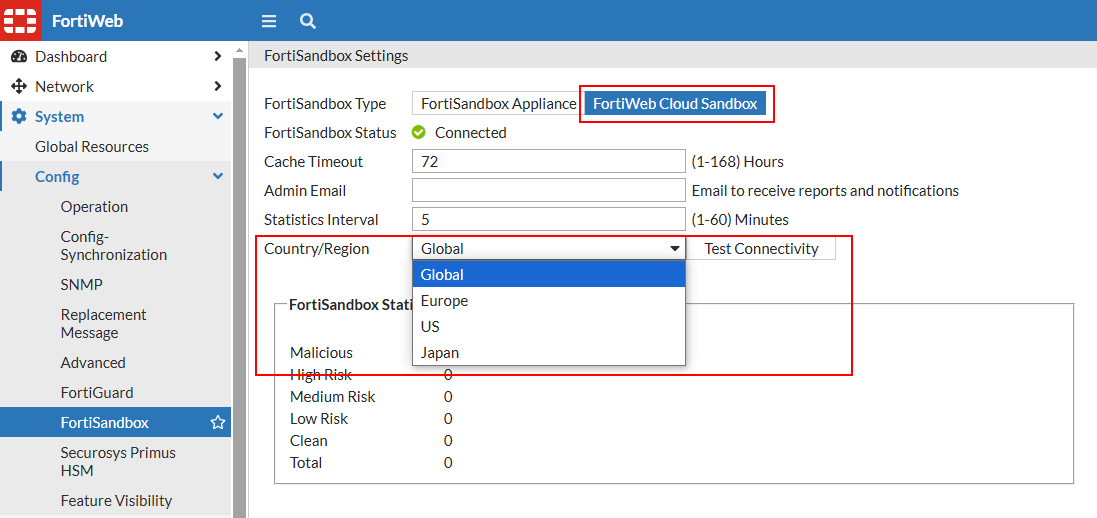
To configure FortiSandbox:
- Go to System > Config > FortiSandbox.
- Complete the settings according to the below table:
- FortiSandbox Appliance—Submit files that match the upload restriction rules to a FortiSandbox physical appliance or FortiSandbox-VM.
- FortiWeb Cloud Sandbox—Submit files to FortiWeb Cloud Sandbox. You need to register your FortiWeb and a FortiWeb FortiGuard Sandbox Cloud Service subscription.
- Click Apply.
| FortiSandbox Type |
|
| Server IP/Domain |
Enter the IP address or domain name of the FortiSandbox. Available only when FortiSandbox Appliance is selected. |
| FortiSandbox Status |
The connectivity status of FortiSandbox is displayed here. |
| Cache Timeout | After it receives the FortiSandbox results, FortiWeb takes the action specified by the file security policy. During this time, it does not re-submit the file to FortiSandbox. The valid range is 1-168 hours. The default value is 72. |
| Admin Email | Enter the email address that FortiSandbox sends weekly reports and notifications to. |
| Statistics Interval | Specifies how often FortiWeb retrieves statistics from FortiSandbox, in minutes. The valid range is 1-60 minutes. The default value is 5. |
|
Country/Region |
Available only when FortiWeb Cloud Sandbox is selected. Datacenters are located in Canada, Germany, the United States, and Japan to ensure better performance. The default region is Global. Select a country or region from the list. FortiWeb will retrieve and establish a connection to the appropriate FortiSandbox Cloud server IP based on the selected region. |
For more information, see Limiting file uploads.