
Fortinet white logo
Fortinet white logo

What's new

What's new

The following sections describe new features, enhancements, and changes in FortiProxy 7.4.8:

Support switching to an alternate FortiSandbox if the main FortiSandbox is unavailable

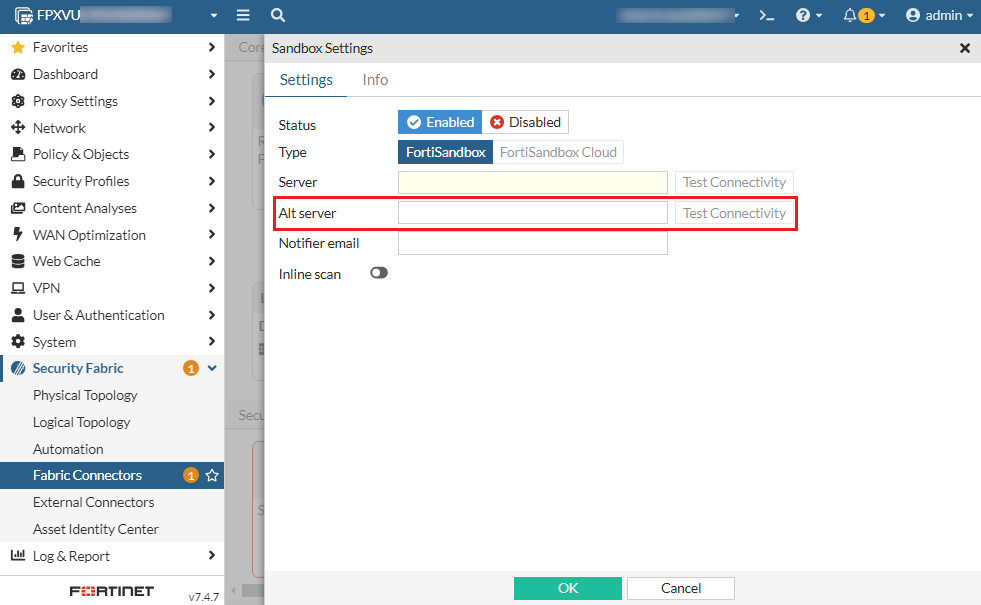
FolrtiProxy 7.4.8adds support for switching to an alternate FortiSandbox when the main FortiSandbox is unavailable. Once the connectivity is restored, it will automatically fall back to the primary FortiSandbox. You can configure an alternate FortiSandbox using the new Alt server option when configuring a FortiSandbox connector:
Alternatively, use the new alt-server option under config system fortisandbox. Use the new health-check-interval option to configure the interval of health check for the failover.

Log sample:

1: date=2025-01-09 time=07:15:56 eventtime=1736363756320902685 logid="0100022948"

type="event" subtype="system" level="warning" vd="root" logdesc="FSA failover status warning" name="sandbox" interface="undefined" probeproto="ping" msg="FortiSandbox changed

state from alive to dead, Peer:Primary status Primary:DOWN Alternate:DOWN protocol: ping."

Change to HTTP header content maximum length

In FortiProxy 7.4.8, the HTTP header content maximum length is increased from 1023 to 4000.

UEFI support for GCP

FortiProxy 7.4.8 adds UEFI support for GCP.

CLI changes

FortiProxy 7.4.8 includes the following CLI change:

  • config system fortisandbox—Use the new alt-server option to configure an alternate FortiSandbox to be used when the main FortiSandbox is unavailable. Use the new health-check-interval option to configure the interval of health check for the failover.

What's new

What's new

The following sections describe new features, enhancements, and changes in FortiProxy 7.4.8:

Support switching to an alternate FortiSandbox if the main FortiSandbox is unavailable

FolrtiProxy 7.4.8adds support for switching to an alternate FortiSandbox when the main FortiSandbox is unavailable. Once the connectivity is restored, it will automatically fall back to the primary FortiSandbox. You can configure an alternate FortiSandbox using the new Alt server option when configuring a FortiSandbox connector:

Alternatively, use the new alt-server option under config system fortisandbox. Use the new health-check-interval option to configure the interval of health check for the failover.

Log sample:

1: date=2025-01-09 time=07:15:56 eventtime=1736363756320902685 logid="0100022948"

type="event" subtype="system" level="warning" vd="root" logdesc="FSA failover status warning" name="sandbox" interface="undefined" probeproto="ping" msg="FortiSandbox changed

state from alive to dead, Peer:Primary status Primary:DOWN Alternate:DOWN protocol: ping."

Change to HTTP header content maximum length

In FortiProxy 7.4.8, the HTTP header content maximum length is increased from 1023 to 4000.

UEFI support for GCP

FortiProxy 7.4.8 adds UEFI support for GCP.

CLI changes

FortiProxy 7.4.8 includes the following CLI change:

  • config system fortisandbox—Use the new alt-server option to configure an alternate FortiSandbox to be used when the main FortiSandbox is unavailable. Use the new health-check-interval option to configure the interval of health check for the failover.