
Fortinet white logo
Fortinet white logo

What's new

What's new

The following sections describe new features, enhancements, and changes in FortiProxy 7.4.7:

Use a static client certificate for SSL/SSH inspection

When configuring an SSL/SSH inspection profile, you can now configure FortiProxy to use a static client certificate for mTLS authentication on behalf of all users using the new Static option of SSL Client Certificate. You can then select the client certificate to use.
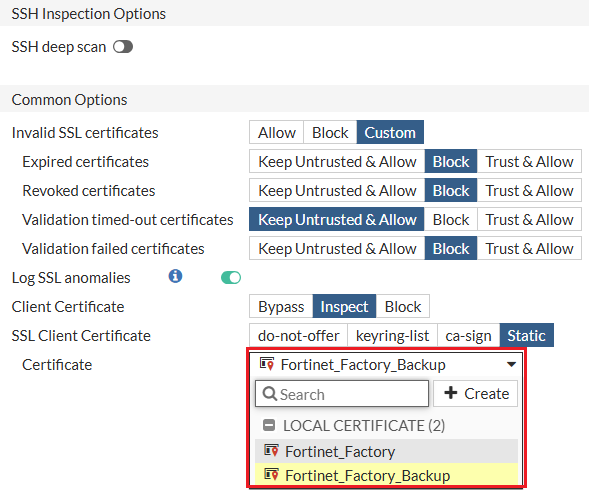
Alternatively use the new static status option of the config ssl-client-certificate subcommand under config firewall ssl-ssh-profile. You can then configure the client certificate using the new set cert subcommand.

Header replacement in web-proxy profile

In web-proxy profiles, the header can be replaced.

config web-proxy profile
			edit my_profile
			config headers
			edit 1
			set name "server"
			set action add-to-response
			set add-option {replace | replace-when-match}
			set content "content_changed"
			next
			end
			next
		end

replace

Replace content to existing HTTP header or create new header if HTTP header is not found.

replace-when-match

Replace content to existing HTTP header.

Support for Securosys Primus HSM

FortiProxy 7.4.7 adds support for Securosys Primus HSM.

  • Under config system nethsm, you can now configure the HSM vendor to be Securosys Primus and then configure the Primus-related settings:

    config system nethsm

    set status enable

    set vendor primus

    set primus-cfg <primus.cfg file content>

    set secret-content <Encrypted Config>

    config partitions

    edit "PRIMUSDEV270"

    set slot-id 1

    set pkcs11-pin <Encrypted password>

    next

    end
  • When configuring local keys and certificates using the config vpn certificate localcommand, you can now configure the HSM vendor to be Securosys Primus HSM and configure the HSM key type.

  • You can perform operations on Primus HSM using the new execute nethsm primus command.

Add license information in SNMP

FortiProxy 7.4.7 adds license information to SNMP with the following OIDs:

  • FortiProxy license related: 3.6.1.4.1.12356.101.10.117.*

  • SWG Bundle (FURL): 3.6.1.4.1.12356.101.10.117.1.*

    • Licensed sessions: 3.6.1.4.1.12356.101.10.117.1.1

    • Active sessions (licensing limit): 3.6.1.4.1.12356.101.10.117.1.2

    • Purchased seats: 3.6.1.4.1.12356.101.10.117.1.3

  • Browser Isolation (FNBI): 3.6.1.4.1.12356.101.10.117.2.*

  • Content Analysis (FCAS): 3.6.1.4.1.12356.101.10.117.3.*

SR-IOV support on Hyper-V

FortiProxy 7.4.7 adds support for SR-IOV on Hyper-V to optimize FortiProxy-VM performance.

CLI changes

FortiProxy 7.4.7 includes the following CLI changes:

  • config vpn certificate local—This command adds support for Securosys Primus HSM with the following changes:

    • Use the new hsm-vendor subcommand to configure the HSM vendor.

      safenet

      Safenet HSM.

      primus

      Securosys Primus HSM.
    • Use the new hsm-keytype subcommand to configure the HSM key type.

      rsa RSA key type.
      ec

      EC key type.

    • The nethsm-slot command is renamed hsm-slot.

  • The execute nethsm command is renamed execute nethsm safenet.

    Use the new execute nethsm primus command to perform operations on Primus HSM with the following options:

    # execute nethsm primus

    clear-pkcs-provider-log Clear logs from /tmp/pkcs11.log, generated by pkcs11.so, the OpenSSL provider.

    clear-primus-log Clear logs from /tmp/primus.log, generated by libprimusP11.so.

    delete-object Delete Hardware Security Module object(s).

    dump-pkcs-provider-log Dump logs from /tmp/pkcs11.log, generated by pkcs11.so, the OpenSSL provider.

    dump-primus-log Dump logs from /tmp/primus.log, generated by libprimusP11.so.

    inspect-primus-library-info Display information about the integrated libprimusP11.so library.

    list-objects List Hardware Security Module objects.

    upload-primus-cfg Upload nethsm primus.cfg file.

    upload-primus-cfg-raw Upload nethsm primus.cfg file.

  • config system nethsm—The set vendor parameter includes the new primus option to configure the HSM vendor to be Securosys Primus. You can then configure the Primus-related settings:

    config system nethsm

    set status enable

    set vendor primus

    set primus-cfg <primus.cfg file content>

    set secret-content <Encrypted Config>

    config partitions

    edit "PRIMUSDEV270"

    set slot-id 1

    set pkcs11-pin <Encrypted password>

    next

    end
  • config firewall ssl-ssh-profile—The set client-certificate subcommand adds the new bypass-on-cert-req option to configure FortiProxy to bypass on certificate requests.

  • diagnose debug kernel log—Use this new command to show or clear kernel log.

    show

    Dump the kernel log.

    clear

    Clear the kernel log.

What's new

What's new

The following sections describe new features, enhancements, and changes in FortiProxy 7.4.7:

Use a static client certificate for SSL/SSH inspection

When configuring an SSL/SSH inspection profile, you can now configure FortiProxy to use a static client certificate for mTLS authentication on behalf of all users using the new Static option of SSL Client Certificate. You can then select the client certificate to use.

Alternatively use the new static status option of the config ssl-client-certificate subcommand under config firewall ssl-ssh-profile. You can then configure the client certificate using the new set cert subcommand.

Header replacement in web-proxy profile

In web-proxy profiles, the header can be replaced.

config web-proxy profile
			edit my_profile
			config headers
			edit 1
			set name "server"
			set action add-to-response
			set add-option {replace | replace-when-match}
			set content "content_changed"
			next
			end
			next
		end

replace

Replace content to existing HTTP header or create new header if HTTP header is not found.

replace-when-match

Replace content to existing HTTP header.

Support for Securosys Primus HSM

FortiProxy 7.4.7 adds support for Securosys Primus HSM.

  • Under config system nethsm, you can now configure the HSM vendor to be Securosys Primus and then configure the Primus-related settings:

    config system nethsm

    set status enable

    set vendor primus

    set primus-cfg <primus.cfg file content>

    set secret-content <Encrypted Config>

    config partitions

    edit "PRIMUSDEV270"

    set slot-id 1

    set pkcs11-pin <Encrypted password>

    next

    end
  • When configuring local keys and certificates using the config vpn certificate localcommand, you can now configure the HSM vendor to be Securosys Primus HSM and configure the HSM key type.

  • You can perform operations on Primus HSM using the new execute nethsm primus command.

Add license information in SNMP

FortiProxy 7.4.7 adds license information to SNMP with the following OIDs:

  • FortiProxy license related: 3.6.1.4.1.12356.101.10.117.*

  • SWG Bundle (FURL): 3.6.1.4.1.12356.101.10.117.1.*

    • Licensed sessions: 3.6.1.4.1.12356.101.10.117.1.1

    • Active sessions (licensing limit): 3.6.1.4.1.12356.101.10.117.1.2

    • Purchased seats: 3.6.1.4.1.12356.101.10.117.1.3

  • Browser Isolation (FNBI): 3.6.1.4.1.12356.101.10.117.2.*

  • Content Analysis (FCAS): 3.6.1.4.1.12356.101.10.117.3.*

SR-IOV support on Hyper-V

FortiProxy 7.4.7 adds support for SR-IOV on Hyper-V to optimize FortiProxy-VM performance.

CLI changes

FortiProxy 7.4.7 includes the following CLI changes:

  • config vpn certificate local—This command adds support for Securosys Primus HSM with the following changes:

    • Use the new hsm-vendor subcommand to configure the HSM vendor.

      safenet

      Safenet HSM.

      primus

      Securosys Primus HSM.
    • Use the new hsm-keytype subcommand to configure the HSM key type.

      rsa RSA key type.
      ec

      EC key type.

    • The nethsm-slot command is renamed hsm-slot.

  • The execute nethsm command is renamed execute nethsm safenet.

    Use the new execute nethsm primus command to perform operations on Primus HSM with the following options:

    # execute nethsm primus

    clear-pkcs-provider-log Clear logs from /tmp/pkcs11.log, generated by pkcs11.so, the OpenSSL provider.

    clear-primus-log Clear logs from /tmp/primus.log, generated by libprimusP11.so.

    delete-object Delete Hardware Security Module object(s).

    dump-pkcs-provider-log Dump logs from /tmp/pkcs11.log, generated by pkcs11.so, the OpenSSL provider.

    dump-primus-log Dump logs from /tmp/primus.log, generated by libprimusP11.so.

    inspect-primus-library-info Display information about the integrated libprimusP11.so library.

    list-objects List Hardware Security Module objects.

    upload-primus-cfg Upload nethsm primus.cfg file.

    upload-primus-cfg-raw Upload nethsm primus.cfg file.

  • config system nethsm—The set vendor parameter includes the new primus option to configure the HSM vendor to be Securosys Primus. You can then configure the Primus-related settings:

    config system nethsm

    set status enable

    set vendor primus

    set primus-cfg <primus.cfg file content>

    set secret-content <Encrypted Config>

    config partitions

    edit "PRIMUSDEV270"

    set slot-id 1

    set pkcs11-pin <Encrypted password>

    next

    end
  • config firewall ssl-ssh-profile—The set client-certificate subcommand adds the new bypass-on-cert-req option to configure FortiProxy to bypass on certificate requests.

  • diagnose debug kernel log—Use this new command to show or clear kernel log.

    show

    Dump the kernel log.

    clear

    Clear the kernel log.