

What's new
The following sections describe new features, enhancements, and changes in FortiProxy 7.4.11:
New connection policy types Explicit Web Connect and Transparent Connect for HTTPS
FortiProxy7.4.11 introduces the Explicit Web Connect and Transparent Connectpolicy types to handle forward server and SSL deep inspection in HTTPS CONNECT/SNI state. See Create or edit a policy.
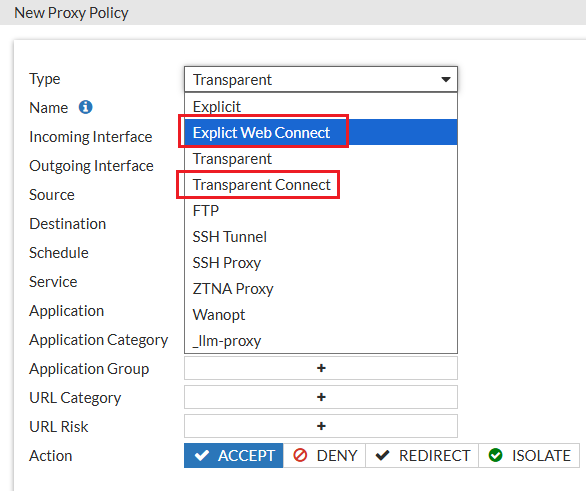
The connection policies have higher priority than regular transparent and explicit policies. When a connection policy is configured, HTTPS requests will first match the connection policy before proceeding to the regular transparent and explicit policies. Content scan related UTM profiles are not available for connection policies.

|
Plain-text HTTP or decrypted HTTPS traffic will only match regular transparent and explicit policies. |
The new policy types are also added to the config firewall policy command:
config firewall policy
edit <id>
set type <explicit-web-connect/transparent-connect>
next
end
Enhancements to traffic shaping based on HTTP response
FortiProxy 7.4.11 includes the following enhancements to traffic shaping based on HTTP response:
-
DSCP support
-
Response policy matching based on matched shaping policy
To configure DSCP-related settings and matched shaping policies:
Use the following new fields in the config firewall response-shaping-policy command:
config firewall response-shaping-policy
edit 1
set uuid a0edf572-0378-51f0-f0f6-8f924dccfd53
set dstaddr "resp-content-length"
set class-id 10
set diffserv-forward enable
set diffservcode-forward 000000
set diffserv-reverse enable
set diffservcode-rev 000000
set matched-shaping-policies 2 1 3
set srcaddr "all"
License sharing enhancements
FortiProxy 7.4.11 improves license sharing stability in the following ways:
-
Additional layer of root nodes for better redundancy and recovery
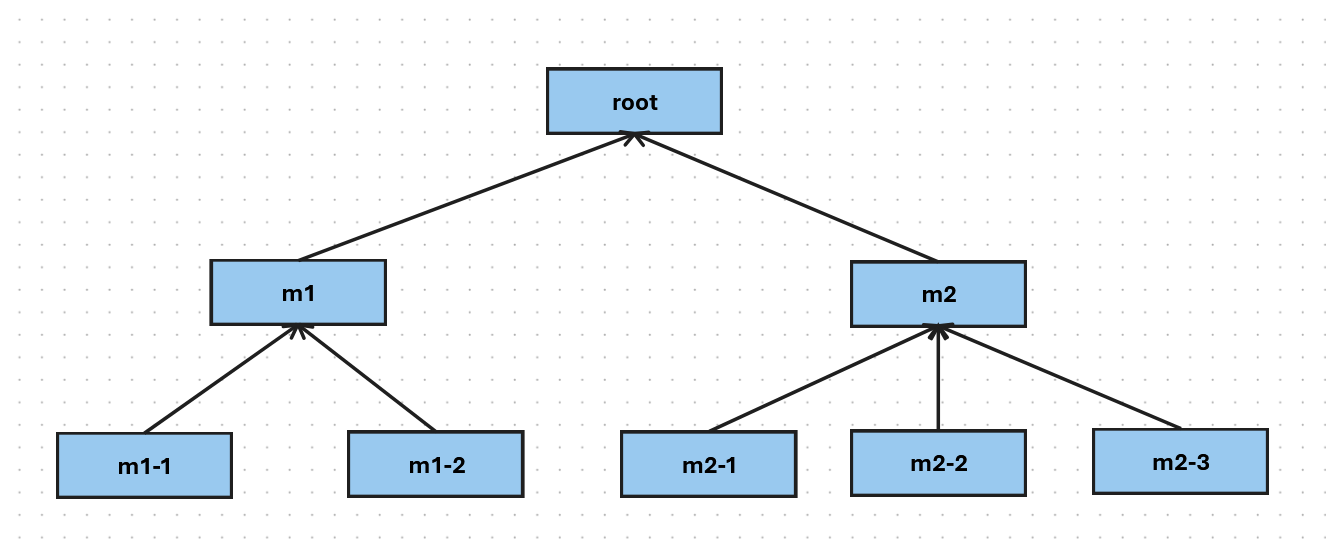
You can now add a layer of child root nodes between the security fabric root node and downstream members. A security fabric root node can have multiple child root nodes, each with a different set of downstream nodes. In the following example, root is the security fabric root. m1 and m2 are the child root nodes with two and three downstream nodes respectively.
-
When the security fabric root is working as expected, the child root nodes act like regular downstream nodes, contributing and claiming licenses from the pool managed by the security fabric root node.
-
When the security fabric root node is down ( e.g., due to a failure or network disconnection) for a specified period of time (10 minutes), the child root nodes take over license sharing responsibilities and coordinate seat allocation for downstream members to ensures the continuity of license sharing.
-
For the first 7 days of grace period, each child root node is entitled to the whole license pool that the security fabric root node used to manage. In the example above, if the purchased seats for each node is 100, both m1 and m2 will have a license pool of 800 during the first 7 days after root becomes available.
-
After 7 days, the license pool of each child root node is limited to licenses from itself and its downstream members. In the example above, if the purchased seats for each node is 100, m1 and m2 will have a license pool of 300 and 400 respectively after 7 days of root being unavailable.
-
-
When the security fabric root is restored, it re-claims license sharing responsibilities from the child root nodes and restores license sharing to the original state where all child root nodes and downstream members contribute and claim licenses from the security fabric root node.
-
-
License sharing grace period for offline operation extended from 8 hours to 7 days
In case of disconnection from the root, a security fabric member node can now retain its eligible seats ( last allocated or locally purchased seats, whichever is greater) for 7 days before falling back to locally purchased seats . The seats are released back into the pool when the connection to the root recovers.
See the License Sharing Deployment Guide for more details.
Negate user group as source in policy match
When creating or editing a user group, you can now configure negate user group as source in policy match using the new negate option:
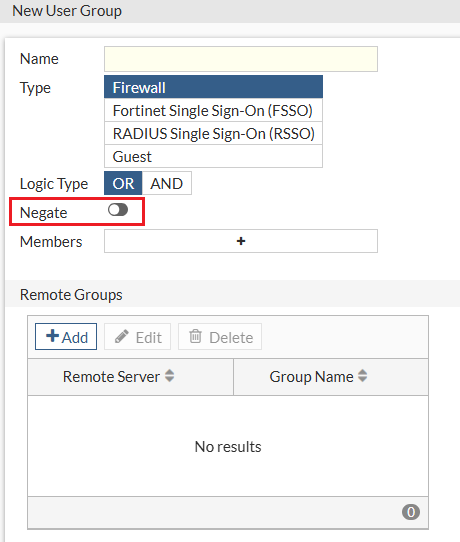
Alternatively use the new negate option in the config user group command:
config user group
edit <name>
set negate <enable/disable>
end
Authentication based on custom HTTP header
In FortiProxy 7.4.11, you can configure authentication based on custom HTTP headers in the authentication scheme if the method is x-auth-user using the new auth-user-header option in the config authentication scheme command:
config authentication scheme
edit "1"
set method x-auth-user
set auth-user-header "custom-header1"
set user-database "ldap1"
next
end
If auth-user-header is not specified, the default value x-authenticated-user is used as the header name instead.
CLI changes
FortiProxy 7.4.11 includes the following CLI changes:
-
diag wad user filter—Use this new command to set a filter to query the user by the leading string (case insensitive). You can the use thediag testcommands to check the data in ldap-cache and worker. -
config firewall access-proxy—The default value ofsvr-pool-multiplexis changed from enable to disable.