
Fortinet white logo
Fortinet white logo

User Guide

26.1.0

Application Performance by Region

Application Performance by Region

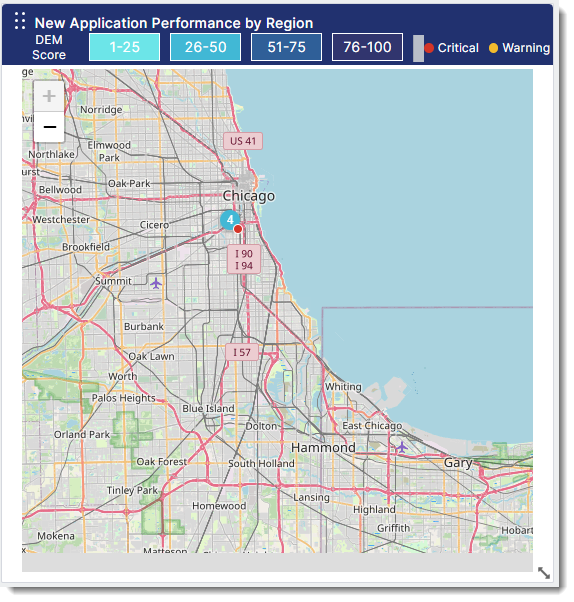
The Application Performance by Region widget shows the UX Score, availability, and incident information on a map view.
Configuration

When creating or editing a widget, a drawer that shows the widget's configuration options slides out from the right. Each configurable option is described in the following table.

Field

Description

Widget Name

Name of the widget as it appears on the dashboard.

Application

Select the application or applications you want to include in the widget.

Metrics

Select one or more metrics to include in the widget.

Values:

  • Average DEM Score

  • Availability %

  • Average Response Time

  • Average Latency

  • Average Jitter

  • Average Packet Loss

Title Hyperlink

Enter a valid dashboard URL.

Time Range

The time range for the trendline.

Values:

  • Last Hour (Default)

  • Last 15 minutes

  • Last 6 hours

  • Last 12 hours

  • Last 24 hours

  • Last week

  • Last month

  • Last year

Monitoring Location Type

Select the location types to include in the widget. Only the selected locations will contribute to the metric calculations.

Values:

  • All

  • Endpoint Agents

  • OnSights

  • Public Probes

  • SD-WAN Devices

Application Performance by Region

Application Performance by Region

The Application Performance by Region widget shows the UX Score, availability, and incident information on a map view.

Configuration

When creating or editing a widget, a drawer that shows the widget's configuration options slides out from the right. Each configurable option is described in the following table.

Field

Description

Widget Name

Name of the widget as it appears on the dashboard.

Application

Select the application or applications you want to include in the widget.

Metrics

Select one or more metrics to include in the widget.

Values:

  • Average DEM Score

  • Availability %

  • Average Response Time

  • Average Latency

  • Average Jitter

  • Average Packet Loss

Title Hyperlink

Enter a valid dashboard URL.

Time Range

The time range for the trendline.

Values:

  • Last Hour (Default)

  • Last 15 minutes

  • Last 6 hours

  • Last 12 hours

  • Last 24 hours

  • Last week

  • Last month

  • Last year

Monitoring Location Type

Select the location types to include in the widget. Only the selected locations will contribute to the metric calculations.

Values:

  • All

  • Endpoint Agents

  • OnSights

  • Public Probes

  • SD-WAN Devices