

VRF routing support
VRF supports static routing, OSPF, and BGP. Other routing protocols require using VDOMs.
BGP
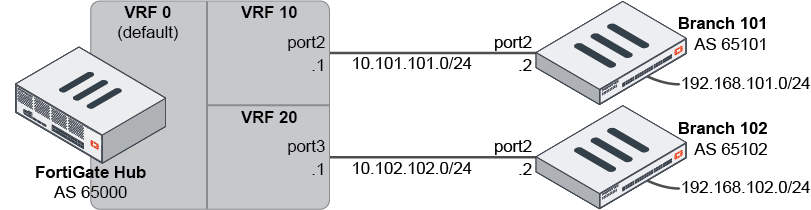
In this example, BGP is used to update the VRF that it is neighbors with.
The hub is configured with two neighbors connected to two interfaces. The branches are configured to match the hub, with branch networks configured to redistribute into BGP.
Policies must be created on the hub and branches to allow traffic between them.
To configure the hub:
config router bgp
    set as 65000
    config neighbor
        edit "10.101.101.2"
            set soft-reconfiguration enable
            set interface "port2"
            set remote-as 65101
            set update-source "port2"
        next
        edit "10.102.102.2"
            set soft-reconfiguration enable
            set interface "port3"
            set remote-as 65102
            set update-source "port3"
        next
    end
end
To configure branch 101:
config router bgp
    set as 65101
    config neighbor
        edit "10.101.101.1"
            set soft-reconfiguration enable
            set interface "port2"
            set remote-as 65000
            set update-source "port2"
        next
    end
    config redistribute connected
        set status enable
    end
end
To configure branch 102:
config router bgp
    set as 65102
    config neighbor
        edit "10.102.102.1"
            set soft-reconfiguration enable
            set interface "port2"
            set remote-as 65000
            set update-source "port2"
        next
    end
    config redistribute connected
        set status enable
    end
end
To verify the BGP neighbors and check the routing table on the hub:
# get router info bgp summary
BGP router identifier 192.168.0.1, local AS number 65000
BGP table version is 2
2 BGP AS-PATH entries
0 BGP community entries

Neighbor 		V	AS		MsgRcvd	MsgSent	TblVer	InQ	OutQ Up/Down	State/PfxRcd
10.101.101.2	4	65101		4		4		2		0	0	00:01:05	3
10.102.102.2	4	65102		3		3		1		0	0	00:00:30	3

Total number of neighbors 2
# get router info routing-table all
Routing table for VRF=0
Codes (…)
S*	0.0.0.0/0 [10/0] via 192.168.0.254, port1
C	10.101.101.0/24 is directly connected, port2
C	10.102.102.0/24 is directly connected, port3
C	192.168.0.0/24 is directly connected, port1
B	192.168.101.0/24 [20/0] via 10.101.101.2, port2, 00:01:25
B	192.168.102.0/24 [20/0] via 10.102.102.2, port3, 00:00:50
To configure VRF on the hub:
-
Put the interfaces into VRF:
config system interface edit port2 set vrf 10 next edit port3 set vrf 20 next end -
Restart the router to reconstruct the routing tables:
# execute router restart
-
Check the routing tables:
# get router info routing-table all
Routing table for VRF=0
Codes (…)
S*	0.0.0.0/0 [10/0] via 192.168.0.254, port1
C	192.168.0.0/24 is directly connected, port1

Routing table for VRF=10
C	10.101.101.0/24 is directly connected, port2
B	192.168.101.0/24 [20/0] via 10.101.101.2, port2, 00:02:25

Routing table for VRF=20
C	10.102.102.0/24 is directly connected, port3
B	192.168.102.0/24 [20/0] via 10.102.102.2, port2, 00:01:50
-
Check the BGP summary:
# get router info bgp summary

VRF 10 BGP router identifier 10.101.101.1, local AS number 65000
BGP table version is 1
2 BGP AS-PATH entries
0 BGP community entries

Neighbor 		V	AS		MsgRcvd	MsgSent	TblVer	InQ	OutQ Up/Down	State/PfxRcd
10.101.101.2	4	65101		4		4		2		0	0	00:02:05	3

Total number of neighbors 1

VRF 10 BGP router identifier 10.101.101.1, local AS number 65000
BGP table version is 1
2 BGP AS-PATH entries
0 BGP community entries

Neighbor 		V	AS		MsgRcvd	MsgSent	TblVer	InQ	OutQ Up/Down	State/PfxRcd
10.102.102.2	4	65102		3		3		1		0	0	00:01:30	3

Total number of neighbors 1
OSPF
OSPF routes in VRFs work the same as BGP: the interface that OSPF is using is added to the VRF.
To configure the hub:
-
Configure OSPF:
config router ospf set router-id 1.1.1.1 config area edit 0.0.0.0 next end config ospf-interface edit Branch101 set interface “port2” set dead-interval 40 set hello-interval 10 next edit Branch102 set dead-interval 40 set hello-interval 10 next end config network edit 0 set prefix 10.101.101.0 255.255.255.0 next edit 0 set prefix 10.102.102.0 255.255.255.0 next edit 0 set prefix 192.168.1.0 255.255.255.0 next end end -
Put the interfaces into VRF:
config system interface
    edit port2
        set vrf 10
    next
    edit port3
        set vrf 20
    next
end
To configure branch 101:
config router ospf
    set router-id 101.101.101.101
    config area
        edit 0.0.0.0
        next
    end
    config ospf-interface
        edit HUB
            set interface port2
            set dead-interval 40
            set hello-interval 10
        next
    end
    config network
        edit 0
            set prefix 10.101.101.0 255.255.255.0
        next
        edit 0
            set prefix 192.168.101.0 255.255.255.0
        next
    end
end
To check the routing table and OSPF summary:
# get router info routing-table ospf
# get router info ospf interface
Static route
Static routes in VRFs work the same as BGP and OSPF because the interface that the static route is using is added to the VRF.
To add a VRF ID in a static route in the GUI:
-
Configure the interface:
-
Go to Network > Interfaces.
-
Click Create New > Interface or Edit an existing interface.
-
Enter a value in the VRF ID field.
-
Configure the other settings as needed.
-
Click OK.
-
-
Add a static route to VRF. For example, using blackhole:
-
Go to Network > Static Routes.
-
Click Create New and select the type of static route.
-
Enter a Subnet.
-
In the Interface field, select Blackhole.
-
In the VRF ID field, enter the ID created in step one.
-
Click OK.
-
To add a VRF ID in a static route in the CLI:
-
Configure the interface:
config system interface edit port2 set vrf 10 next end -
Add a static route to the VRF. For example, using blackhole:
config router static
    edit 3
        set dst 0.0.0.0/0
        set blackhole enable
        set vrf 10
    next
end
A static route can also be added to the VRF when using an IPsec interface by enabling VPN ID with IPIP encapsulation. See SD-WAN segmentation over a single overlay for more information.
To add a static route to the VRF when using IPsec:
config vpn ipsec phase1-interface
    edit "vpn1"
        set interface "port2"
        set auto-discovery-receiver enable
        set encapsulation vpn-id-ipip
        set remote-gw 1.1.101.1
        set psksecret ******
    next
end
config router static
    edit 1
        set dst 10.32.0.0 255.224.0.0
        set device "vpn1"
        set vrf 10
    next
end
To check the routing table:
# get router info routing-table static