
Fortinet white logo
Fortinet white logo

User Guide

AI-ARRP

AI-ARRP

AI-ARRP is an advanced, AI-driven system that automates and optimizes the management and distribution of wireless channels across all Access Points (APs) monitored by FortiAIOps. The AI engine makes precise channel decisions by leveraging historical telemetry and deep insights gathered by FortiAIOps.

The accuracy of AI-ARRP stems from its ability to optimally score every available channel for each FortiAP radio. This scoring uses critical RF metrics, including noise levels, channel utilization, interfering APs, rogue APs, and spectral RSSI. FortiAIOps achieves this accuracy by analyzing real-time RF conditions along with up to two weeks of historical channel data to generate reliable channel scores and recommend a better channel for the AP radio.

To use the FortiAIOps AI-ARRP engine, you must enable both ai-darrp-support and darrp within the FortiAP (WTP) profile (see DARRP with FortiAIOps managed FortiGates).

Use the following commands:

config wireless-controller wtp-profile

edit <name>

config radio-1

set ai-darrp-support enable

set darrp enable

next

next

end

Note: By default, ai-darrp-support is disabled.

The combination of the darrp and ai-darrp-support commands determine how FortiGate and FortiAIOps handle channel selection and data collection.

darrp

ai-darrp-support

Description

disable enable Local DARRP is inactive. FortiAIOps collects telemetry data using GET REST-APIs but cannot make changes.
enable enable The FortiAIOps engine takes control. It collects data and actively triggers channel changes using POST REST-APIs.

Note:

  • It is recommended to enable both darrp and ai-darrp-support to leverage the FortiAIOps AI-ARRP capabilities.

  • You can enable AI-ARRP from FortiAIOps GUI for Non AI-ARRP radios. See Detailed Analysis and Optimization.

Once enabled, the FortiAIOps AI-ARRP engine performs the following actions:

  1. Data Collection: RF statistics for all channels on each AP radio are collected every minute.

  2. Analysis and Daily Channel Health Forecast: The collected data is aggregated every hour, and the system evaluates the health of each available channel for that AP radio. The AI-ARRP model evaluates current channel health metrics along with up to two weeks of historical RF data, and generates daily forecast of channel performance for each radio.

  3. DARRP Schedule and Channel Validations: During the scheduled DARRP window on the FortiGate, AI-ARRP analyzes and performs a series of critical validation checks, including:

    • Channel availability based on the FortiAP profile

    • Mandatory regulatory compliance (country code and indoor/outdoor channel rules)

    • Non-overlapping channel requirements and channel bonding considerations

    • Channel failures related to Wireless SLAs and any radar detections

  4. Final Channel Push: The finalized recommended channels for each radio are securely pushed to the FortiGate, and the FortiAPs use these updated channel assignments in their next channel planning cycle.

Note: AI-ARRP is only supported on FortiOS 7.6.5 and FortiAP version 7.6.3.

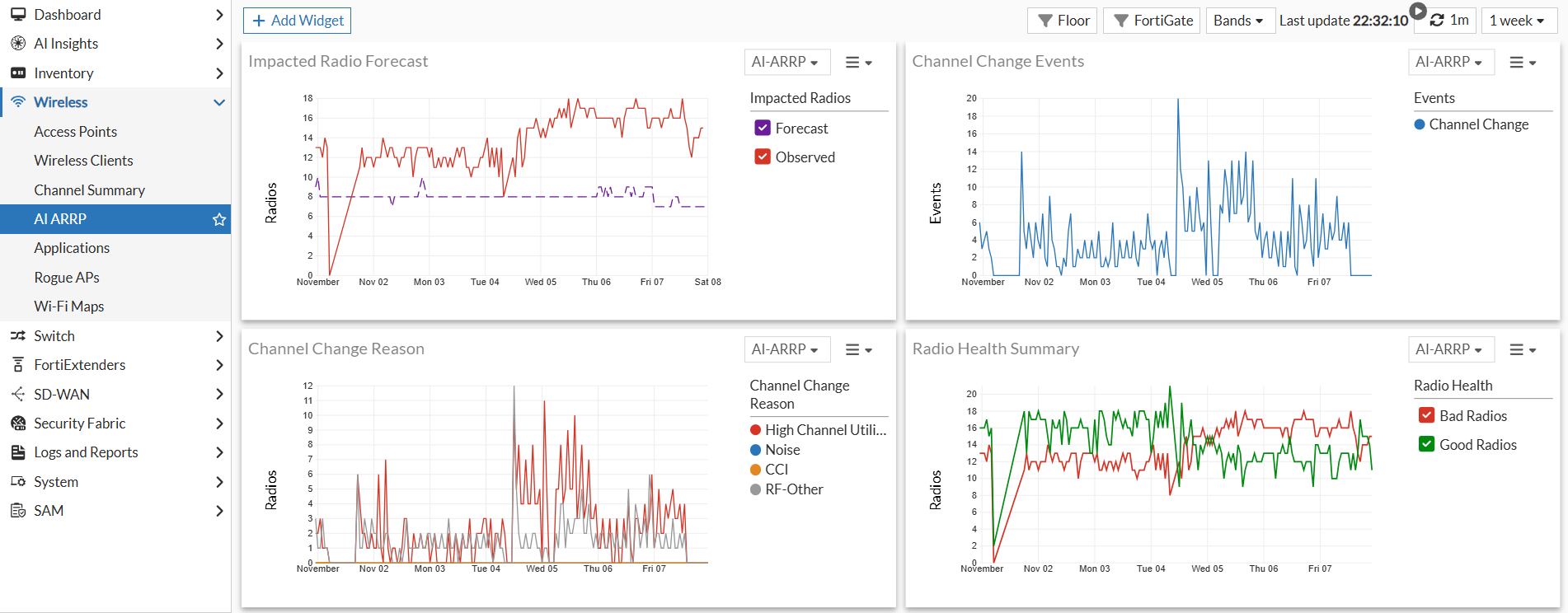
The AI ARRP window is available under the Wireless menu.
Filtering

The AI ARRP window consists of four primary widgets and offers the following filtering capabilities:

Filters

Use the filters at the top to select Floor, FortiGate, and Bands.

  • Floor: Select Floor filter and in the Floor Selection pane, choose the required Site, Building and Floor using the drop down.

  • FortiGate: Select the FortiGate filter and from the Dashboard Filters pane select the required FortiGate.

  • Bands: Select the necessary bands from the Bands filter.

Timeline

Select the monitoring timeline from the drop down. Choose between 4 hours, 6 hours, 1 day, and 1 week.

AI-ARRP

AI-ARRP

AI-ARRP is an advanced, AI-driven system that automates and optimizes the management and distribution of wireless channels across all Access Points (APs) monitored by FortiAIOps. The AI engine makes precise channel decisions by leveraging historical telemetry and deep insights gathered by FortiAIOps.

The accuracy of AI-ARRP stems from its ability to optimally score every available channel for each FortiAP radio. This scoring uses critical RF metrics, including noise levels, channel utilization, interfering APs, rogue APs, and spectral RSSI. FortiAIOps achieves this accuracy by analyzing real-time RF conditions along with up to two weeks of historical channel data to generate reliable channel scores and recommend a better channel for the AP radio.

To use the FortiAIOps AI-ARRP engine, you must enable both ai-darrp-support and darrp within the FortiAP (WTP) profile (see DARRP with FortiAIOps managed FortiGates).

Use the following commands:

config wireless-controller wtp-profile

edit <name>

config radio-1

set ai-darrp-support enable

set darrp enable

next

next

end

Note: By default, ai-darrp-support is disabled.

The combination of the darrp and ai-darrp-support commands determine how FortiGate and FortiAIOps handle channel selection and data collection.

darrp

ai-darrp-support

Description

disable enable Local DARRP is inactive. FortiAIOps collects telemetry data using GET REST-APIs but cannot make changes.
enable enable The FortiAIOps engine takes control. It collects data and actively triggers channel changes using POST REST-APIs.

Note:

  • It is recommended to enable both darrp and ai-darrp-support to leverage the FortiAIOps AI-ARRP capabilities.

  • You can enable AI-ARRP from FortiAIOps GUI for Non AI-ARRP radios. See Detailed Analysis and Optimization.

Once enabled, the FortiAIOps AI-ARRP engine performs the following actions:

  1. Data Collection: RF statistics for all channels on each AP radio are collected every minute.

  2. Analysis and Daily Channel Health Forecast: The collected data is aggregated every hour, and the system evaluates the health of each available channel for that AP radio. The AI-ARRP model evaluates current channel health metrics along with up to two weeks of historical RF data, and generates daily forecast of channel performance for each radio.

  3. DARRP Schedule and Channel Validations: During the scheduled DARRP window on the FortiGate, AI-ARRP analyzes and performs a series of critical validation checks, including:

    • Channel availability based on the FortiAP profile

    • Mandatory regulatory compliance (country code and indoor/outdoor channel rules)

    • Non-overlapping channel requirements and channel bonding considerations

    • Channel failures related to Wireless SLAs and any radar detections

  4. Final Channel Push: The finalized recommended channels for each radio are securely pushed to the FortiGate, and the FortiAPs use these updated channel assignments in their next channel planning cycle.

Note: AI-ARRP is only supported on FortiOS 7.6.5 and FortiAP version 7.6.3.

The AI ARRP window is available under the Wireless menu.

Filtering

The AI ARRP window consists of four primary widgets and offers the following filtering capabilities:

Filters

Use the filters at the top to select Floor, FortiGate, and Bands.

  • Floor: Select Floor filter and in the Floor Selection pane, choose the required Site, Building and Floor using the drop down.

  • FortiGate: Select the FortiGate filter and from the Dashboard Filters pane select the required FortiGate.

  • Bands: Select the necessary bands from the Bands filter.

Timeline

Select the monitoring timeline from the drop down. Choose between 4 hours, 6 hours, 1 day, and 1 week.