
Fortinet white logo
Fortinet white logo

Administration Guide

Running speed tests from the hub to the spokes in dial-up IPsec tunnels

Running speed tests from the hub to the spokes in dial-up IPsec tunnels

In this example, the hub is configured as a VPN dial-up server, and both of the spokes are connected to the hub. It is assumed that the VPN configuration is already done, with a dynamic gateway type and kernel device creation (net-device) disabled. Speed tests are configured on only one interface for the branch devices. Speed tests may be configured for all underlay interfaces, but care must be taken to avoid tests running at the same time when utilizing speedtest-bypass-routing to ensure there remains a viable path from Hub to Spokes.
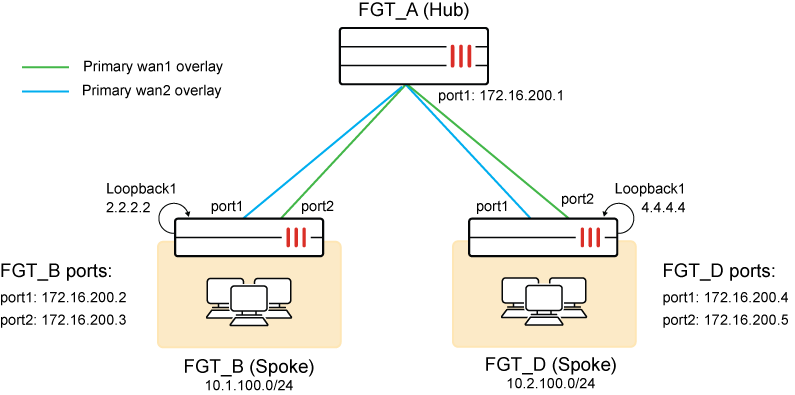
The VPN interfaces and IP addresses are:

FortiGate

Interface

IP Address

FGT_A (Hub)

hub-phase1

hub-phase11

10.10.100.254

10.10.100.253

FGT_B (Spoke)

spoke11-p1

spoke12-p1

10.10.100.2

10.10.100.3

FGT_D (Spoke)

spoke21-p1

spoke22-p1

10.10.100.4

10.10.100.5

A recurring speed test is configured that runs on the hub over the dial-up interfaces. The speed tests are performed over the underlay interface from the hub to the spoke. Each spoke is configured to operate as a speed test server and to allow the speed test to run on its underlay interface. The spokes establish a BGP peering with the hub (can be BGP per overlay or BGP on loopback) and advertises its loopback network to the hub. The specific configuration is only shown for FGT_B.

To configure the spoke FortiGates (FGT_B) as a speed test server:
  1. Enable a speed test server with custom speed-test listening ports:

    A speed test server is enabled on the hub. Port 7000 will run speed tests, and port 6000 will be the controller used to issue access tokens for speed test authentication.

    config system global
         set speedtest-server enable
         set speedtestd-ctrl-port 6000
         set speedtestd-server-port 7000
    end
  2. Allow speed tests on one underlay:

    config system interface
        edit "port1"
            append allowaccess speed-test
        next
    end
  3. Allow speed tests on one overlay:

    config system interface                
        edit "hub-spoke11-p1" 
            set allowaccess ping speed-test      
            ...
            set interface "port1"
        next
    end
  4. Configure SD-WAN with bypass routing enabled for speed tests on member spoke11-p1:

    config system sdwan
        set speedtest-bypass-routing enable
        config members
            edit 1
                set interface "spoke11-p1"
            next
            edit 2
                set interface "spoke12-p1"
            next
        end
        config neighbor
            edit "10.10.100.254"
                set member 1
                set mode speedtest
            next
    	edit "10.10.100.253"
                set member 2
            next
    
        end
    end
  5. Configure BGP routing:

    config router route-map
        edit "No_Speed-Test"
            config rule
                edit 1
                    set action permit
                next
            end
        next
        edit "Start_Speed-Test"
            config rule
                edit 1
                    set action deny
                next
            end
        next
    end
    config router bgp
        set as 65412
        config neighbor
            edit "10.10.100.254"
                set advertisement-interval 1
                set remote-as 65412
                set route-map-out "Start_Speed-Test"
                set route-map-out-preferable "No_Speed-Test"
            next
        end
        config network
            edit 1
                set prefix 2.2.2.2 255.255.255.255
            next
            edit 2
                set prefix 10.1.100.0 255.255.255.0
            next
        end
    end

Results

  1. Before the speed test starts, FGT_A can receive the route from FGT_B by BGP from both overlays:

    # get router info routing-table bgp
    Routing table for VRF=0
    B       2.2.2.2/32 [200/0] via 10.10.100.2 (recursive via 172.16.200.2, hub-phase1), 00:00:10
    			 [200/0] via 10.10.100.3 (recursive via 172.16.200.3, hub-phase11), 00:00:10
    B       10.1.100.0/24 [200/0] via 10.10.100.2 (recursive via 172.16.200.2, hub-phase1), 00:00:10
                          [200/0] via 10.10.100.3 (recursive via 172.16.200.3, hub-phase11), 00:00:10
  2. At the scheduled time, the speed test starts for the hub-phase1 interface from hub to spoke:

    # diagnose test application forticron 9
    Speed test schedules:
        Interface     Server     Update    Up/Down-limit (kbps)                Days        H:M     TOS     Schedule
    ---------------------------------------------------------------------------------------------------------------------------
        hub-phase1    dynamic                                                  1111111    14:41    0x00    speedtest_recurring
    Active schedules:
            64002f: hub-phase1(port1) 172.16.200.2     hub-phase1_1 
            64002e: hub-phase1(port1) 172.16.200.4     hub-phase1_0

    The diagnose debug application speedtest -1 command can be used on both the hub and spokes to check the speed test execution.

  3. While the speed test is running, FGT_A does not receive the route from FGT_B over that interface by BGP:

    #  get router info routing-table bgp
    Routing table for VRF=0
    B       2.2.2.2/32 [200/0] via 10.10.100.3 (recursive via 172.16.200.3, hub-phase11), 00:00:20
    B       10.1.100.0/24 [200/0] via 10.10.100.3 (recursive via 172.16.200.3, hub-phase11), 00:00:20
  4. Speed tests results can be dynamically applied to the dial-up tunnel for egress traffic shaping:

    # diagnose vpn tunnel list
    ------------------------------------------------------
    name=hub-phase1_0 ver=2 serial=c 172.16.200.1:0->172.16.200.4:0 tun_id=172.16.200.4 dst_mtu=1500 dpd-link=on remote_location=0.0.0.0 weight=1
    ...
    egress traffic control:
            bandwidth=737210(kbps) lock_hit=0 default_class=2 n_active_class=3     
            class-id=2      allocated-bandwidth=73720(kbps)         guaranteed-bandwidth=73720(kbps)
                            max-bandwidth=73720(kbps)       current-bandwidth=0(kbps)
                            priority=low    forwarded_bytes=52
                            dropped_packets=0       dropped_bytes=0
            class-id=3      allocated-bandwidth=221163(kbps)        guaranteed-bandwidth=221162(kbps)
                            max-bandwidth=294883(kbps)      current-bandwidth=0(kbps)
                            priority=medium         forwarded_bytes=0
                            dropped_packets=0       dropped_bytes=0
            class-id=4      allocated-bandwidth=442325(kbps)        guaranteed-bandwidth=147441(kbps)
                            max-bandwidth=442325(kbps)      current-bandwidth=0(kbps)
                            priority=high   forwarded_bytes=0
                            dropped_packets=0       dropped_bytes=0
    ------------------------------------------------------
    name=hub-phase1_1 ver=2 serial=d 172.16.200.1:0->172.16.200.2:0 tun_id=172.16.200.2 dst_mtu=1500 dpd-link=on remote_location=0.0.0.0 weight=1
    ...
    egress traffic control:
            bandwidth=726813(kbps) lock_hit=0 default_class=2 n_active_class=3  
            class-id=2      allocated-bandwidth=72681(kbps)         guaranteed-bandwidth=72681(kbps)              
                            max-bandwidth=72681(kbps)       current-bandwidth=0(kbps)
                            priority=low    forwarded_bytes=123
                            dropped_packets=0       dropped_bytes=0
            class-id=3      allocated-bandwidth=218044(kbps)        guaranteed-bandwidth=218043(kbps)
                            max-bandwidth=290725(kbps)      current-bandwidth=0(kbps)
                            priority=medium         forwarded_bytes=0
                            dropped_packets=0       dropped_bytes=0
            class-id=4      allocated-bandwidth=436087(kbps)        guaranteed-bandwidth=145362(kbps)
                            max-bandwidth=436087(kbps)      current-bandwidth=0(kbps)
                            priority=high   forwarded_bytes=0
                            dropped_packets=0       dropped_bytes=0
  5. Speed test results can be cached, indexed, and written to disk:

    # diagnose test application forticron 10
    Speed test results:
    1: vdom=root, phase1intf=hub-phase1, peer-id='spoke11-p1', bandwidth=737210, last_log=1624226603
    2: vdom=root, phase1intf=hub-phase1, peer-id='spoke21-p1', bandwidth=726813, last_log=1624226614
    
    # diagnose test application forticron 11
    Write 2 logs to disk.
    
    # diagnose test application forticron 12
    load 2 results.

    Disable then reenable the IPsec VPN tunnel and the cached speed test results can be applied to the tunnel again:

    # diagnose vpn tunnel list
    ------------------------------------------------------
    name=hub-phase1_0 ver=2 serial=c 172.16.200.1:0->172.16.200.4:0 tun_id=172.16.200.4 dst_mtu=1500 dpd-link=on remote_location=0.0.0.0 weight=1
    ...
    egress traffic control:
            bandwidth=737210(kbps) lock_hit=0 default_class=2 n_active_class=3
    ------------------------------------------------------
    name=hub-phase1_1 ver=2 serial=d 172.16.200.1:0->172.16.200.2:0 tun_id=172.16.200.2 dst_mtu=1500 dpd-link=on remote_location=0.0.0.0 weight=1
    ...
    egress traffic control:
            bandwidth=726813(kbps) lock_hit=0 default_class=2 n_active_class=3

Running speed tests from the hub to the spokes in dial-up IPsec tunnels

Running speed tests from the hub to the spokes in dial-up IPsec tunnels

In this example, the hub is configured as a VPN dial-up server, and both of the spokes are connected to the hub. It is assumed that the VPN configuration is already done, with a dynamic gateway type and kernel device creation (net-device) disabled. Speed tests are configured on only one interface for the branch devices. Speed tests may be configured for all underlay interfaces, but care must be taken to avoid tests running at the same time when utilizing speedtest-bypass-routing to ensure there remains a viable path from Hub to Spokes.

The VPN interfaces and IP addresses are:

FortiGate

Interface

IP Address

FGT_A (Hub)

hub-phase1

hub-phase11

10.10.100.254

10.10.100.253

FGT_B (Spoke)

spoke11-p1

spoke12-p1

10.10.100.2

10.10.100.3

FGT_D (Spoke)

spoke21-p1

spoke22-p1

10.10.100.4

10.10.100.5

A recurring speed test is configured that runs on the hub over the dial-up interfaces. The speed tests are performed over the underlay interface from the hub to the spoke. Each spoke is configured to operate as a speed test server and to allow the speed test to run on its underlay interface. The spokes establish a BGP peering with the hub (can be BGP per overlay or BGP on loopback) and advertises its loopback network to the hub. The specific configuration is only shown for FGT_B.

To configure the spoke FortiGates (FGT_B) as a speed test server:
  1. Enable a speed test server with custom speed-test listening ports:

    A speed test server is enabled on the hub. Port 7000 will run speed tests, and port 6000 will be the controller used to issue access tokens for speed test authentication.

    config system global
         set speedtest-server enable
         set speedtestd-ctrl-port 6000
         set speedtestd-server-port 7000
    end
  2. Allow speed tests on one underlay:

    config system interface
        edit "port1"
            append allowaccess speed-test
        next
    end
  3. Allow speed tests on one overlay:

    config system interface                
        edit "hub-spoke11-p1" 
            set allowaccess ping speed-test      
            ...
            set interface "port1"
        next
    end
  4. Configure SD-WAN with bypass routing enabled for speed tests on member spoke11-p1:

    config system sdwan
        set speedtest-bypass-routing enable
        config members
            edit 1
                set interface "spoke11-p1"
            next
            edit 2
                set interface "spoke12-p1"
            next
        end
        config neighbor
            edit "10.10.100.254"
                set member 1
                set mode speedtest
            next
    	edit "10.10.100.253"
                set member 2
            next
    
        end
    end
  5. Configure BGP routing:

    config router route-map
        edit "No_Speed-Test"
            config rule
                edit 1
                    set action permit
                next
            end
        next
        edit "Start_Speed-Test"
            config rule
                edit 1
                    set action deny
                next
            end
        next
    end
    config router bgp
        set as 65412
        config neighbor
            edit "10.10.100.254"
                set advertisement-interval 1
                set remote-as 65412
                set route-map-out "Start_Speed-Test"
                set route-map-out-preferable "No_Speed-Test"
            next
        end
        config network
            edit 1
                set prefix 2.2.2.2 255.255.255.255
            next
            edit 2
                set prefix 10.1.100.0 255.255.255.0
            next
        end
    end

Results

  1. Before the speed test starts, FGT_A can receive the route from FGT_B by BGP from both overlays:

    # get router info routing-table bgp
    Routing table for VRF=0
    B       2.2.2.2/32 [200/0] via 10.10.100.2 (recursive via 172.16.200.2, hub-phase1), 00:00:10
    			 [200/0] via 10.10.100.3 (recursive via 172.16.200.3, hub-phase11), 00:00:10
    B       10.1.100.0/24 [200/0] via 10.10.100.2 (recursive via 172.16.200.2, hub-phase1), 00:00:10
                          [200/0] via 10.10.100.3 (recursive via 172.16.200.3, hub-phase11), 00:00:10
  2. At the scheduled time, the speed test starts for the hub-phase1 interface from hub to spoke:

    # diagnose test application forticron 9
    Speed test schedules:
        Interface     Server     Update    Up/Down-limit (kbps)                Days        H:M     TOS     Schedule
    ---------------------------------------------------------------------------------------------------------------------------
        hub-phase1    dynamic                                                  1111111    14:41    0x00    speedtest_recurring
    Active schedules:
            64002f: hub-phase1(port1) 172.16.200.2     hub-phase1_1 
            64002e: hub-phase1(port1) 172.16.200.4     hub-phase1_0

    The diagnose debug application speedtest -1 command can be used on both the hub and spokes to check the speed test execution.

  3. While the speed test is running, FGT_A does not receive the route from FGT_B over that interface by BGP:

    #  get router info routing-table bgp
    Routing table for VRF=0
    B       2.2.2.2/32 [200/0] via 10.10.100.3 (recursive via 172.16.200.3, hub-phase11), 00:00:20
    B       10.1.100.0/24 [200/0] via 10.10.100.3 (recursive via 172.16.200.3, hub-phase11), 00:00:20
  4. Speed tests results can be dynamically applied to the dial-up tunnel for egress traffic shaping:

    # diagnose vpn tunnel list
    ------------------------------------------------------
    name=hub-phase1_0 ver=2 serial=c 172.16.200.1:0->172.16.200.4:0 tun_id=172.16.200.4 dst_mtu=1500 dpd-link=on remote_location=0.0.0.0 weight=1
    ...
    egress traffic control:
            bandwidth=737210(kbps) lock_hit=0 default_class=2 n_active_class=3     
            class-id=2      allocated-bandwidth=73720(kbps)         guaranteed-bandwidth=73720(kbps)
                            max-bandwidth=73720(kbps)       current-bandwidth=0(kbps)
                            priority=low    forwarded_bytes=52
                            dropped_packets=0       dropped_bytes=0
            class-id=3      allocated-bandwidth=221163(kbps)        guaranteed-bandwidth=221162(kbps)
                            max-bandwidth=294883(kbps)      current-bandwidth=0(kbps)
                            priority=medium         forwarded_bytes=0
                            dropped_packets=0       dropped_bytes=0
            class-id=4      allocated-bandwidth=442325(kbps)        guaranteed-bandwidth=147441(kbps)
                            max-bandwidth=442325(kbps)      current-bandwidth=0(kbps)
                            priority=high   forwarded_bytes=0
                            dropped_packets=0       dropped_bytes=0
    ------------------------------------------------------
    name=hub-phase1_1 ver=2 serial=d 172.16.200.1:0->172.16.200.2:0 tun_id=172.16.200.2 dst_mtu=1500 dpd-link=on remote_location=0.0.0.0 weight=1
    ...
    egress traffic control:
            bandwidth=726813(kbps) lock_hit=0 default_class=2 n_active_class=3  
            class-id=2      allocated-bandwidth=72681(kbps)         guaranteed-bandwidth=72681(kbps)              
                            max-bandwidth=72681(kbps)       current-bandwidth=0(kbps)
                            priority=low    forwarded_bytes=123
                            dropped_packets=0       dropped_bytes=0
            class-id=3      allocated-bandwidth=218044(kbps)        guaranteed-bandwidth=218043(kbps)
                            max-bandwidth=290725(kbps)      current-bandwidth=0(kbps)
                            priority=medium         forwarded_bytes=0
                            dropped_packets=0       dropped_bytes=0
            class-id=4      allocated-bandwidth=436087(kbps)        guaranteed-bandwidth=145362(kbps)
                            max-bandwidth=436087(kbps)      current-bandwidth=0(kbps)
                            priority=high   forwarded_bytes=0
                            dropped_packets=0       dropped_bytes=0
  5. Speed test results can be cached, indexed, and written to disk:

    # diagnose test application forticron 10
    Speed test results:
    1: vdom=root, phase1intf=hub-phase1, peer-id='spoke11-p1', bandwidth=737210, last_log=1624226603
    2: vdom=root, phase1intf=hub-phase1, peer-id='spoke21-p1', bandwidth=726813, last_log=1624226614
    
    # diagnose test application forticron 11
    Write 2 logs to disk.
    
    # diagnose test application forticron 12
    load 2 results.

    Disable then reenable the IPsec VPN tunnel and the cached speed test results can be applied to the tunnel again:

    # diagnose vpn tunnel list
    ------------------------------------------------------
    name=hub-phase1_0 ver=2 serial=c 172.16.200.1:0->172.16.200.4:0 tun_id=172.16.200.4 dst_mtu=1500 dpd-link=on remote_location=0.0.0.0 weight=1
    ...
    egress traffic control:
            bandwidth=737210(kbps) lock_hit=0 default_class=2 n_active_class=3
    ------------------------------------------------------
    name=hub-phase1_1 ver=2 serial=d 172.16.200.1:0->172.16.200.2:0 tun_id=172.16.200.2 dst_mtu=1500 dpd-link=on remote_location=0.0.0.0 weight=1
    ...
    egress traffic control:
            bandwidth=726813(kbps) lock_hit=0 default_class=2 n_active_class=3