IPAM automatic conflict resolution
IPAM can detect and resolve any IP conflicts that may occur on the interfaces that it manages.
When automatic-conflict-resolution is enabled, IPAM will periodically check and validate the addresses of all interfaces. In case of any conflicts, IPAM will automatically attempt to obtain a new address for the affected interface managed by IPAM, ensuring no address duplication. Additionally, it also prevent conflicts when new FortiGates join the Security Fabric.
To configure automatic conflict resolution in the GUI:
-
Go to Network > IPAM and select the IPAM Settings tab.
-
Enable Auto-resolve conflicts.
-
Click OK.
To configure automatic conflict resolution in the CLI:
config system ipam
    set automatic-conflict-resolution enable
end
When automatic-conflict-resolution is disabled, the conflicts do no resolve automatically.
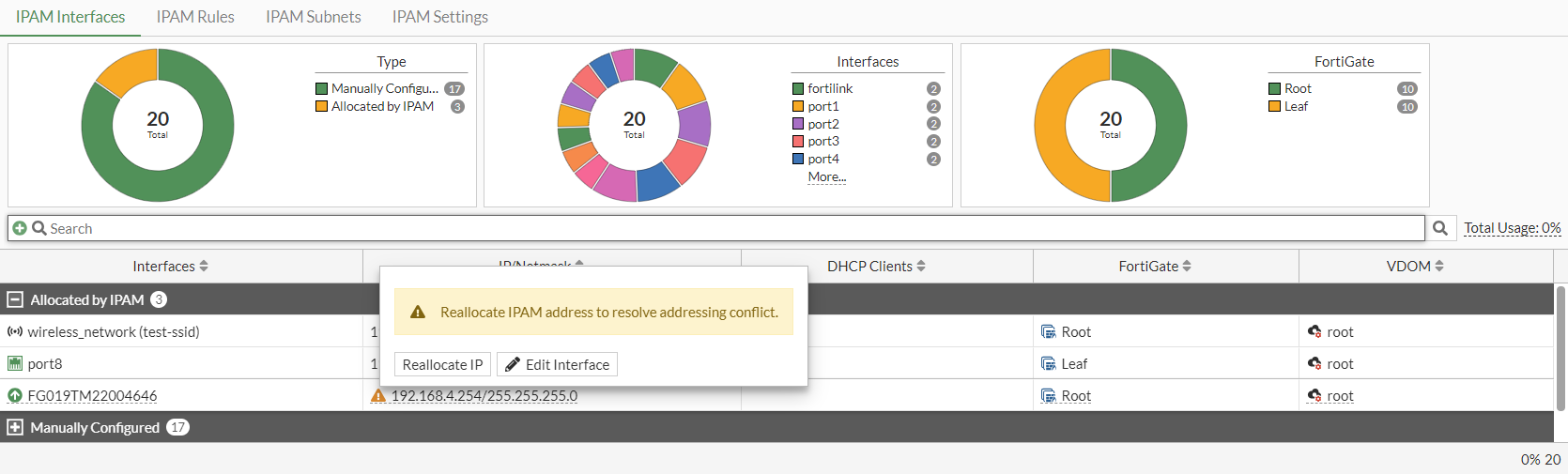
To resolve conflicts in the GUI for IP addresses allocated by IPAM:
-
Go to Network > IPAM and select the IPAM Interfaces tab.
-
Hover your mouse over the conflict marker and select Reallocate IP to manually reallocate the IP address.