

Central DNAT
Central NAT allows for the central configuration of SNAT (source NAT) and DNAT (destination NAT).
To enable central NAT in the GUI:
-
Go to System > Settings.
-
In the System Operation Settings, enable Central SNAT.
-
Click Apply.
To enable central NAT in the CLI:
config system settings
    set central-nat {enable | disable}
end
When central NAT is enabled, virtual IPs (VIPs) are not configured in the firewall policy. The VIPs are configured as separate objects where their status must be enabled.

|
This option is only available for IPv4 VIP and VIP46 objects. |
Configuring a DNAT and VIP object in central NAT mode is similar to configuring a VIP when central NAT is disabled. See Static virtual IPs for more information on each setting.
VIP objects can carry over when switching from non-central NAT mode to central NAT mode or vice-versa. However, if a VIP is assigned to a firewall policy in non-central NAT mode, it must be unassigned before switching to central NAT mode.
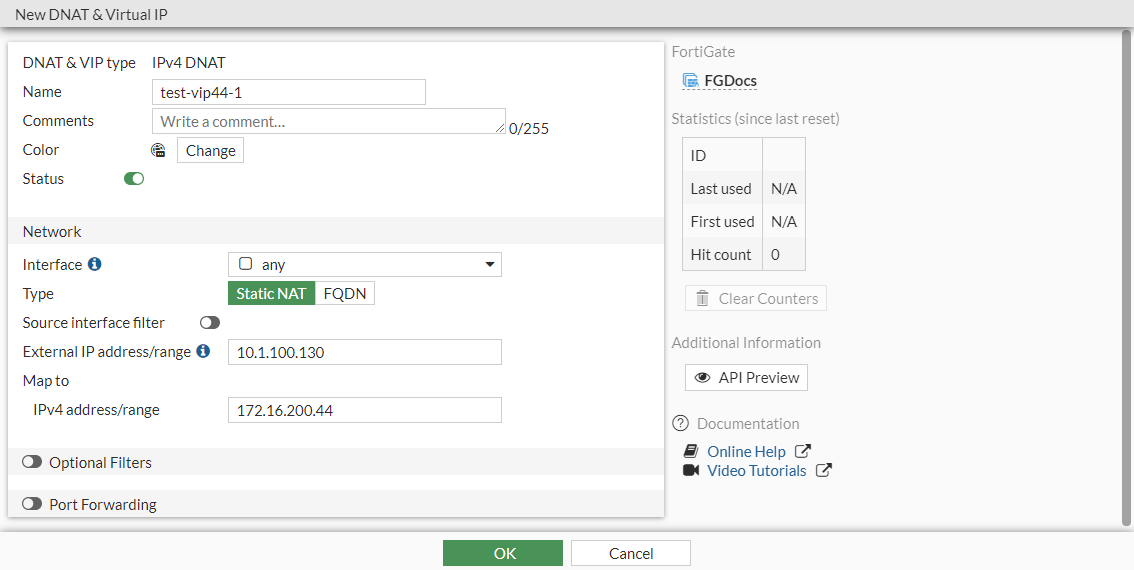
In this example, a DNAT and VIP are configured to forward traffic from 10.1.100.130 to 172.16.200.44. This example assumes that the firewall address, Addr_172.16.200.44/32, has already been configured.
To configure DNAT and a VIP in the GUI:
-
Configure the VIP:
-
Go to Policy & Objects > DNAT & Virtual IPs and click Create New > DNAT & Virtual IP.
-
Enter a name (test-vip44-1).
-
Set the External IP address/range to 10.1.100.130.
-
Set the Map to IPv4 address/range to 172.16.200.44.
-
Click OK.
-
-
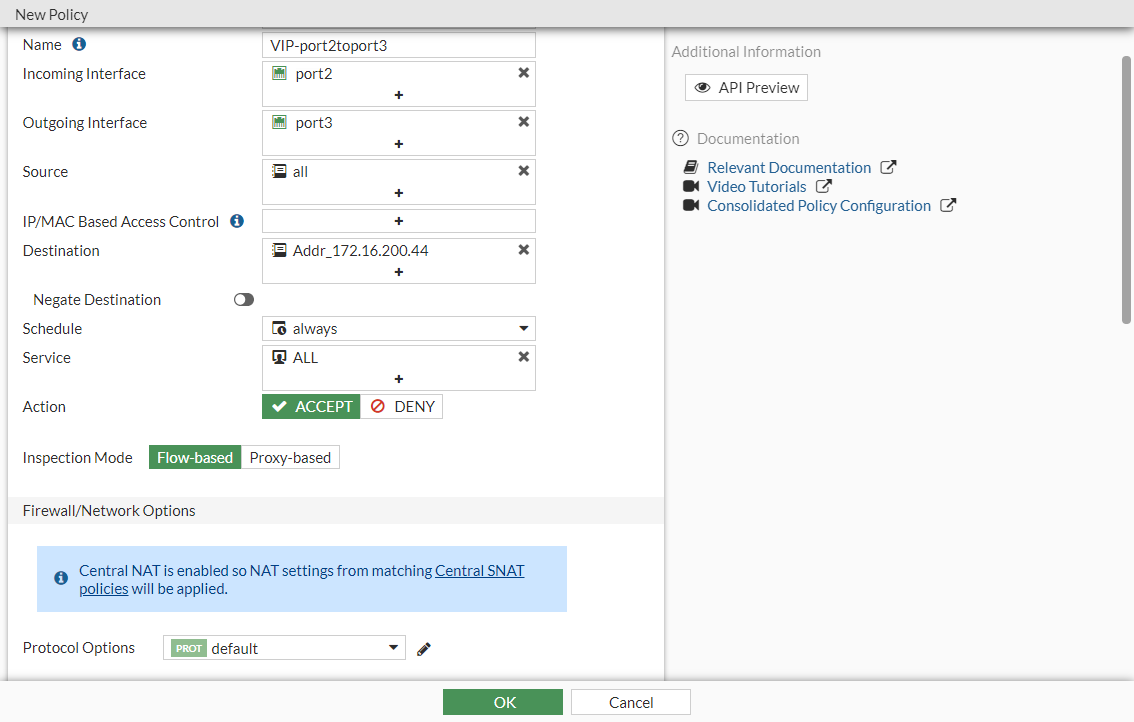
Configure a firewall policy that allows traffic in the direction of the VIP:
-
Go to Policy & Objects > Firewall Policy and click Create New.
-
Configure the following settings:
Name
VIP-port2toport3
Source
all
Destination
Addr_172.16.200.44
Schedule
always
Service
ALL
Action
ACCEPT
-
Configure the other settings as needed. There is no SNAT configuration section, so central SNAT policies will be applied.
-
Click OK.
-
To configure DNAT and a VIP in the CLI:
- Configure the VIP:
config firewall vip edit "test-vip44-1" set extip 10.1.100.130 set mappedip "172.16.200.44" set extintf "any" set status enable next end - Configure a firewall policy that allows traffic in the direction of the VIP:
config firewall policy
    edit 3
        set name "VIP-port2toport3"
        set srcintf "port2"
        set dstintf "port3"
        set action accept
        set srcaddr "all"
        set dstaddr "Addr_172.16.200.44"
        set schedule "always"
        set service "ALL"
    next
end
To verify the DNAT and VIP:
If the VIP status is enabled, it will appear in the VIP table:
# diagnose firewall iprope list 100000
policy index=7 uuid_idx=625 action=accept
flag (8000104): f_p nat pol_stats
cos_fwd=0  cos_rev=0
group=00100000 av=00000000 au=00000000 split=00000000
host=0 chk_client_info=0x0 app_list=0 ips_view=0
misc=0
zone(1): 0 -> zone(1): 0
source(1): 0.0.0.0-255.255.255.255, uuid_idx=0,
dest(1): 10.1.100.130-10.1.100.130, uuid_idx=625,
service(1):
        [0:0x0:0/(0,0)->(0,0)] helper:auto
nat(1): flag=0 base=10.1.100.130:0 172.16.200.44-172.16.200.44(0:0)
If the VIP status is disabled, it will not appear in the VIP table.
In this example, a one-to-one static NAT is enabled. Send a ping to 10.1.100.130, and the traffic will be forwarded to the destination 172.16.200.44.