

FortiGate StateRamp support
A StateRamp FortiGate SKU entitles the FortiGate to use dedicated FortiGuard servers located in the United States. It also entitles customers to access their support tickets through a dedicated FortiCare service located in the United States.
When you purchase a StateRamp FortiGate, you will receive a FortiGate that automatically boots up in StateRamp mode. It will contact the dedicated FortiGuard server to learn the rest of its entitlement.
All FortiGuard services that are supported by the StateRamp device are United States-based and use a specific FQDN. The FortiGuard servers only support connections through Anycast. Any unused cloud services are disabled on the FortiGate.
Supported FortiGuard services
The following table lists supported FortiGuard services:
|
Feature or service |
FQDN |
IP address |
|---|---|---|
|
FortiGate firmware upgrade Contract / License Update |
update.fortinetgov.com |
23.249.62.6 |
|
FortiGuard Query |
guardservice.fortinetgov.com |
23.249.62.16 |
|
Video Query |
videoquery.fortinetgov.com |
23.249.62.18 |
|
SDNS |
sdns.fortinetgov.com |
23.249.62.53 |
|
Geo IP address Database |
gip.fortinetgov.com |
23.249.62.16 |
|
Device Query |
devquery.fortinetgov.com |
23.249.62.16 |
|
Default DNS server |
23.249.63.52 / 23.249.63.53 |
|
|
Default NTP server |
ntp1.fortinetgov.com ntp2.fortinetgov.com |
23.249.63.60/23.249.63.61 23.249.63.62 23.249.63.63 |
Unsupported FortiGuard services
The following lists the unsupported FortiGuard services:
-
FortiCare server connection
-
Central management to FortiManager or FortiGuard
-
Logging to FortiAnalyzer
-
FortiSandbox (FSA) and FSA Cloud configuration
-
FortiGuard DDNS service
-
FortiSwitch authorization
-
FortiExtender pre-authorization
-
Local FortiClient EMS
-
FortiClient EMS cloud
-
Product API: Device vulnerability on GUI device assets
-
Security fabric CSF: Configured as root
-
Security fabric CSF: Configured as leaf
-
Alert email - User must configure their own email server
-
FortiNDR
-
Email Filter query to RBL_SERVER (dnsbl.sorbs.net)
-
FortiToken server connection
-
Logging to FortiGate Cloud server
-
SD-WAN overlay
-
Activating FortiGate Cloud account
-
Regular FortiGuard DNS setting
-
FortiAP pre-authorization
-
Security rating under Security Fabric
-
Attack Surface Security Rating
The following lists FortiGuard services that are subject to limitations:
-
Security Rating, FortiSwitch, FortiAP, FortiClient, FortiExplorer, and FortiNAC related automation stitch, trigger, or action
Blocking unsupported features on StateRamp devices
When trying to enable services that are not supported on StateRamp devices, an error will be returned in the GUI and CLI. Likewise, some features are hidden in the GUI if they are disabled for StateRamp devices.
In the following example, the user attempts to enable FortiAnalyzer on a StateRamp FortiGate which is an unsupported service on StateRamp devices.
To view StateRamp device unsupported feature errors:
-
In the CLI, verify that the device has a StateRamp license:
# get system status
Version: FortiGate-1101E v7.4.11,build2878,260126 (GA.M)
First GA patch build date: 230509
Current Security Level: High
Firmware Signature: certified
...
License Status: StateRAMP
...
-
Test configuring the unsupported feature in the GUI:
-
In the GUI, go to Security Fabric > Fabric Connectors.
-
Edit Logging & Analytics.
-
Attempt to enable FortiAnalyzer.
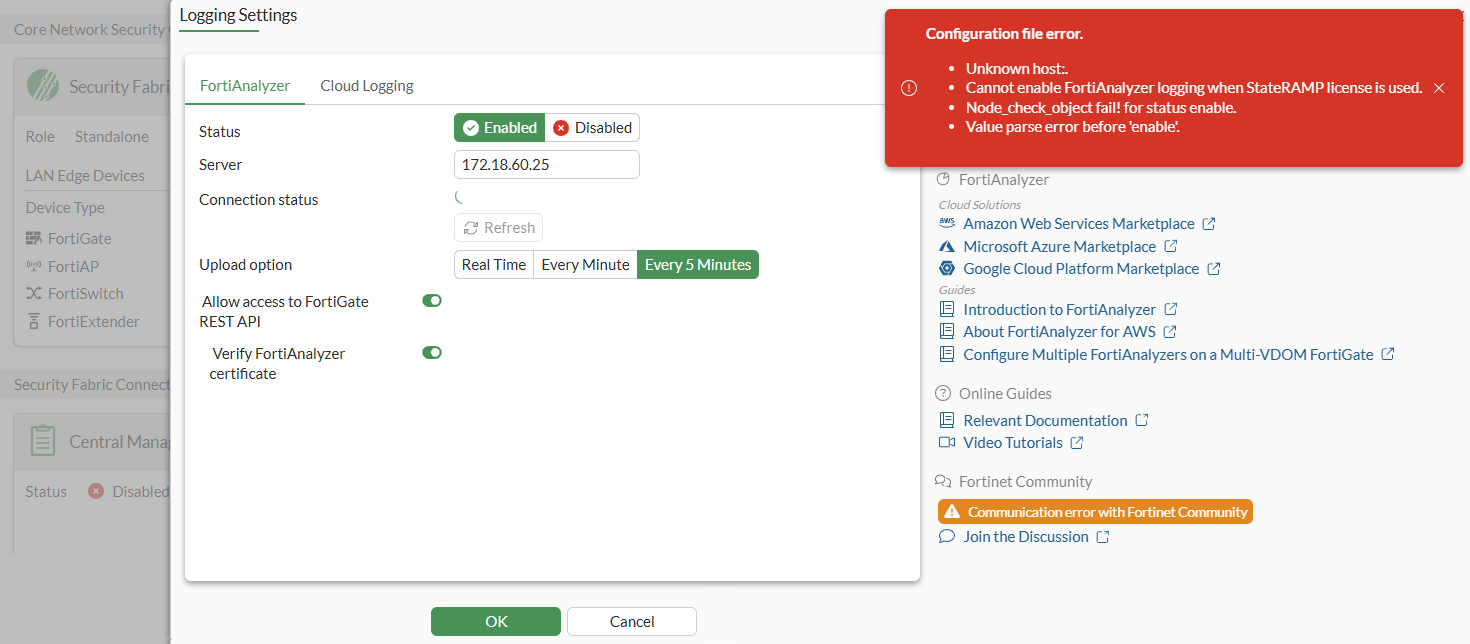
An error is displayed and the Switch Controller feature is hidden.
-
-
Test configuring the unsupported feature in the CLI:
-
Attempt to enable FortiAnalyzer.
config log fortianalyzer setting
    set status enable
        Cannot enable FortiAnalyzer logging when StateRAMP license is used.
        node_check_object fail! for status enable

        value parse error before 'enable'
        Command fail. Return code -39
An error is displayed.
-