

ZTNA proxy access with SAML authentication example
In this example, an HTTPS access proxy is configured, and SAML authentication is applied to authenticate the client. The FortiGate acts as the SAML SP and a SAML authenticator serves as the IdP. In addition to verifying the user and device identity with the client certificate, the user is also authorized based on user credentials to establish a trust context before granting access to the protected resource.
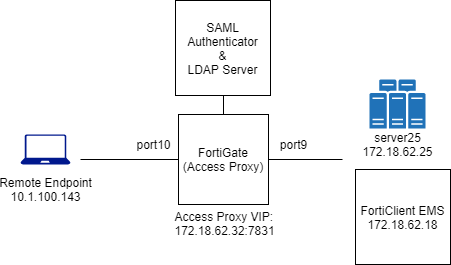
This example assumes that the FortiGate EMS fabric connector is already successfully connected.
To configure the access proxy VIP:
config firewall vip
    edit "ZTNA_server01"
        set type access-proxy
        set extip 172.18.62.32
        set extintf "any"
        set server-type https
        set extport 7831
        set ssl-certificate "Fortinet_SSL"
    next
end
To configure access proxy server mappings:
config firewall access-proxy
    edit "ZTNA_server01"
        set vip "ZTNA_server01"
        set client-cert enable
        config api-gateway
            edit 1
                set service https
                config realservers
                    edit 1
                        set ip 172.18.62.25
                        set port 443
                    next
                end
            next
        end
    next
end
To configure a SAML server:
config user saml
    edit "saml_ztna"
        set cert "Fortinet_CA_SSL"
        set entity-id "https://fgt9.myqalab.local:7831/samlap"
        set single-sign-on-url "https://fgt9.myqalab.local:7831/XX/YY/ZZ/saml/login/"
        set single-logout-url "https://fgt9.myqalab.local:7831/XX/YY/ZZ/saml/logout/"
        set idp-entity-id "http://MYQALAB.LOCAL/adfs/services/trust"
        set idp-single-sign-on-url "https://myqalab.local/adfs/ls"
        set idp-single-logout-url "https://myqalab.local/adfs/ls"
        set idp-cert "REMOTE_Cert_4"
        set digest-method sha256
        set adfs-claim enable
        set user-claim-type upn
        set group-claim-type group-sid
    next
end
To map the SAML server into an access proxy configuration:
config firewall access-proxy
    edit "ZTNA_server01"
        config api-gateway
             edit 3
                set service samlsp
                set saml-server "saml_ztna"
            next
        end
    next
end
To configure an LDAP server and an LDAP server group to verify user groups:
config user ldap
    edit "ldap-10.1.100.198"
        set server "10.1.100.198"
        set cnid "cn"
        set dn "dc=myqalab,dc=local"
        set type regular
        set username "cn=fosqa1,cn=users,dc=myqalab,dc=local"
        set password **********
        set group-search-base "dc=myqalab,dc=local"
    next
end
config user group
    edit "ldap-group-saml"
        set member "ldap-10.1.100.198"
    next
end
To configure the authentication rule and scheme to match the new SAML server:
config authentication rule
    edit "saml_ztna"
        set srcintf "port10"
        set srcaddr "all"
        set ip-based disable
        set active-auth-method "saml_ztna"
        set web-auth-cookie enable
    next
end
config authentication scheme
    edit "saml_ztna"
        set method saml
        set saml-server "saml_ztna"
        set saml-timeout 30
        set user-database "ldap-10.1.100.198"
    next
end
To enable user group authentication in an access-proxy type firewall proxy-policy:
config firewall proxy-policy
    edit 6
        set name "ZTNA_remote"
        set proxy access-proxy
        set access-proxy "ZTNA_server01"
        set srcintf "any"
        set srcaddr "all"
        set dstaddr "all"
        set action accept
        set schedule "always"
        set groups "ldap-group-saml"
        set utm-status enable
        set ssl-ssh-profile "certificate-inspection"
    next
end
Testing the connection
To test the connection:

|
It is not necessary to configure a ZTNA Destination on the FortiClient for the HTTPS access proxy use case. In fact, configuring a ZTNA Destination rule for the website may interfere with its operation. |
-
On a client PC, try to access the webpage through the HTTPS access proxy. For example, go to http://172.18.62.32:7831 in a browser.
-
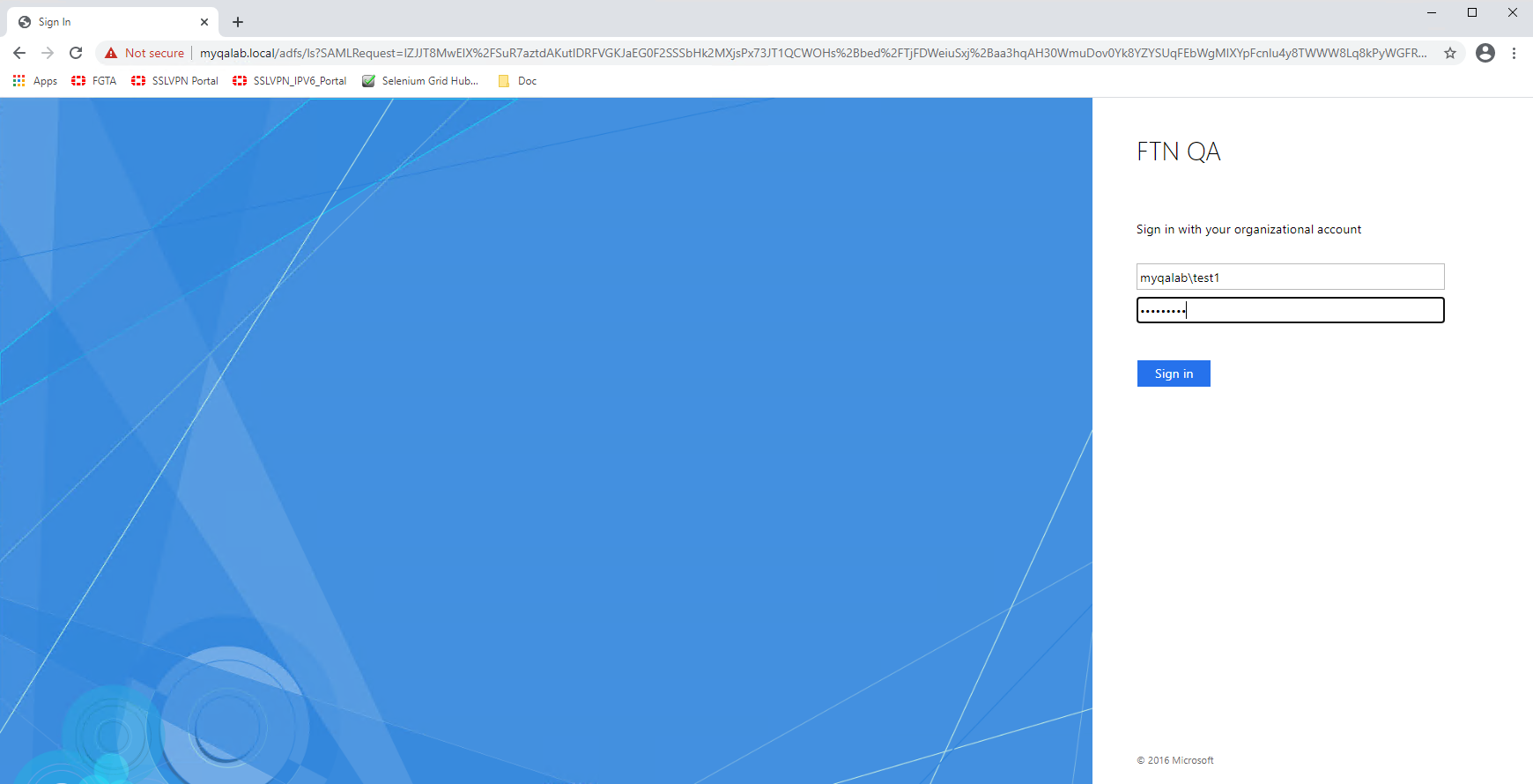
The client PC is prompted for a client certificate. After the certificate is validated, you are redirected to a SAML log in portal.
-
Enter your user credentials. The SAML server authenticates and sends a SAML assertion response message to the FortiGate.
-
The FortiGate queries the LDAP server for the user group, and then verifies the user group against the groups or groups defined in the proxy policy.
-
The user is proxied to the webpage on the real web server.
Logs and debugs
Use the following command to check the user information after the user has been authenticated:
# diagnose wad user list
ID: 7, VDOM: vdom1, IPv4: 10.1.100.143
  user name   : test1@MYQALAB.local
  worker      : 0
  duration    : 124
  auth_type   : Session
  auth_method : SAML
  pol_id      : 6
  g_id        : 13
  user_based  : 0
  expire      : no
  LAN:
    bytes_in=25953 bytes_out=14158
  WAN:
    bytes_in=8828 bytes_out=6830
Event log:
1: date=2021-03-24 time=19:02:21 eventtime=1616637742066893182 tz="-0700" logid="0102043025" type="event" subtype="user" level="notice" vd="vdom1" logdesc="Explicit proxy authentication successful" srcip=10.1.100.143 dstip=172.18.62.32 authid="saml" user="test1@MYQALAB.local" group="N/A" authproto="HTTP(10.1.100.143)" action="authentication" status="success" reason="Authentication succeeded" msg="User test1@MYQALAB.local succeeded in authentication"
Traffic log:
1: date=2021-03-24 time=19:09:06 eventtime=1616638146541253587 tz="-0700" logid="0000000010" type="traffic" subtype="forward" level="notice" vd="vdom1" srcip=10.1.100.143 srcport=58084 srcintf="port10" srcintfrole="undefined" dstcountry="Reserved" srccountry="Reserved" dstip=172.18.62.25 dstport=443 dstintf="vdom1" dstintfrole="undefined" sessionid=8028 service="HTTPS" wanoptapptype="web-proxy" proto=6 action="accept" policyid=6 policytype="proxy-policy" poluuid="8dcfe762-8d0b-51eb-82bf-bfbee59b89f2" duration=8 user="test1@MYQALAB.local" group="ldap-group-saml" authserver="ldap-10.1.100.198" wanin=10268 rcvdbyte=10268 wanout=6723 lanin=7873 sentbyte=7873 lanout=10555 appcat="unscanned"