

Integrate with SSH Connector
The SSH Connector allows admins with local permissions to connect to Linux endpoints remotely, and quarantine the exploited endpoint by shutting down its network access. After the SSH connector is configured, the quarantine, triggered by deception incidents, will be implemented by SSH accessing the attacker's unit via the deployment network where the attack originated from.
To configure the SSH Connector:
- Go to Fabric > Quarantine Integration and click Quarantine integration with new device. The Integrate With New Device pane opens.
- From the Integrate method dropdown, select SSH Connector and configure the integration settings as required.

The Username should be a user with administrative privileges for the endpoints.
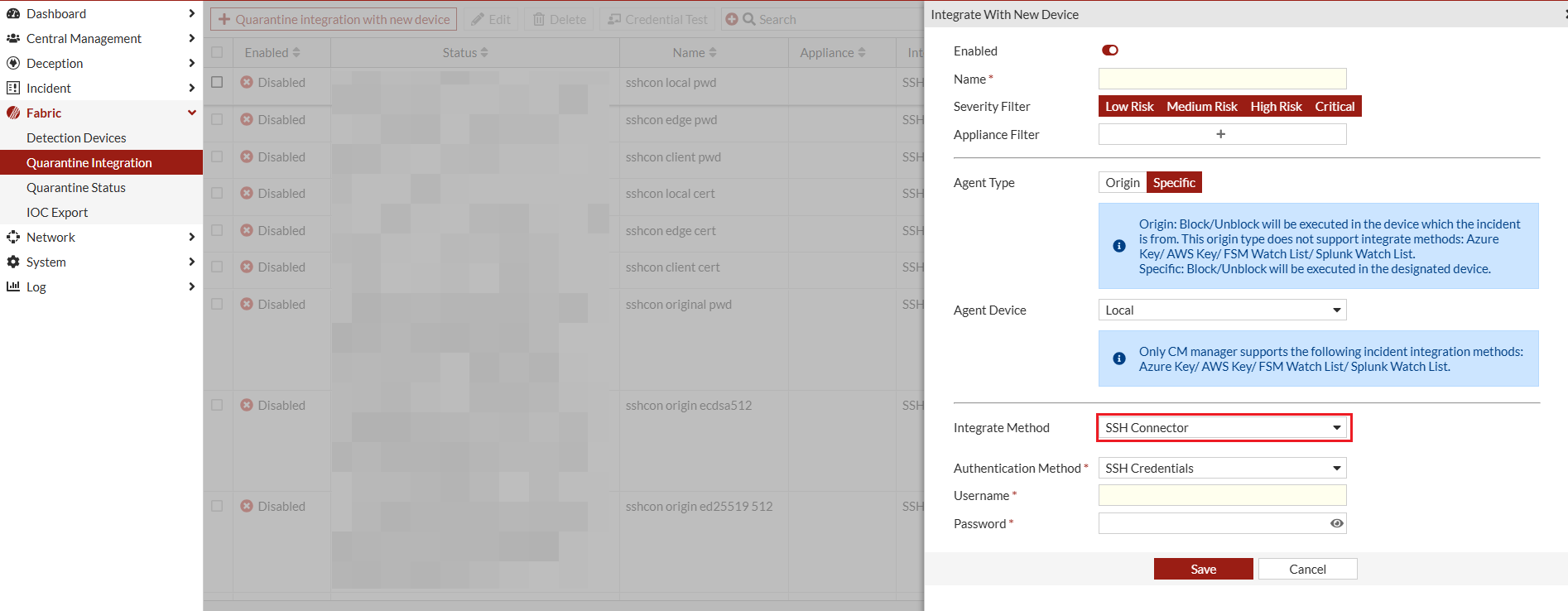
- Click Save.
- Configure the Linux endpoint. For information, see Mitigation using Linux remote command .
- After you configure the FortiDeceptor and the Linux endpoints, perform a connection check.
The SSH Connector does not support endpoint quarantine on cloud platforms such as AWS, Azure, and Google Cloud Platform, even if the connection check is successful. Additionally, endpoints that do not support the
nmclinetworkingoffcommand cannot be quarantined using this integration.