
Fortinet white logo
Fortinet white logo

Administration Guide

Adding CLI templates

Adding CLI templates

You can add Pre-Run CLI Templates and CLI templates.

To create a new CLI template:
  1. Go to Device Manager > Provisioning Templates > CLI.
  2. Click Create New , and select either Pre-Run CLI Template or CLI Template.

    The Create New Pre-Run CLI Template/Create New CLI Template pane is displayed.
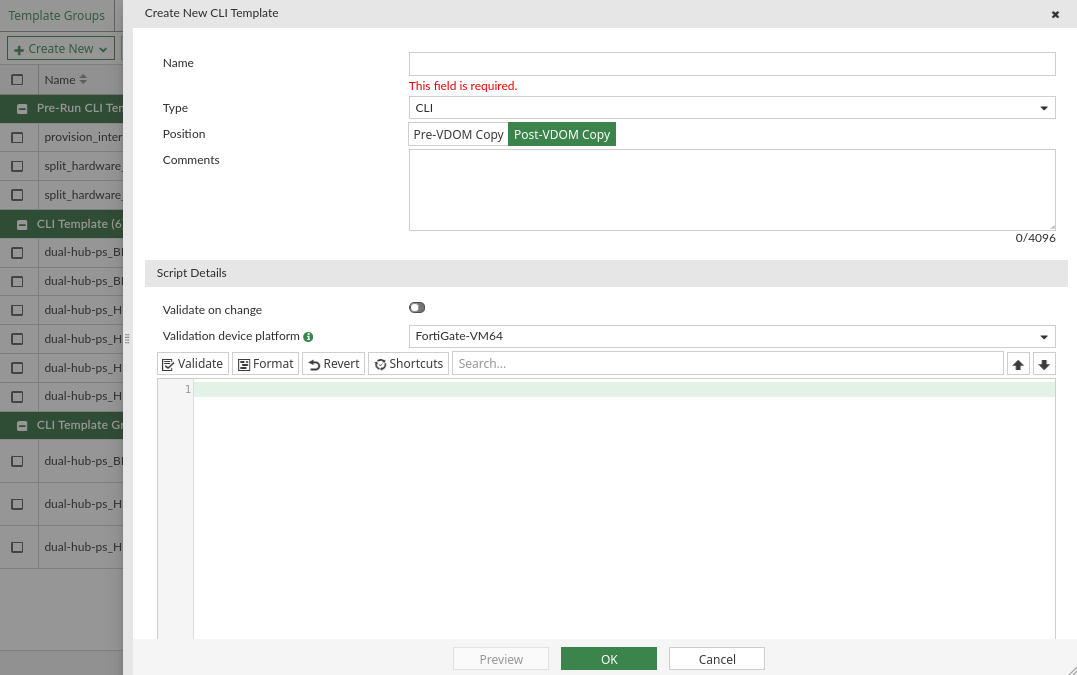
  3. Enter the required information:

    Template Name

    Type a unique name for the template.

    Type

    Select the template type from one of the following options:

    • CLI Script
    • Jinja Script

    Position

    Select one of the following options to determine when the CLI template will be installed to the device:

    Pre-VDOM Copy

    During installation, the CLI template is applied to the device before the policy package.

    Unlike Pre-run CLI Templates, Pre-VDOM Copy templates aren't restricted only to model devices and are not unassigned from the managed device once applied to the Device Database.

    Post-VDOM Copy

    During installation, the CLI template is applied to the device after the policy package.
    This is the default option.

    For more information for the sequence of installation operations, see: Sequence of operations for installation to managed devices.

    This setting is not available for pre-run CLI templates or template groups.

    Comments

    Optionally, type a comment for the template.

    Script details

    Type the script itself, either manually using a keyboard, or by copying and pasting from another editor.

  4. Click OK.

    The CLI template is created and displayed under it's appropriate category. For example, if you created a pre-run CLI template, it displays under the Pre-Run CLI Template category.

Using pre-run CLI templates

Pre-Run CLI templates run once on a model device to pre-configure them with required settings, for example to add interfaces to a FortiGate-VM. Pre-run CLI templates are exclusively available to model devices, and can only be assigned to model devices.

You can assign pre-run CLI templates to model devices directly or with the use of device blueprints. See Assigning CLI templates to managed devices and Using device blueprints for model devices.

When a pre-run CLI template has been assigned to a model device, it will be automatically applied to the model device's Device Database once the Add Device wizard completes. Once applied, the pre-run CLI template is unassigned from the model device.

If the configuration fails to apply to the Device Database, FortiManager will display an error. When this occurs, administrators can review and update the pre-run CLI template as needed and then manually reassign it to the device and perform an install to reapply the configuration to the model device's Device Database.

For more information see Sequence of operations for installation to managed devices.

Adding CLI templates

Adding CLI templates

You can add Pre-Run CLI Templates and CLI templates.

To create a new CLI template:
  1. Go to Device Manager > Provisioning Templates > CLI.
  2. Click Create New , and select either Pre-Run CLI Template or CLI Template.

    The Create New Pre-Run CLI Template/Create New CLI Template pane is displayed.

  3. Enter the required information:

    Template Name

    Type a unique name for the template.

    Type

    Select the template type from one of the following options:

    • CLI Script
    • Jinja Script

    Position

    Select one of the following options to determine when the CLI template will be installed to the device:

    Pre-VDOM Copy

    During installation, the CLI template is applied to the device before the policy package.

    Unlike Pre-run CLI Templates, Pre-VDOM Copy templates aren't restricted only to model devices and are not unassigned from the managed device once applied to the Device Database.

    Post-VDOM Copy

    During installation, the CLI template is applied to the device after the policy package.
    This is the default option.

    For more information for the sequence of installation operations, see: Sequence of operations for installation to managed devices.

    This setting is not available for pre-run CLI templates or template groups.

    Comments

    Optionally, type a comment for the template.

    Script details

    Type the script itself, either manually using a keyboard, or by copying and pasting from another editor.

  4. Click OK.

    The CLI template is created and displayed under it's appropriate category. For example, if you created a pre-run CLI template, it displays under the Pre-Run CLI Template category.

Using pre-run CLI templates

Pre-Run CLI templates run once on a model device to pre-configure them with required settings, for example to add interfaces to a FortiGate-VM. Pre-run CLI templates are exclusively available to model devices, and can only be assigned to model devices.

You can assign pre-run CLI templates to model devices directly or with the use of device blueprints. See Assigning CLI templates to managed devices and Using device blueprints for model devices.

When a pre-run CLI template has been assigned to a model device, it will be automatically applied to the model device's Device Database once the Add Device wizard completes. Once applied, the pre-run CLI template is unassigned from the model device.

If the configuration fails to apply to the Device Database, FortiManager will display an error. When this occurs, administrators can review and update the pre-run CLI template as needed and then manually reassign it to the device and perform an install to reapply the configuration to the model device's Device Database.

For more information see Sequence of operations for installation to managed devices.