

Traffic flow of transparent modes
In True Transparent Proxy (TTP) Mode and Transparent Inspection (TI) Mode, traffic flows from the client to FortiWeb's bridge interface (without changing the destination IP address), where it is inspected before being forwarded to the backend back-end server, which responds directly to the client using its original IP address.
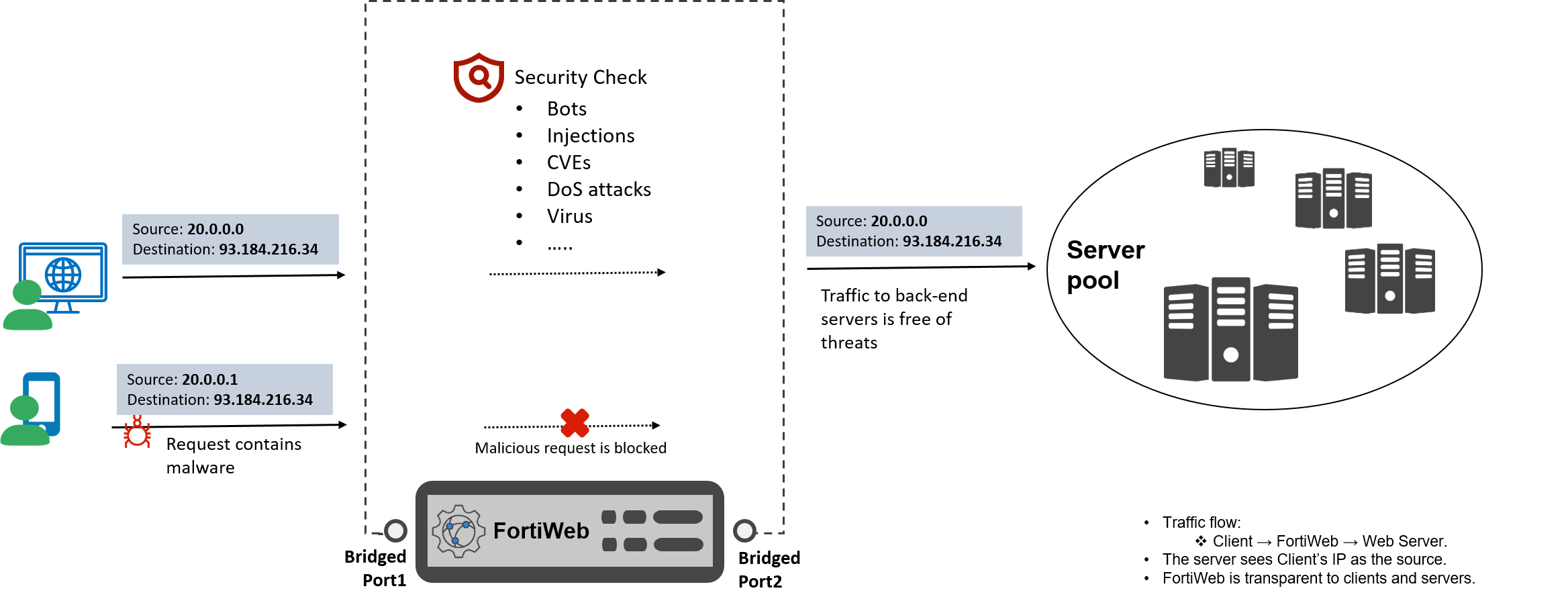 Client Request:
-
A client sends a request directly to the back-end server’s IP (e.g., 93.184.216.34).
-
The request reaches to FortiWeb’s bridged ports (e.g. Port1/Port2).
FortiWeb Processing:
-
True Transparent Proxy:
-
FortiWeb transparently proxies traffic arriving on a network port that belongs to a Layer 2 bridge. It terminate the connection, inspects the request, and forwards it to the back-end server.
-
TTP mode is very close to RP mode. It is capable of serving custom return codes and block pages. It also supports the use of more secured TLS 1.3.
-
Back-end server sees the client’s original IP (no NAT).
-
-
Transparent Inspection:
-
Inspects traffic without terminating the connection. FortiWeb only uses the web server’s certificate to decrypt traffic in order to scan it for policy violations. If there are no violations, it allows the existing encrypted traffic to continue without interruption.
-
When violations are detected, FortiWeb can only reset connections and cannot return any custom block page.
-
Only supports TLS 1.0/1.1/1.2.
-
Server Response:
-
The back-end server replies directly to the client’s IP.
-
Response traffic passes through FortiWeb for inspection (if configured).