
Fortinet white logo
Fortinet white logo

Administration Guide

FortiAI Integration (8.0.0)

FortiAI Integration (8.0.0)

FortiWeb now integrates with FortiAI, a generative AI assistant powered by a large language model (LLM) trained on Fortinet product knowledge and web security concepts. FortiAI provides real-time, in-product support for understanding FortiWeb features, investigating attack patterns, and interpreting log data.

This enhancement introduces conversational, AI-assisted queries directly into the FortiWeb interface—enabling administrators to interact with the system more intuitively, reduce investigation time, and gain deeper insights into traffic behavior and application-layer threats.

Benefits

This integration enables FortiWeb administrators to:

  • Accelerate threat triage by asking investigative questions in plain language

  • Reduce time spent searching documentation by receiving direct answers

  • Lower operational overhead with an assistant that supports real-time context

  • Enhance operational insight with pattern-based log summaries and breakdowns

How It Works: Capabilities and Interface

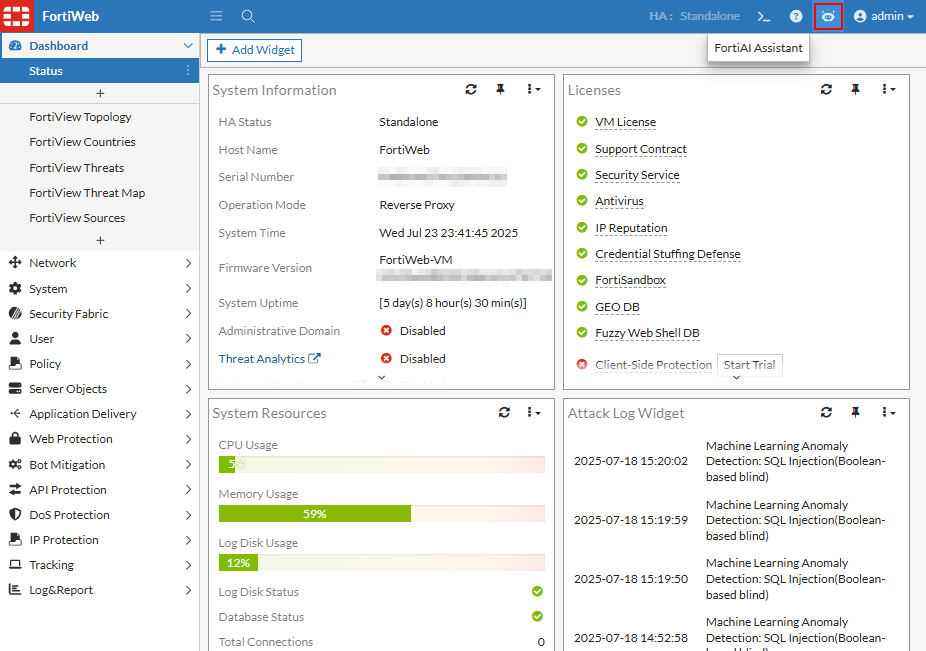
FortiAI is embedded directly into the FortiWeb interface and can be accessed from the banner on any page in the GUI. Clicking the FortiAI icon opens the FortiAI Assistant panel, which appears alongside the current configuration or monitoring page. This panel allows administrators to submit natural-language queries and receive contextual, AI-generated responses in real time.
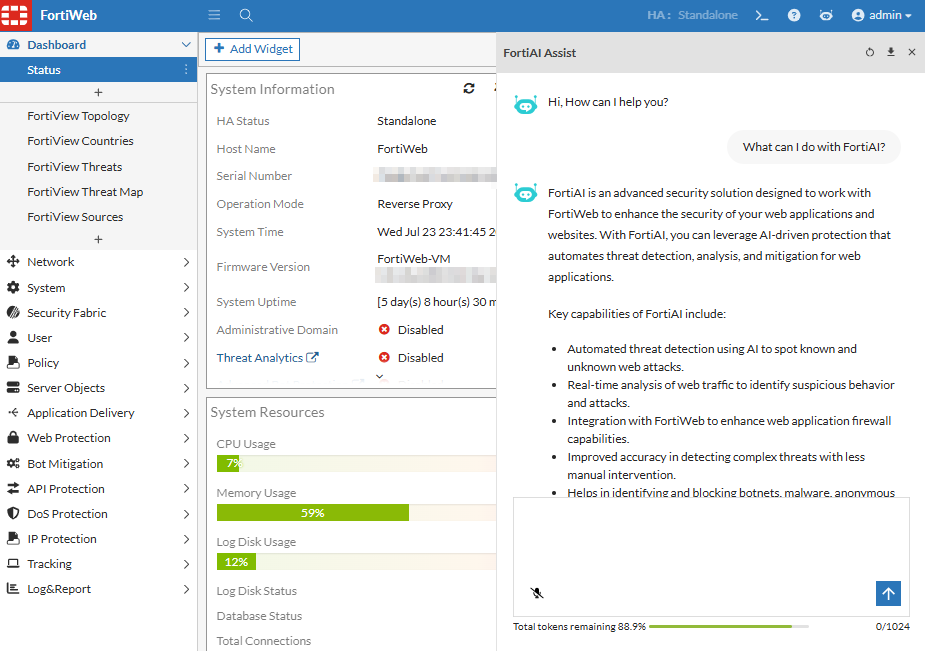
Administrators can ask questions such as:

  • “Which CVE had the highest number of attacks this week?”

  • “Summarize all critical attacks from the last 24 hours.”

  • “List all IPs that accessed /login.php today.”

  • “Identify abnormal behavior from source IP 136.243.90.99.”

  • “How does FortiWeb detect and block bot attacks?”

  • “What is ML-Based Bot Detection?”

Major functions

Documentation-Based Q&A

FortiAI can retrieve information from FortiWeb’s product documentation, including:

  • Administration Guide

  • CLI Reference

  • Release Notes

  • Troubleshooting content

  • Datasheets

This allows administrators to get fast, context-aware answers to product questions without leaving the interface.

Log-Centric Threat Analysis

FortiAI can analyze recent log data to help with:

  • Attack trend summaries

  • CVE and signature-based pattern detection

  • IP behavior correlation

  • Filtering and investigation of anomalous or critical events

This makes FortiAI an intelligent, on-demand analyst that enhances the effectiveness of FortiWeb’s operational workflows.

Licensing, Platform Support, and Token Usage

FortiAI usage is licensed based on token consumption, with monthly and annual token limits defined per FortiWeb platform model.

Each query consumes tokens based on complexity and response length. If token limits are exceeded, FortiAI will be temporarily disabled.

Token limits per platform:

Model

Monthly Token Limit

100F 1,166,667
400F 1,666,667
600F 2,500,000
1000F 3,333,333
2000F 6,300,000
3000F 13,282,500
4000F 21,000,000
VM01

387,083

VM04

1,799,583

VM16

5,481,667

Note: FortiAI is enabled automatically on supported models. No user-side configuration is required.

Platform Support Limitation:

In this initial implementation, FortiAI is supported only on VMware-based virtual machine deployments of FortiWeb. Other virtual platforms, cloud deployments, and containers are not currently supported. Expanded platform support is planned for a future release.

Looking Ahead

In FortiWeb 8.0.0, FortiAI focuses on log analytics and documentation support. Future releases plan to expand functionality with:

  • Guided configuration

  • Automated troubleshooting steps

  • Integration into more FortiWeb modules

FortiWeb joins FortiAnalyzer and FortiManager in delivering FortiAI-powered security operations, offering a consistent and intelligent assistant across the Fortinet product portfolio.

For further details about this feature, see FortiAI.

FortiAI Integration (8.0.0)

FortiAI Integration (8.0.0)

FortiWeb now integrates with FortiAI, a generative AI assistant powered by a large language model (LLM) trained on Fortinet product knowledge and web security concepts. FortiAI provides real-time, in-product support for understanding FortiWeb features, investigating attack patterns, and interpreting log data.

This enhancement introduces conversational, AI-assisted queries directly into the FortiWeb interface—enabling administrators to interact with the system more intuitively, reduce investigation time, and gain deeper insights into traffic behavior and application-layer threats.

Benefits

This integration enables FortiWeb administrators to:

  • Accelerate threat triage by asking investigative questions in plain language

  • Reduce time spent searching documentation by receiving direct answers

  • Lower operational overhead with an assistant that supports real-time context

  • Enhance operational insight with pattern-based log summaries and breakdowns

How It Works: Capabilities and Interface

FortiAI is embedded directly into the FortiWeb interface and can be accessed from the banner on any page in the GUI. Clicking the FortiAI icon opens the FortiAI Assistant panel, which appears alongside the current configuration or monitoring page. This panel allows administrators to submit natural-language queries and receive contextual, AI-generated responses in real time.

Administrators can ask questions such as:

  • “Which CVE had the highest number of attacks this week?”

  • “Summarize all critical attacks from the last 24 hours.”

  • “List all IPs that accessed /login.php today.”

  • “Identify abnormal behavior from source IP 136.243.90.99.”

  • “How does FortiWeb detect and block bot attacks?”

  • “What is ML-Based Bot Detection?”

Major functions

Documentation-Based Q&A

FortiAI can retrieve information from FortiWeb’s product documentation, including:

  • Administration Guide

  • CLI Reference

  • Release Notes

  • Troubleshooting content

  • Datasheets

This allows administrators to get fast, context-aware answers to product questions without leaving the interface.

Log-Centric Threat Analysis

FortiAI can analyze recent log data to help with:

  • Attack trend summaries

  • CVE and signature-based pattern detection

  • IP behavior correlation

  • Filtering and investigation of anomalous or critical events

This makes FortiAI an intelligent, on-demand analyst that enhances the effectiveness of FortiWeb’s operational workflows.

Licensing, Platform Support, and Token Usage

FortiAI usage is licensed based on token consumption, with monthly and annual token limits defined per FortiWeb platform model.

Each query consumes tokens based on complexity and response length. If token limits are exceeded, FortiAI will be temporarily disabled.

Token limits per platform:

Model

Monthly Token Limit

100F 1,166,667
400F 1,666,667
600F 2,500,000
1000F 3,333,333
2000F 6,300,000
3000F 13,282,500
4000F 21,000,000
VM01

387,083

VM04

1,799,583

VM16

5,481,667

Note: FortiAI is enabled automatically on supported models. No user-side configuration is required.

Platform Support Limitation:

In this initial implementation, FortiAI is supported only on VMware-based virtual machine deployments of FortiWeb. Other virtual platforms, cloud deployments, and containers are not currently supported. Expanded platform support is planned for a future release.

Looking Ahead

In FortiWeb 8.0.0, FortiAI focuses on log analytics and documentation support. Future releases plan to expand functionality with:

  • Guided configuration

  • Automated troubleshooting steps

  • Integration into more FortiWeb modules

FortiWeb joins FortiAnalyzer and FortiManager in delivering FortiAI-powered security operations, offering a consistent and intelligent assistant across the Fortinet product portfolio.

For further details about this feature, see FortiAI.