
Fortinet white logo
Fortinet white logo

Administration Guide

Support for UPN Format in Kerberos Constrained Delegation (8.0.0)

Support for UPN Format in Kerberos Constrained Delegation (8.0.0)

FortiWeb now supports using User Principal Name (UPN) format—such as user@example.com—as the Kerberos client identity in Kerberos Constrained Delegation (KCD). This enhancement introduces optional support for Enterprise Principal Name (EPN) encoding (KRB5_NT_ENTERPRISE), in addition to the existing support for traditional Kerberos Principal Name (KPN) format (KRB5_NT_PRINCIPAL).

When UPN Support is enabled, FortiWeb interprets the client identity using EPN syntax. This allows delegation to succeed in environments where user credentials are available only in UPN form, and where the Kerberos realm is not explicitly included in client requests. A fallback realm or domain suffix can be provided using the new Domain Realm option.

This enhancement applies only when Kerberos Constrained Delegation is selected as the authentication delegation method in a Site Publishing Rule. Support for UPN format is not available for regular Kerberos delegation or other delegation types. If UPN Support is not enabled, FortiWeb continues to construct the Kerberos client identity using the standard Kerberos Principal Name (KPN) format by default.

For Kerberos Constrained Delegation to be available in the Site Publishing configuration, the Client Authentication Method must be Client Certificate Authentication, NTLM Authentication or SAML Authentication. Other authentication methods, such as HTML Form Authentication or HTTP Basic Authentication, do not support KCD and will not expose the UPN-related options.

GUI Update in Site Publish Rule Configuration (Application Delivery > Site Publish > Site Publish):
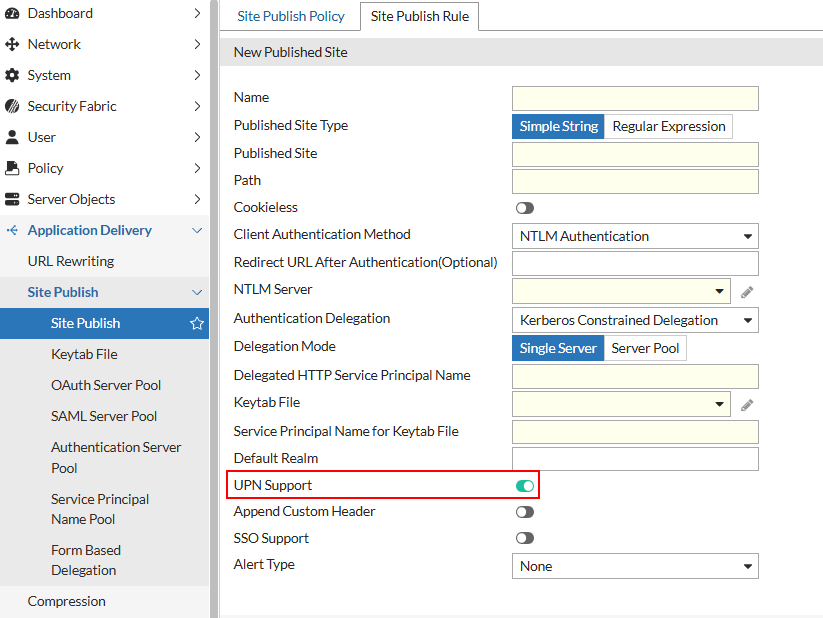
CLI Update to config waf site-publish-helper rule:
config waf site-publish-helper rule
  edit <name>
    set client-auth-method {client-cert-auth | ntlm-auth}
    set auth-delegation kerberos-constrained-delegation
    set default-domain-realm <string>
    set upn-support {enable | disable}
  next
end

Support for UPN Format in Kerberos Constrained Delegation (8.0.0)

Support for UPN Format in Kerberos Constrained Delegation (8.0.0)

FortiWeb now supports using User Principal Name (UPN) format—such as user@example.com—as the Kerberos client identity in Kerberos Constrained Delegation (KCD). This enhancement introduces optional support for Enterprise Principal Name (EPN) encoding (KRB5_NT_ENTERPRISE), in addition to the existing support for traditional Kerberos Principal Name (KPN) format (KRB5_NT_PRINCIPAL).

When UPN Support is enabled, FortiWeb interprets the client identity using EPN syntax. This allows delegation to succeed in environments where user credentials are available only in UPN form, and where the Kerberos realm is not explicitly included in client requests. A fallback realm or domain suffix can be provided using the new Domain Realm option.

This enhancement applies only when Kerberos Constrained Delegation is selected as the authentication delegation method in a Site Publishing Rule. Support for UPN format is not available for regular Kerberos delegation or other delegation types. If UPN Support is not enabled, FortiWeb continues to construct the Kerberos client identity using the standard Kerberos Principal Name (KPN) format by default.

For Kerberos Constrained Delegation to be available in the Site Publishing configuration, the Client Authentication Method must be Client Certificate Authentication, NTLM Authentication or SAML Authentication. Other authentication methods, such as HTML Form Authentication or HTTP Basic Authentication, do not support KCD and will not expose the UPN-related options.

GUI Update in Site Publish Rule Configuration (Application Delivery > Site Publish > Site Publish):

CLI Update to config waf site-publish-helper rule:
config waf site-publish-helper rule
  edit <name>
    set client-auth-method {client-cert-auth | ntlm-auth}
    set auth-delegation kerberos-constrained-delegation
    set default-domain-realm <string>
    set upn-support {enable | disable}
  next
end