
Fortinet white logo
Fortinet white logo

Administration Guide

Traffic flow of WCCP mode

Traffic flow of WCCP mode

WCCP mode redirects traffic at the network layer (Layer 3/4). Clients send requests directly to the application domain's IP address, while WCCP-enabled devices (e.g., firewalls, routers) intercept and transparently redirect these requests to FortiWeb. FortiWeb inspects the traffic and establishes a new session to forward the HTTP/HTTPS traffic to the web server. As a result, web servers log FortiWeb’s IP as the source IP.

Functionally, WCCP mode combines aspects of True Transparent Proxy (TTP) and Reverse Proxy (RP):

  • Front-end behavior (similar to TTP): Clients initiate traffic toward the back-end server’s IP address.

  • Back-end behavior (similar to RP): FortiWeb processes and forwards traffic using its own IP address when communicating with the back-end server.
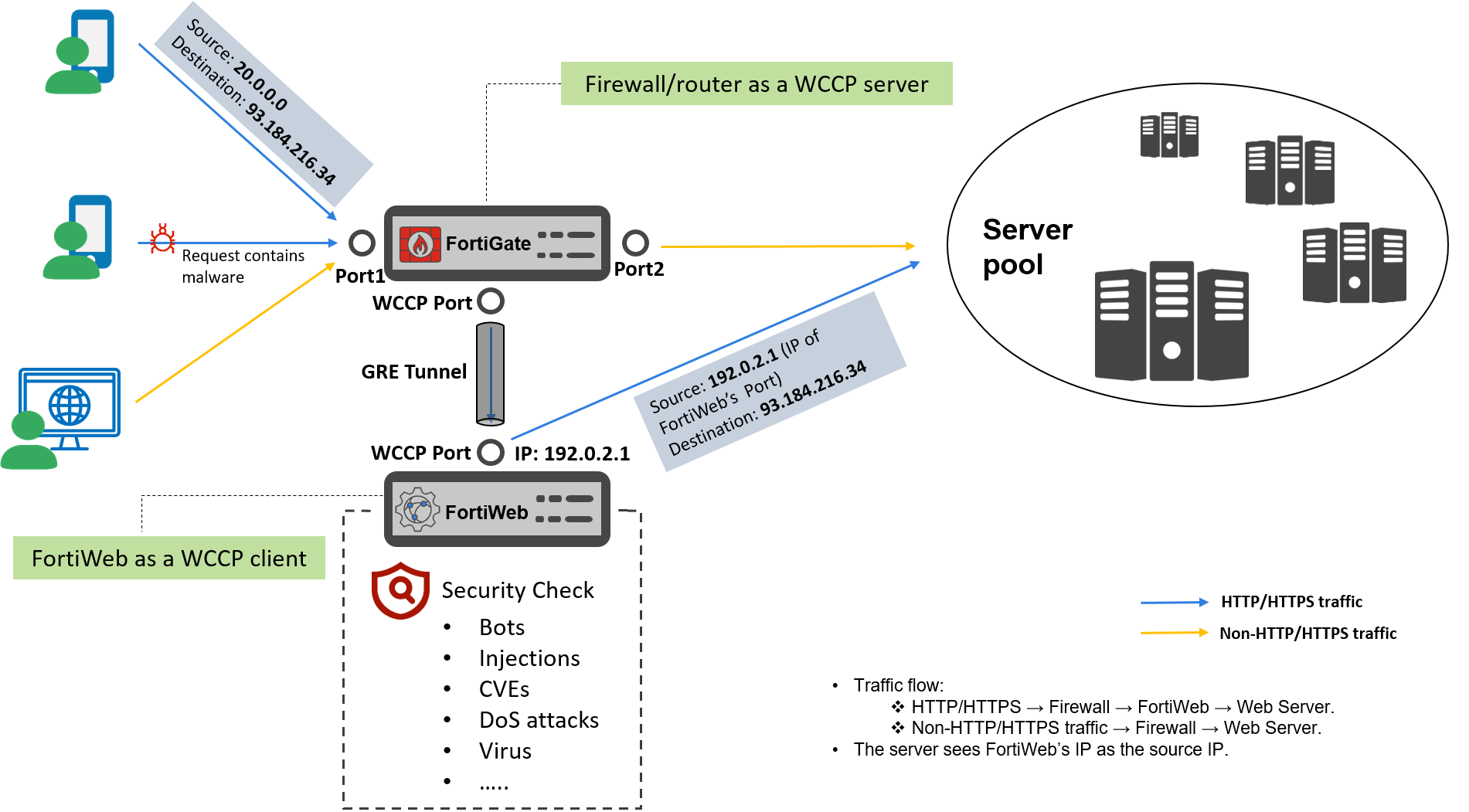
  • Client request:

    • A client accesses a web application via its domain (e.g., https://www.example.com, resolved to public IP 93.184.216.34).

    • The traffic first reaches the WCCP-enabled firewall (acting as the WCCP server).

  • Firewall Redirection:

    • The firewall intercepts HTTP/HTTPS traffic (e.g., port 80/443) and redirects it to FortiWeb (WCCP client) using:

      • GRE Tunnels (Layer 3 encapsulation)
        GRE (Generic Routing Encapsulation) is a tunneling protocol used to encapsulate one packet inside another. The firewall encapsulates the request, specify FortiWeb's IP address (WCCP Port's IP) as the destination of the encapsulated packet.

      • Instead of GRE, the firewall rewrites the MAC address in the packet header to redirect traffic to FortiWeb at Layer 2.

    • Non-HTTP/HTTPS traffic (e.g., SSH, SMTP) bypasses FortiWeb and flows directly to the web server via the switch.

  • FortiWeb Processing:

    • FortiWeb receives the GRE packet, decapsulates it, and inspects the traffic.

    • If SSL inspection is enabled, it decrypts the traffic for analysis. At this point, FortiWeb sees the real client IP and web server destination IP.

    • After processing, FortiWeb encrypts the traffic. It sends the packet as a new connection, with FortiWeb's IP address (192.0.2.1) as the source IP, and web server's IP (93.184.216.34) as the destination.

  • FortiWeb to Web Server:

    • FortiWeb forwards the HTTP/HTTPS traffic to the web server.

    • The web server sees FortiWeb’s IP (WCCP Port's IP) as the source address, not the client’s original IP.

Traffic flow of WCCP mode

Traffic flow of WCCP mode

WCCP mode redirects traffic at the network layer (Layer 3/4). Clients send requests directly to the application domain's IP address, while WCCP-enabled devices (e.g., firewalls, routers) intercept and transparently redirect these requests to FortiWeb. FortiWeb inspects the traffic and establishes a new session to forward the HTTP/HTTPS traffic to the web server. As a result, web servers log FortiWeb’s IP as the source IP.

Functionally, WCCP mode combines aspects of True Transparent Proxy (TTP) and Reverse Proxy (RP):

  • Front-end behavior (similar to TTP): Clients initiate traffic toward the back-end server’s IP address.

  • Back-end behavior (similar to RP): FortiWeb processes and forwards traffic using its own IP address when communicating with the back-end server.

  • Client request:

    • A client accesses a web application via its domain (e.g., https://www.example.com, resolved to public IP 93.184.216.34).

    • The traffic first reaches the WCCP-enabled firewall (acting as the WCCP server).

  • Firewall Redirection:

    • The firewall intercepts HTTP/HTTPS traffic (e.g., port 80/443) and redirects it to FortiWeb (WCCP client) using:

      • GRE Tunnels (Layer 3 encapsulation)
        GRE (Generic Routing Encapsulation) is a tunneling protocol used to encapsulate one packet inside another. The firewall encapsulates the request, specify FortiWeb's IP address (WCCP Port's IP) as the destination of the encapsulated packet.

      • Instead of GRE, the firewall rewrites the MAC address in the packet header to redirect traffic to FortiWeb at Layer 2.

    • Non-HTTP/HTTPS traffic (e.g., SSH, SMTP) bypasses FortiWeb and flows directly to the web server via the switch.

  • FortiWeb Processing:

    • FortiWeb receives the GRE packet, decapsulates it, and inspects the traffic.

    • If SSL inspection is enabled, it decrypts the traffic for analysis. At this point, FortiWeb sees the real client IP and web server destination IP.

    • After processing, FortiWeb encrypts the traffic. It sends the packet as a new connection, with FortiWeb's IP address (192.0.2.1) as the source IP, and web server's IP (93.184.216.34) as the destination.

  • FortiWeb to Web Server:

    • FortiWeb forwards the HTTP/HTTPS traffic to the web server.

    • The web server sees FortiWeb’s IP (WCCP Port's IP) as the source address, not the client’s original IP.