

Syntax Based Detection
FortiWeb’s Syntax Based Detection engine analyzes the structural grammar of user input to detect web-based attacks that may not be reliably identified through pattern matching alone. Unlike traditional signature-based methods that rely on static keywords and regular expressions, syntax-based detection parses input content according to language-specific grammar rules — such as SQL, JavaScript, or shell command syntax — to identify malicious payloads with higher precision.
This approach improves detection accuracy by reducing both false positives and false negatives, particularly in scenarios involving obfuscated, encoded, or fragmented input. It is especially effective for detecting:
-
Sophisticated SQL injection attempts that evade simple pattern matching
-
Obfuscated XSS payloads embedded in request parameters
-
Shell command injection attacks using substitution, chaining, or dynamic execution
Syntax-based detection is commonly applied to input vectors such as URL parameters, headers, cookies, and POST data. When a request field is matched, FortiWeb parses and evaluates the content using a lightweight abstract syntax tree (AST) and semantic checks specific to the targeted language.
For information about configuring detection rules, see Configuring Syntax Based Detection policies. To omit scanning certain syntax based injection attacks in some cases, see Configuring Exceptions for syntax-based injection attack types.
Supported Detection Types
FortiWeb currently supports the following detection types:
-
SQL Syntax Based Detection — Analyzes the structure of SQL fragments embedded in request parameters to detect malicious expressions that may bypass regular signature checks.
-
XSS Syntax Based Detection — Parses JavaScript grammar to identify executable scripts or obfuscated code fragments commonly used in cross-site scripting attacks.
-
CMD Syntax Based Detection — Detects shell command injection attempts by analyzing input using abstract syntax tree (AST) parsing and keyword normalization techniques.
Each detection type uses language-specific grammar parsing and semantic checks to improve detection accuracy and reduce false positives. The following sections provide detailed descriptions of how each detection type works, including configuration guidance and known limitations.
SQL Syntax Based Detection
As the nature of the SQL language is similar to English grammar, false positives can occur together with false negatives. For example, one regular expression rule cannot completely cover all the variables of a SQL injection type, such as:
SELECT * FROM users WHERE id = 1 OR 1=1
SELECT * FROM users WHERE id = 1 OR abc=abc
SELECT * FROM users WHERE id = 1 OR 3<5
SELECT * FROM users WHERE id = 1 OR UTC_DATE()=UTC_DATE()
To address this, FortiWeb's syntax-based SQL injection detection approach detects a SQL injection attack by analyzing the lexeme and syntax of SQL language rather than using a pattern matching mechanism. It first turns the input statement into a sequence of tokens, and then turns the sequence of tokens into an abstract syntax tree (AST), which is a representation of the abstract syntactic structure of the input statement. The parser compares the produced AST with the AST of built-in standard SQL statements to check whether they have the same AST structure. If the syntactic structures are different, FortiWeb recognizes it as a SQL injection attempt and then triggers the violation action.
How syntax-based SQL injection detection works
When clients access web applications, they input values in fields rather than the entire SQL statement. The application inserts the values into an SQL statement and sends the query to the database.
For example, you may be asked to enter the employee ID on the web page when you want to check someone's profile. The employee ID is the condition value for the query, and it is sent to the web server by a request:
GET /employee_profile.asp?employee_id=20001 HTTP/1.1
Then the received value 2001 will be combined with a SQL template to generate a SQL statement for the query:
select * from employee where employee_no = 2001
However, if a client inputs the condition value with a snippet such as 1 or 1 = 1, it might be a SQL injection attempt.
When syntax-based SQL injection detection is configured, the snippets in requests will be processed by SQL template combination, grammar parsing, and an AST comparison to validate whether it is a SQL injection. For example, the snippet 1 or 1 = 1 will be extracted from request
GET /employee_profile.asp?employee_id=1 or 1 = 1 HTTP/1.1
and combined with a FortiWeb built-in template
select * from t where v = [injection point]
to generate the SQL statement
select * from t where v = 1 or 1 = 1
FortiWeb runs the process to build an AST for the target SQL statement and compare it with the FortiWeb built-in standard AST to see if they have the same structure. Different but equivalent SQL statements yield the same AST structure, and nonequivalent SQL statements have different AST structures. For example, here is a built-in standard statement and two target statements:
- Built-in standard statement:
select * from t where v = 1 - Target statement 1:
select * from t where v = WAF products - Target statement 2:
select * from t where v = 1 or 1 = 1
The first target statement is equivalent to the built-in standard statement. Each has the same AST structure as illustrated below:
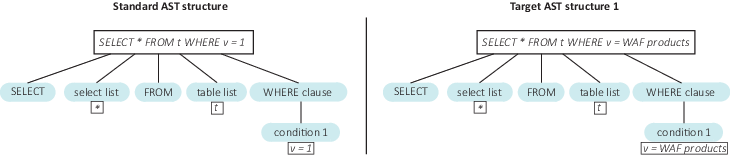
The second target statement is not equivalent to the built-in standard statement:

They are different AST structures, and as a result FortiWeb will detect an SQL injection attempt.
Built-in SQL statement templates
To address all possible injection points FortiWeb needs to first understand the probable context of SQL statements. The common three options are:
select * from employee where employee_no = "2001"
select * from employee where employee_no = '2001'
select * from employee where employee_no = 2001
To cover all cases that an attacker might try, syntax-based SQL injection detection employs the following three templates:
- Double Quote Based SQL Injection:
select * from t where v = "[injection point]" - Single Quote Based SQL Injection:
select * from t where v = '[injection point]' - As-Is Based SQL Injection:
select * from t where v = [injection point]
By default, FortiWeb enables all three templates. While you can disable each one, it is not recommended to do so unless you're absolutely certain that this query type is not supported by the database.
SQL injection types
Once a snippet is identified as an SQL injection, FortiWeb will describe the SQL injection types and show corresponding ASTs, such as:
| SQL Injection types | Snippet examples |
|---|---|
| Stacked queries SQL injection |
1; delete from users |
| Embedded queries |
1 union select username, password from users 1 /*! ; drop table admin */ |
| Condition based boolean injection |
1 /**/OR/**/1/**/=/**/1 1 OR ’abc’=’abc’ case 1 when 2 then '2' end 1 || user_id is not null |
| Arithmetic operation based boolean injection |
a'+'b A' DIV 'B A' & 'B |
| Line comments |
1"-- 1 #abc |
| SQL function based boolean injection |
ascii(substring(length(version()),1,1)) |
XSS Syntax Based Detection
To start with syntax-based XSS injection detection, let's first review how the signature-based XSS Injection detection works.
The signature-based XSS Injection detection uses regular expression rules. Sometimes it's hard to define XSS Injections precisely and cover all XSS related signatures such as HTML tags, attributions, and JavaScript functions.
False positives may occur if certain script tag itself is contained in user input, for example, the user enters "</script> is an HTML closing tag" in the input box. This is a legitimate input but Signature-based XSS Injection detection will falsely identify it as an XSS Injection because it contains an HTML tag "</script>".
Another problem with Signature-based XSS Injection detection is that it may ignore real XSS Injections. Attackers can do obfuscation for JavaScript XSS code to bypass signature-based XSS Injection detection. For example, l=self,___=1?'ert(123)':0,_=l?'al':0,__=1?'ev':0,l[__+_](_+___) is the obfuscated code for "alert(123)"; Another example, HTML5 uses many new HTML elements. In order to detect them, corresponding regular expressions shall be added. It's most likely to miss certain HTML elements. As a result, the ones that are not covered in the regular expressions will skip the scan.
To address this, FortiWeb introduces syntax-based XSS Injection detection which analyzes the HTML/JavaScript syntax. It executes HTML and JavaScript document parsing so that non-injection codes will not be detected as attacks. At the same time, it performs JavaScript compiling for suspicious codes and checks the compiled results, which prevents attackers from obfuscating XSS code to bypass the Signature-based XSS Injection detection.
How syntax-based XSS injection detection works
This section shows how HTML/JavaScript based XSS injection detection approach works for each of the five XSS attack types.
- HTML Attribute Based XSS Injection
The web application uses the user input to fill an input element's attribute without doing any user input filtering.
For example,<input type="text" name="state" value="INPUT_FROM_USER">
An attacker submits the code" onfocus="alert(document.cookie), and the final code is<input type="text" name="state" value="" onfocus="alert(document.cookie)">.
The HTML/JavaScript based XSS injection detection approach does HTML document parsing for the template"<input value="">"and generates the HTML document tree. After filling the user input, the template is<input value="" onfocus="alert(document.cookie)">, and the approach does HTML document parsing for this template.
The figure below shows the tree changes: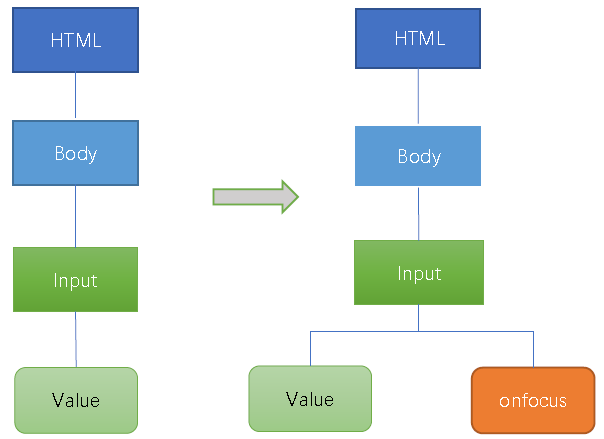
This approach checks via JavaScript compiling if the value "Onfocus" is valid JavaScript code. If the compiling succeeds, the user input will be detected as XSS attack. - HTML Tag based XSS Injection Detection
For the XSS attack example in last section, the attacker can also insert another HTML code"><a onmouseover='javascript:alert(/xss/)' href="">x</a>. The template will be as follows after the attacker's input is embedded and the HTML document tree is changed.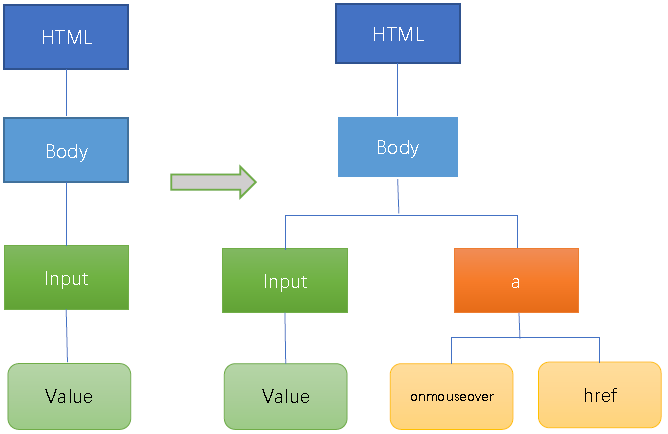
This approach checks via JavaScript compiling if the value "onmouseover" is valid JavaScript code. If the compiling succeeds, the user input will be detected as XSS attack. - HTML CSS based XSS Injection Detection
An attacker can inject CSS code exploiting a CSS injection vulnerability.
For example, an attacker injects a new HTML IMG tag with STYLE attribution whose value is CSS code instead of JavaScript code; thus doing JavaScript compiling directly for the STYLE attribution value will fail and you need to parse the value according to CSS syntax. If these is any sensitive syntax in the attribution value, it will be detected as an XSS attack.<IMG STYLE="xss:expression(alert('XSS'))" src=#> - Function based XSS Injection Detection
The example below shows the source code on server side which has JavaScript type XSS vulnerability. The variable "content" gets the user input without applying any XSS check.<html>
<body>
Search:<div id="kw"></div>
<script>
var content="<?php echo $_GET['keyword'] ?>";
document.getElementById("kw").innerHTML=content;
</script>
</html>
</body>
An attacker can submitkeyword=hello";alert(/xss/)//argument to trigger XSS attack; the JavaScript code will bevar content="hello";alert(/xss/)//";.
To detect the XSS, use the JavaScript templatevar content="USER-INPUT";. Insert the user input in the templatevar id="hello";alert(/xss/)//";.
If JavaScript compiling succeeds, check if extra function calls are introduced from the JavaScript compiling results. If yes, it means the attacker succeeds to inject JavaScript function for XSS, as normal user input will not introduce any JavaScript functions in the compiling results. In the figure below, one more function "Alert" is added in the results.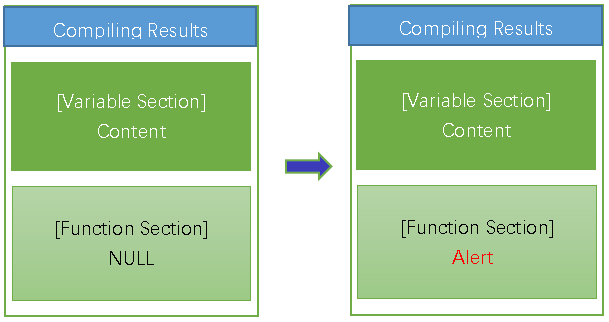
- Variable based XSS Injection Detection
For example, the variable "content" gets the user input without applying any XSS check.<html>
<body>
Search:<div id="kw"></div>
<script>
var content="<?php echo $_GET['keyword'] ?>";
document.getElementById("kw").innerHTML=content;
</script>
</html>
</body>
An attacker can submitkeyword=hello";document.body.innerHTML="<a onmouseover = 'hello";document.body.innerHTML="xss"//argument to trigger XSS attack; the JavaScript code will bevar content=hello";document.body.innerHTML="<a onmouseover = 'hello";document.body.innerHTML="xss"//;.
To detect the XSS, use the JavaScript templatevar content="USER-INPUT";. Insert the user input in the templatevar id="hello";document.body.innerHTML="<a onmouseover = 'hello";document.body.innerHTML="xss"//";.
If JavaScript compiling succeeds, check if sensitive HTML DOM variable is introduced from the JavaScript compiling results. If yes, it means the attacker succeeds to achieve XSS by writing HTML DOM varibale. In the figure below, one more variable "document.body.innerHTML" is added in the results.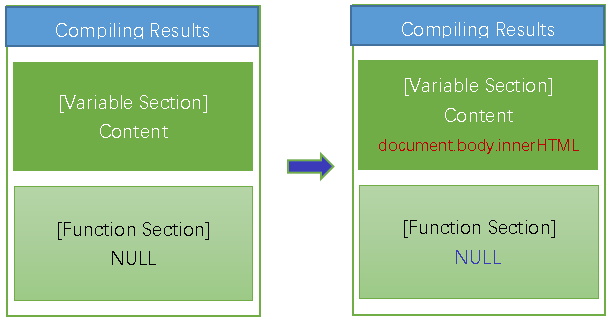
CMD Syntax Based Detection
CMD Syntax-Based Detection identifies shell command injection (CMDi) attempts by parsing input fields for command-line syntax. This method goes beyond static keyword matching by analyzing whether the structure of the input conforms to real shell command grammar, making it possible to detect evasive payloads and reduce false positives.
Shell command injection is a serious threat vector in which attackers exploit web inputs to execute arbitrary commands on the target system. Obfuscation techniques—such as splitting keywords into fragments, using shell variables, or substituting commands dynamically—can bypass signature-based defenses. For example, an attacker might encode cat /etc/passwd as:
'c'a't' /etc/pa's's'w'd
or inject commands using substitution and variables:
cmd=il;k${cmd}l 888
To detect these threats, FortiWeb applies lightweight grammar analysis in three stages: preprocessing, parsing, and semantic matching. First, candidate input strings are filtered and normalized to remove obfuscation. The engine then tokenizes the string and generates an abstract syntax tree (AST) representing the structure of shell commands. Semantic rules are applied to identify patterns such as:
-
Use of sensitive or dangerous commands (e.g.,
cat,curl,rm) -
Command substitution with
`...`or$(...) -
Chained operators (
&&,||,;) -
Indirect execution via variables or command grouping
The system evaluates only the first detected command for performance and to avoid amplification. If the input string matches known command syntax and includes suspicious elements, it is flagged or blocked according to the configured action.
CMD Syntax Based Detection is particularly useful in detecting complex or multi-stage payloads that are difficult to capture with conventional pattern matching.
Detection targets
You can apply CMD Syntax-Based Detection to any of the following request fields:
-
Argument names (
ARGS_NAMES) -
Argument values (
ARGS_VALUE) -
Cookies (
REQUEST_COOKIES) -
User-Agent (
REQUEST_USER_AGENT) -
Referrer (
REQUEST_REFERER) -
Other headers (
OTHER_REQUEST_HEADERS)
Limitations
CMD Syntax Based Detection is limited to shell command grammar. It does not analyze code written in other scripting languages (such as Python, PHP, or Node.js), and it does not evaluate full shell scripts or control flow constructs like if, for, or while. Only the first command in the input is evaluated. Strings longer than 8192 bytes are skipped. Detection is based on a predefined keyword set, which does not include custom aliases or user-defined commands.
Configuring Syntax Based Detection policies
- Go to Web Protection > Advanced Protection > Syntax Based Detection.
- Select an existing syntax based detection policy or click Create New to define a new one.
- Configure these settings.
Name
Type a name that can be referenced by other parts of the configuration.
Scan Target
Click the
 icon to select the elements in the request that you want FortiWeb to scan:
Parameter Name
Parameter Value
Request Cookie
Request User-Agent
Request Referer
Other Request Header
Status
Click to enable or disable the attack type detection for this rule.
In each row, select the action that FortiWeb takes when it detects a violation of the rule.
Alert—Accept the request and generate an alert email and/or log message.
Alert & Deny—Block the request (or reset the connection) and generate an alert email and/or log message.
You can customize the web page that FortiWeb returns to the client with the HTTP status code. For details, see Customizing error and authentication pages (replacement messages).
Deny (no log)—Block the request (or reset the connection).
Send HTTP Response—Block and reply to the client with an HTTP error message and generate an alert email and/or log message.
You can customize the attack block page and HTTP error code that returns to the client. For details, see Customizing error and authentication pages (replacement messages).Redirect—Redirect the request to the URL that you specify in the protection profile and generate an alert email and/or log message. Also configure Redirect URL and Redirect URL With Reason.
Period Block—Block subsequent requests from the client for a number of seconds. Also configure Period Block.
You can customize the web page that FortiWeb returns to the client with the HTTP status code. For details, see Customizing error and authentication pages (replacement messages).
Note: If FortiWeb is deployed behind a NAT load balancer, when using this option, you must also define an X-header that indicates the original client’s IP. Failure to do so may cause FortiWeb to block all connections when it detects a violation of this type. For details, see Defining your proxies, clients, & X-headers
Client ID Block Period—Block a malicious or suspicious client based on the FortiWeb generated client ID. This is useful when the source IP of a certain client keeps changing. This option takes effect only when you enable Client Management in the Server Policy. Also configure Period Block.
Note: Logging and/or alert email will occur only if enabled and configured. For details, see Logging and Alert email.
In each row, enter the number of seconds that you want to block subsequent requests from the client after the FortiWeb appliance detects that the client has violated the rule.
This setting is available only if the Action is set to Period Block or Client ID Block Period. The valid range is from 1 to 3,600 seconds (1 hour). See also Blocked IPs.
Severity
When rule violations are recorded in the attack log, each log message contains a Severity Level (
severity_level) field. In each row, select which severity level the FortiWeb appliance will use when it logs a violation of the rule:- Informative
- Low
- Medium
- High
Threat Weight
Set the weight for the threat by dragging the bar.
Trigger Action
In each row, select which trigger, if any, that the FortiWeb appliance will use when it logs and/or sends an alert email about a violation of each rule. For details, see Viewing log messages.
SQL Syntax Based Detection
Configure to prevent a variety of SQL injection attacks.
The syntax-based SQL detection approach uses Lexical analysis to verify whether requests are true SQL Injection attacks. This virtually eliminates SQL Injection false positives and false negatives.
XSS Syntax Based Detection
Configure to prevent XSS injection attacks.
The syntax-based XSS detection approach detects an XSS injection attack by analyzing the HTML/JavaScript syntax.
It does HTML document parsing and JavaScript compiling, and checks whether the compiled results include valid HTML and JavaScript codes.CMD Syntax Based Detection
Configure to detect and block shell command injection attacks.
The CMD syntax-based detection engine parses input using shell grammar rules and abstract syntax tree (AST) analysis to identify command-line execution attempts. It detects obfuscated or multi-stage payloads involving command substitution, operator chaining, variable indirection, and string fragmentation, helping reduce false positives and improve detection accuracy. Only simple shell command syntax is supported.
- Click OK.
- To apply the syntax based detection policy, select it in Configuring a protection profile for inline topologies.
Configuring Exceptions for syntax-based injection attack types
You can configure FortiWeb to omit scan of certain SQL/XSS injection attacks in some cases. You can also configure to generate a log or alert only instead of simply blocking the attack.
These exceptions define request parameters that are not subject to the rules. You can define exceptions using the following request elements:
- Host
- URI
- Full URL
- Parameter
- Cookie
- Client IP
- HTTP Header
To configure an exception for an attack type
- Go to Web Protection > Advanced Protection > Syntax Based Detection.
To access this part of the web UI, your administrator’s account access profile must have Read and Write permission to items in the Web Protection Configuration category. For details, see Permissions. - Select a detection policy and click Edit.
- Select an enabled sub attack type which you want to create exception for and click
 .
. - For Match Sequence, FortiWeb generates a dynamic description of the match sequence you created and displays it at the top of the exception list. You can adjust the sequence using the move options (up and down arrows)
- Click Create New.
- For Element Type, select the type of request element to exempt from this rule and configure these settings:
- String Match—Value is a literal host name.
- Regular Expression Match—Value is a regular expression that matches all and only the hosts that the exception applies to.
- String Match—Value is a literal URL, such as
/folder1/index.htmthat the HTTP request must contain in order to match the rule, or use wildcards to match multiple URLs, such as/folder1/*or/folder1/*/index.htm. - Regular Expression Match—Value is a regular expression that matches all and only the URIs that the exception applies to.
- String Match—Value is a literal URL, such as
/folder1/index.htmthat the HTTP request must contain in order to match the rule, or use wildcards to match multiple URLs, such as/folder1/*or/folder1/*/index.htm. - Regular Expression Match—Value is a regular expression that matches all and only the URLs that the exception applies to.
- String Match—Name is the literal name of a parameter.
- Regular Expression Match— Name is a regular expression that matches all and only the name of the parameter that the exception applies to.
- String Match—Name is the literal name of a cookie.
- Regular Expression Match— Name is a regular expression that matches all and only the name of the cookie that the exception applies to.
-
Equal — FortiWeb does not perform a bot mitigation attack scan for requests with a client IP address or IP range that matches the value of Client IP.
-
Not Equal — FortiWeb only performs a bot mitigation attack scan for requests with a client IP address or IP range that matches the value of Client IP.
- String Match—Name is the literal name of the HTTP Header.
- Regular Expression Match— Name is a regular expression that matches all and only the name of the HTTP Header that the exception applies to.
- And—A matching request matches this entry in addition to other entries in the exemption list.
- Or—A matching request matches this entry instead of other entries in the exemption list.
- Click OK.
- Repeat the previous steps for each entry that you want to add to the exception.
Note: You can create up to 128 exceptions for each attack type.
| Host | ||
| Operation |
|
|
| Value | Specifies the Host: field value to match.To create and test a regular expression, click the >> (test) icon. For details, see Regular expression syntax. |
|
| URI | ||
| Operation |
|
|
| Value | Specifies a URL value to match. You can use up to 2048 characters in regex configuration. The value does not include parameters. For example, /testpage.php, which match requests for http://www.test.com/testpage.php?a=1&b=2.If Operation is String Match, ensure the value starts with a forward slash ( / ) (for example, /causes-false-positives.php).If Operation is Regular Expression Match, the value does not require a forward slash ( / ). However, ensure that it can match values that contain a forward slash. When the URL value is a string, such as /causes-false-positives.php, the URL must begin with a slash ( / ). Do not include a domain name or parameters. To match a domain name, use the Host element type. To match a URL that includes parameters, use the Full URL type. To create and test a regular expression, click the >> (test) icon. For details, see Regular expression syntax. |
|
| Full URL | ||
| Operation |
|
|
| Value | Specifies a URL value that includes parameters to match. For example, /testpage.php?a=1&b=2, which match requests for http://www.test.com/testpage.php?a=1&b=2.If Operation is String Match, ensure the value starts with a forward slash ( / ) (for example, /testpage.php?a=1&b=2).If Operation is Regular Expression Match, the value does not require a forward slash ( / ). However, ensure that it can match values that contain a forward slash. Do not include a domain name. To match a domain name, use the Host element type. To match a URL that does not include parameters, use the URI type. To create and test a regular expression, click the >> (test) icon. For details, see Regular expression syntax. |
|
| Parameter | ||
| Operation |
|
|
| Name | Specifies the name of the parameter to match. To create and test a regular expression, click the >> (test) icon. For details, see Regular expression syntax. |
|
| Check Value of Specified Element | Enable to specify a parameter value to match in addition to the parameter name. | |
| Value | Specifies the parameter value to match. To create and test a regular expression, click the >> (test) icon. For details, see Regular expression syntax. |
|
| Cookie | ||
| Operation |
|
|
| Name | Specifies the name of the cookie to match. To create and test a regular expression, click the >> (test) icon. For details, see Regular expression syntax. |
|
| Check Value of Specified Element | Select to specify a cookie value to match in addition to the cookie name. | |
| Value | Specifies the cookie value to match. To create and test a regular expression, click the >> (test) icon. For details, see Regular expression syntax. |
|
|
Client IP |
||
|
|
Operation |
|
|
|
Client IP |
Specify the client IP address or IP range that FortiWeb uses to determine whether or not to perform a syntax based attack scan for the request. |
|
HTTP Header |
||
|
|
Operation |
|
|
|
Name |
Specifies the name of the HTTP Header to match. To create and test a regular expression, click the >> (test) icon. For details, see Regular expression syntax. |
|
|
Check Value of Specified Element |
Select to specify a HTTP Header value to match in addition to the HTTP Header name. |
|
|
Value |
Specifies the HTTP Header value to match. To create and test a regular expression, click the >> (test) icon. For details, see Regular expression syntax. |
| Concatenate |
Later, you can use the exception list options to adjust the matching sequence for entries. For details, see Example: Concatenating exceptions. |
|
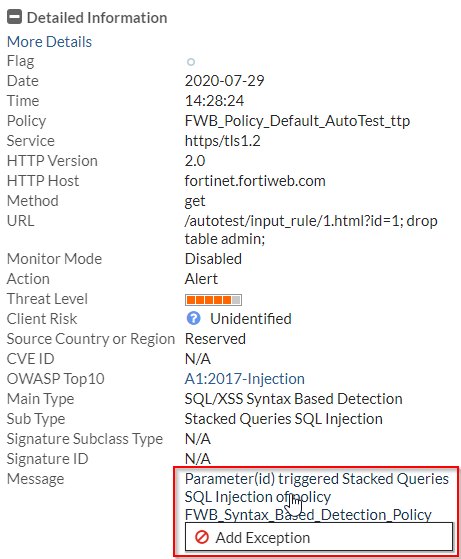
To add an exception from attack log:
For the Syntax Based Detection violations, it's also supported to add exceptions from the attack log.
Go to Log&Report > Log Access > Attack, find the attack logs with Main type "Syntax Based Detection". Double click an log item to view the log details. If you believe the request is falsely detected as an attack, click the message field, then click Add Exception.
Refer to the table in To configure an exception for an attack type to configure the Add Exception settings.
Example: Concatenating exceptions
The illustration displays the following attack type exception configuration:
- The concatenate type for the Full URL rule (ID 2) is Or.
- The concatenate type for the URI rule (ID3) is AND.
- The concatenate type for the Parameter rule has no effect, because it is the first rule.
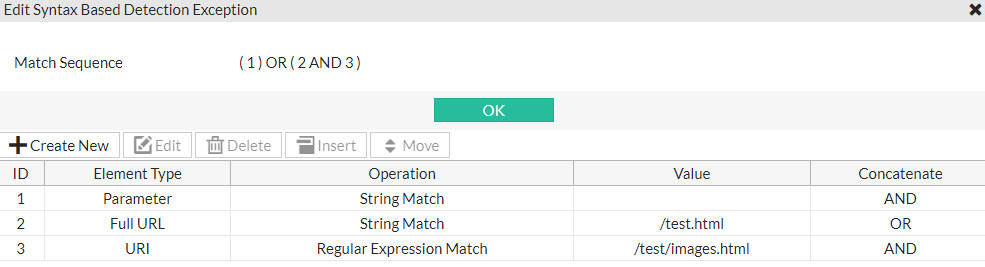
The final logic of the example is (1) OR (2 AND 3), which means FortiWeb skips the attack when both the Parameter and Full URL exception rules match the request, or the URL rule matches.
You can select one element type and click Move button to adjust the orders.
See also