
Fortinet white logo
Fortinet white logo

Administration Guide

Appendix J: Center Sensor Deployment

Appendix J: Center Sensor Deployment

Topology

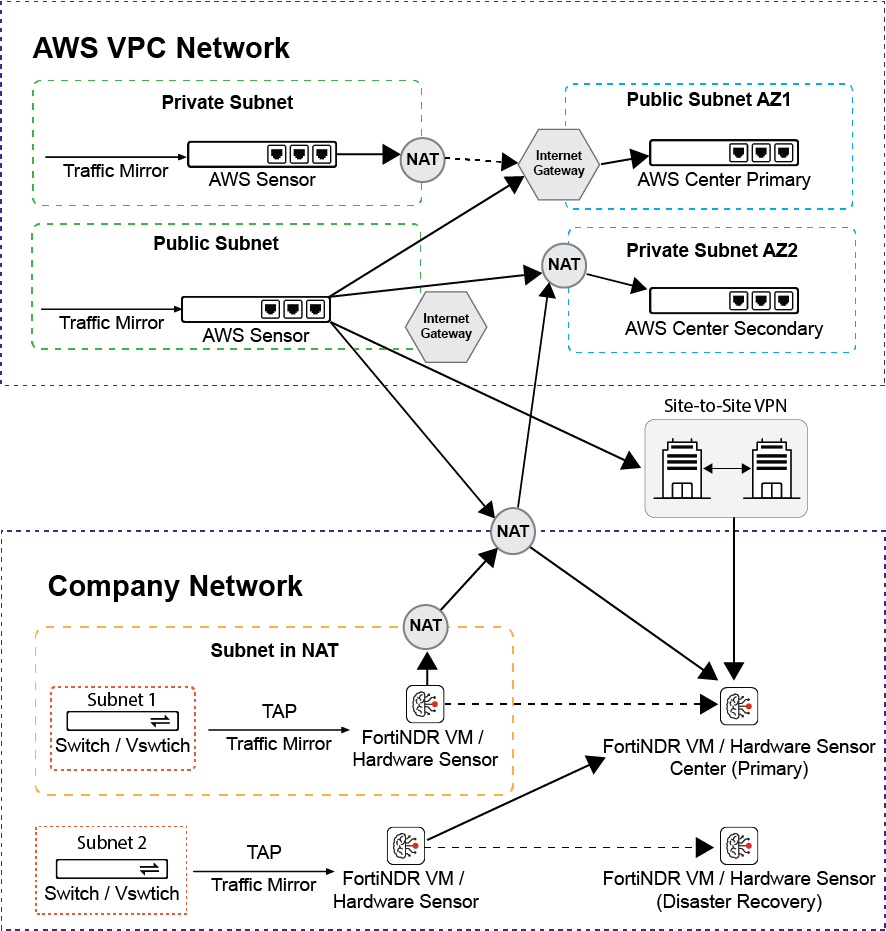
The following is an example topology showing NDR CM and Sensor deployment in AWS, or Hybrid with on-premise devices.
Redundant Center Setup

To achieve better availability, two center topologies are recommended to deploy in two different availability zones as illustrated in the topology above.

On-premises and Private Cloud (FNDR3K5, VM and KVM)

For deployment of on-premises and private cloud, please make sure the network access list listed in Appendix C: FortiNDR ports are configured properly.

For VMCM/KVMCM deployment, please make sure the hosting platform satisfies the recommended disk specs of minimum 15TB (recommended 20TB), and that at least 48 cores (64 cores recommended) and minimum 384GB memory is assigned (recommended 512GB). For more information, refer to FortiNDR data sheet for details: https://www.fortinet.com/content/dam/fortinet/assets/data-sheets/fortindr.pdf

Public Cloud IAAS (AWS IaaS)

Enable access and configure security groups and ACLs for services and ports in the network access list found in Appendix C: FortiNDR ports.

Hybrid Cloud Deployment

When a scenario requires AWS hosted and on-premise Center topology, please ensure sure that network access is configured properly.

NAT Support

Network bandwidth and latency:

Please reserve 10Gbps for FortiNDR Center Port1 and ensure 1Gbps of network bandwidth are reserved from Sensor to Center. The network path should also maintain a low latency from Sensor to Center (P99 Round Trip time from ping should be <10ms).

For NAT deployment:
  • Sensors deployed behind NAT do not require extra setup.
  • For Centers behind NAT, please configure the following port forwarding in addition to HTTPS (Port 443) and SSH (Port 22). If multiple layers of NAT are involved, please make sure cascaded port forwarding is configured properly.
  • For sensors and centers deployed behind NAT and using port-mapping from NAT gateways, please consider using the CLI for firmware upgrade. See, execute restore image.

    NAT IP PORT

    NDR Private Subnet Port

    Protocol

    5566

    5566

    UDP and TCP

    9094(IPv4 deployment), 9096(IPv6 deployment)

    9094(IPv4 deployment), 9096(IPv6 deployment)

    TCP

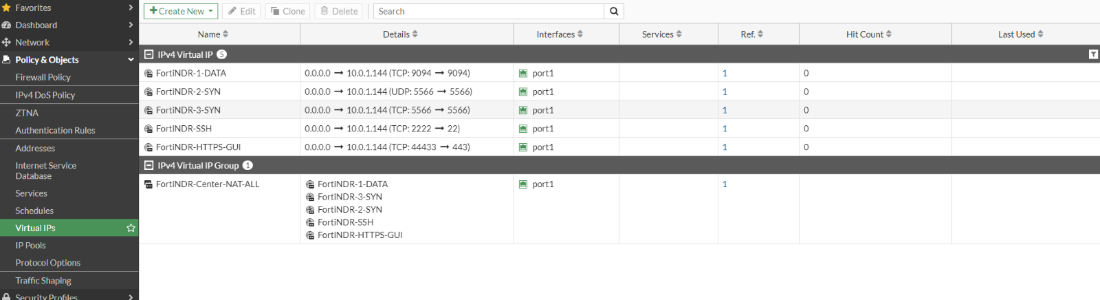
    Example: FortiGate Virtual IP configuration
Limitations:

There is no limitation for sensor deployment behind NAT. For center deployment behind NAT, please ensure all sensors are using the same NAT address to connect.

Example:

For a NAT setup: 10.0.1.2 > 172.19.1.2 > FNDR Center Deployment, ensure all sensors are configured with center IP as 10.0.1.2 or 172.19.1.2. A mixed configuration of center address of 10.0.1.2 and 172.19.1.2 will lead to undefined behavior.

Appendix J: Center Sensor Deployment

Appendix J: Center Sensor Deployment

Topology

The following is an example topology showing NDR CM and Sensor deployment in AWS, or Hybrid with on-premise devices.

Redundant Center Setup

To achieve better availability, two center topologies are recommended to deploy in two different availability zones as illustrated in the topology above.

On-premises and Private Cloud (FNDR3K5, VM and KVM)

For deployment of on-premises and private cloud, please make sure the network access list listed in Appendix C: FortiNDR ports are configured properly.

For VMCM/KVMCM deployment, please make sure the hosting platform satisfies the recommended disk specs of minimum 15TB (recommended 20TB), and that at least 48 cores (64 cores recommended) and minimum 384GB memory is assigned (recommended 512GB). For more information, refer to FortiNDR data sheet for details: https://www.fortinet.com/content/dam/fortinet/assets/data-sheets/fortindr.pdf

Public Cloud IAAS (AWS IaaS)

Enable access and configure security groups and ACLs for services and ports in the network access list found in Appendix C: FortiNDR ports.

Hybrid Cloud Deployment

When a scenario requires AWS hosted and on-premise Center topology, please ensure sure that network access is configured properly.

NAT Support

Network bandwidth and latency:

Please reserve 10Gbps for FortiNDR Center Port1 and ensure 1Gbps of network bandwidth are reserved from Sensor to Center. The network path should also maintain a low latency from Sensor to Center (P99 Round Trip time from ping should be <10ms).

For NAT deployment:
  • Sensors deployed behind NAT do not require extra setup.
  • For Centers behind NAT, please configure the following port forwarding in addition to HTTPS (Port 443) and SSH (Port 22). If multiple layers of NAT are involved, please make sure cascaded port forwarding is configured properly.
  • For sensors and centers deployed behind NAT and using port-mapping from NAT gateways, please consider using the CLI for firmware upgrade. See, execute restore image.

    NAT IP PORT

    NDR Private Subnet Port

    Protocol

    5566

    5566

    UDP and TCP

    9094(IPv4 deployment), 9096(IPv6 deployment)

    9094(IPv4 deployment), 9096(IPv6 deployment)

    TCP

    Example: FortiGate Virtual IP configuration

Limitations:

There is no limitation for sensor deployment behind NAT. For center deployment behind NAT, please ensure all sensors are using the same NAT address to connect.

Example:

For a NAT setup: 10.0.1.2 > 172.19.1.2 > FNDR Center Deployment, ensure all sensors are configured with center IP as 10.0.1.2 or 172.19.1.2. A mixed configuration of center address of 10.0.1.2 and 172.19.1.2 will lead to undefined behavior.