Initial setup
For the meaning of LEDs, see the Quick Start Guide (QSG).
Internet Access
For FortiGuard updates please have a stable internet access from the FortiNDR unit. Go to System > FortiGuard for updates via Internet. For offline deployments please refer to Appendix D: FortiGuard updates.

|
Proxy FortiGuard support is supported via CLI only, please refer to the CLI guide. |
Ports
For all FortiNDR 3500F appliances and VM, port1 and port2 are hard-coded to be management port and sniffer port.
The following is the initial port configuration for FNR-3500F.
| Port | Type | Function |
|---|---|---|
|
Port1 |
10GE copper (10G or 1G autodetect) |
Management port, GUI, Fabric devices files receiving, REST API, ICAP. Default IP address is |
|
Port2 |
10GE copper (10G or 1G autodetect) |
Sniffer port. |
|
Port3 Port4 |
1G Copper |
High availability |
|
Port5 Port6 Port7 Port8 |
10G SPF+ fiber (gen3 only) |
Sniffer port. For VM, only Port5 is used as sniffer port among Port5, Port6, port7 and Port8.
|
|
Console |
Serial port |
Console serial port. 9600 baud, 8 data bits, 1 stop bit, no parity, XON/XOFF. |
The following is the initial port configuration for FNDR 1000F:
| Port | Type | Function |
|---|---|---|
|
Port1 |
10G fiber |
Management port, GUI, Fabric devices files receiving, REST API, ICAP. Default IP address is |
|
Port2 |
10G fiber |
Reserved |
|
Port3 Port4 |
10G fiber |
Sniffer port. |
|
Port5 Port6 |
1G Copper |
High availability. These are labeled as HA1 and HA2 on the device |
|
|
While the FortiNDR 1000F's sniffer port3 and port4 are equipped with fiber ports, you can use the FN-TRAN-SFP+GC transceiver to convert them into copper ports. SKU: FN-TRAN-SFP+GC Product Name: 10GE copper SFP+ RJ45 transceiver (30m range) Description: 10GE copper SFP+ RJ45 Fortinet transceiver (30m range) for systems with SFP+ slots. 10GE copper supports up to 100m cable distance to switch or FortiGate. Ideally the shorter the cable the better the performance, avoiding retransmission and packet loss over physical medium. |
|
|
Use CAT 8 copper cable to achieve the maximum performance of up to 40Gbps for sniffer. For differences in CAT cables, see https://www.cablesandkits.com/learning-center/what-are-cat8-ethernet-cables. |
|
|
*For customers who are required to use SFP+ ports (available in FNR-3500F gen3 hardware only) for management and capture (sniffer), pls contact local CSE for details. |
RAID encryption support (1000F and 3600G models)
To set up disk encryption on 1000F and 3600G models:
Run the following CLI command:
execute raidlevel <raid-level-option> [encryption <security_key>]
For 1000F models:
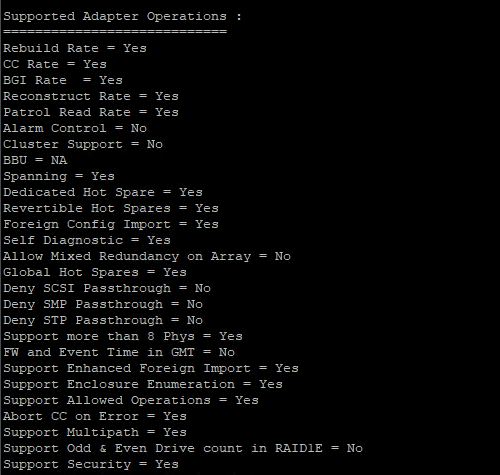
You must use the following CLI command to verify that the system supports Self-Encrypting Drives (SED):
diagnose system raid-status-detail
To verify both SSDs meet the requirements:
- In the
PD LISTtable, verify theSEDcolumn displaysY.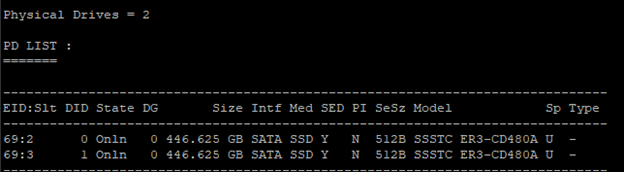
- In the
Supported Adapter Operationssection, verifySupport Security = Yesis displayed.