Fortinet white logo
Fortinet white logo

User Guide

Natural Language queries

Natural Language queries

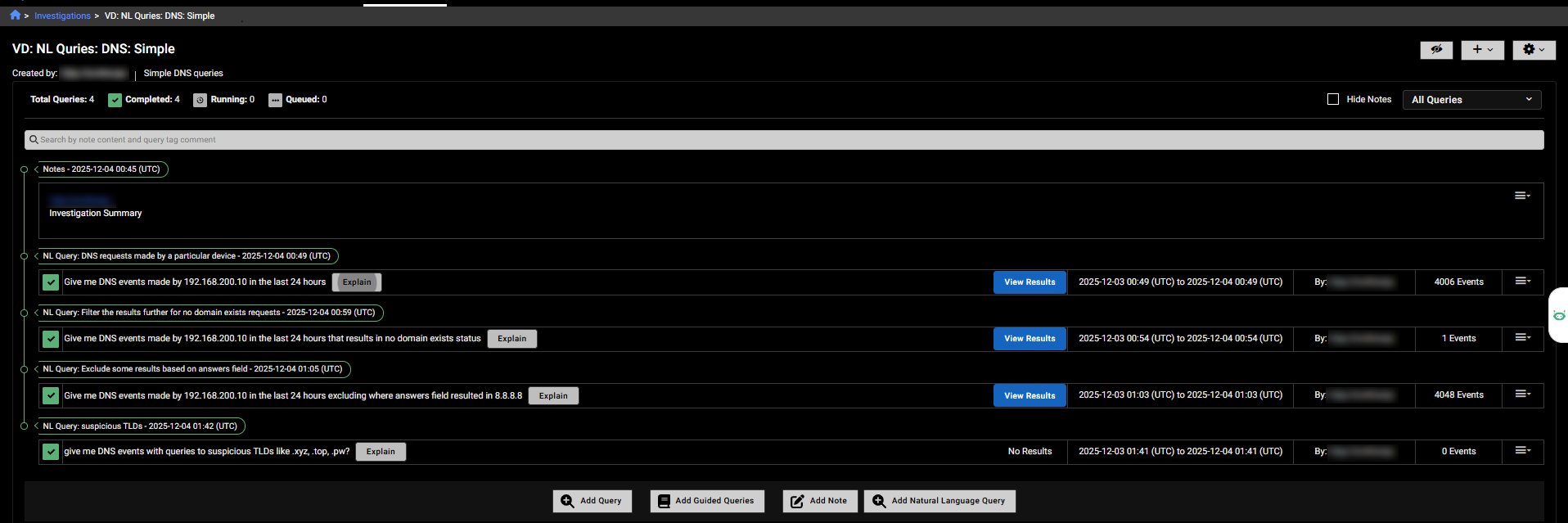
Natural Language (NL) Queries allow analysts to use simple statements for investigations and private searches as an alternative to Internal Query Language (IQL). You can start an NL Query from the Investigations or Private Search pages. NL queries appear with regular queries, and their results appear the same. In the query history, NL Query is shown next to the query name (for example: NL Query - 2025-11-18 06:04 (UTC)).

The Explain button next to the query results displays how the system interpreted your request and the queries it executed. You can copy this explanation and edit it to refine your queries. The Explain button is also available in Private Search and the Visualizer.

Note
  • NL queries are enabled by default. To disable NL Queries, contact your TSM.
  • Users can make up to 300 NL queries per day for the account they belong to. This limit is subject to change.

Supported event types and languages

NL Queries support the following event types and languages at this time:

Category

Support

Event Types DCE RPC, DHCP, DNS, DPI, Flow, flow_state, FTP, HTTP, Kerberos, NTLM, SSH, SSL, Suricata, x509
Languages Arabic, Chinese, Croatian, Czech, Dutch, English, Finnish, French, German, Greek, Hebrew, Hindi, Italian, Japanese, Korean, Norwegian, Polish, Portuguese, Romanian, Russian, Spanish, Swedish, Turkish

Feature Constraints

  • The Actions menu and Facets options are disabled for NL queries.
  • NL Query text does not appear in Global Search results.
  • NL Query results cannot be used to create detectors.
  • Querying using annotations or tags is not supported.
  • Not all NL aggregation queries generate a chart; some display only a table.

  • Raw events are not shown for NL aggregation queries.

Running Natural Language queries

To add a Natural Language query to an investigation:
  1. Go to Investigations and click an investigation in the list.
  2. Click Add Query. The Add a New Query page opens.
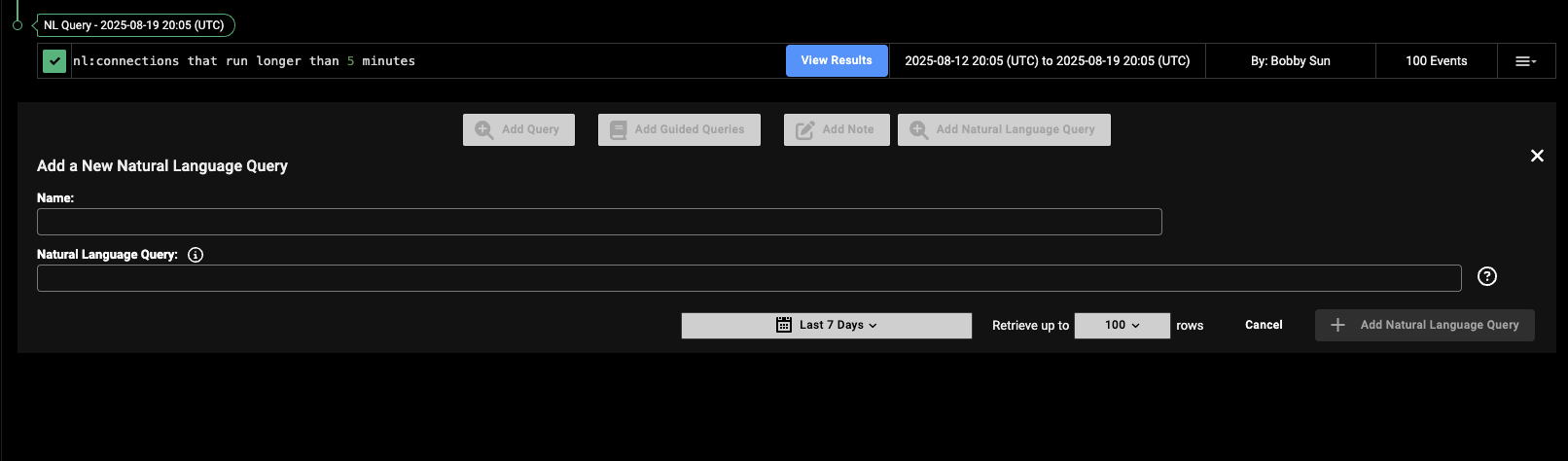
  3. Click Add Natural Language Query. The Add a New Natural Language Query dialog opens.
  4. In the Name field, enter a name for the query.
  5. In the Natural Language Query field, type your query.
To use a Natural Language queries in Private Search:
  1. Go to Investigations > Private Search.
  2. Enable Natural language Query.
  3. In the Name field, enter a name for the query.
  4. In the Natural Language Query field, type your query.
  5. Click Search.

NL Query guidelines

Best Practices

  • Use short time ranges for faster queries and fewer timeouts. A week or a month is ideal.
  • Limit your queries to supported event types.
  • Search within a single account at a time. Natural language queries do not support multi-account searches.
  • Use shorter time ranges in queries to avoid exceeding the 5-minute execution limit, which can cause queries to fail.

  • Clearly define the desired output format. For example:

    • Provide the result as group by source IP, issuer.
    • Include the summary with counts.

Example queries

Flow Examples

Query

Natural Language

Search for top outbound services by data sent Show me flow events with services that transferred most outbound data from internal hosts. Provide the results as group by service name where service is not null and total ip bytes sent.
Search for outbound connections using administrative protocols Show me flow events with internal hosts connecting to external destinations where service field contains ftp or ssh or rdp. Provide the results as group by service and destination asn org.

DNS Examples

Query

Natural Language

Search for long DNS queries Show me DNS events with external destinations where the length of query field is more than 75 characters.
Search for long DNS txt records Show me dns events where query type ='TXT' and length of query and response fields more than 100.

Search for DNS requests made by a device

Show me DNS events made by 192.168.200.10 in the last 24 hours

HTTP Examples

Query

Natural Language

Search for direct-to-IP HTTP post

Show me http events with POST method and host IP field is not null and destination is external.

Search for deprecated Windows versions Show me events with internal hosts where http user agent indicates a deprecated windows version.

SSL Examples

Query

Natural Language

Search for deprecated SSL versions Find internal hosts using SSL versions in ('SSLv2', 'SSLv3', 'TLSv10', 'TLSv11'). provide the results as group by source IP and SSL version.
Search for self-signed SSL certificates Search for self signed SSL certificates. Look for issuer like localhost using a case insensitive search. Provide the result as group by source IP, issuer.

X509 Examples

Query

Natural Language

Search for expired X.509 certificates Search for expired X.509 certificates. Provide the result as group by source IP, validity end date.

Natural Language queries

Natural Language queries

Natural Language (NL) Queries allow analysts to use simple statements for investigations and private searches as an alternative to Internal Query Language (IQL). You can start an NL Query from the Investigations or Private Search pages. NL queries appear with regular queries, and their results appear the same. In the query history, NL Query is shown next to the query name (for example: NL Query - 2025-11-18 06:04 (UTC)).

The Explain button next to the query results displays how the system interpreted your request and the queries it executed. You can copy this explanation and edit it to refine your queries. The Explain button is also available in Private Search and the Visualizer.

Note
  • NL queries are enabled by default. To disable NL Queries, contact your TSM.
  • Users can make up to 300 NL queries per day for the account they belong to. This limit is subject to change.

Supported event types and languages

NL Queries support the following event types and languages at this time:

Category

Support

Event Types DCE RPC, DHCP, DNS, DPI, Flow, flow_state, FTP, HTTP, Kerberos, NTLM, SSH, SSL, Suricata, x509
Languages Arabic, Chinese, Croatian, Czech, Dutch, English, Finnish, French, German, Greek, Hebrew, Hindi, Italian, Japanese, Korean, Norwegian, Polish, Portuguese, Romanian, Russian, Spanish, Swedish, Turkish

Feature Constraints

  • The Actions menu and Facets options are disabled for NL queries.
  • NL Query text does not appear in Global Search results.
  • NL Query results cannot be used to create detectors.
  • Querying using annotations or tags is not supported.
  • Not all NL aggregation queries generate a chart; some display only a table.

  • Raw events are not shown for NL aggregation queries.

Running Natural Language queries

To add a Natural Language query to an investigation:
  1. Go to Investigations and click an investigation in the list.
  2. Click Add Query. The Add a New Query page opens.
  3. Click Add Natural Language Query. The Add a New Natural Language Query dialog opens.
  4. In the Name field, enter a name for the query.
  5. In the Natural Language Query field, type your query.

To use a Natural Language queries in Private Search:
  1. Go to Investigations > Private Search.
  2. Enable Natural language Query.
  3. In the Name field, enter a name for the query.
  4. In the Natural Language Query field, type your query.
  5. Click Search.

NL Query guidelines

Best Practices

  • Use short time ranges for faster queries and fewer timeouts. A week or a month is ideal.
  • Limit your queries to supported event types.
  • Search within a single account at a time. Natural language queries do not support multi-account searches.
  • Use shorter time ranges in queries to avoid exceeding the 5-minute execution limit, which can cause queries to fail.

  • Clearly define the desired output format. For example:

    • Provide the result as group by source IP, issuer.
    • Include the summary with counts.

Example queries

Flow Examples

Query

Natural Language

Search for top outbound services by data sent Show me flow events with services that transferred most outbound data from internal hosts. Provide the results as group by service name where service is not null and total ip bytes sent.
Search for outbound connections using administrative protocols Show me flow events with internal hosts connecting to external destinations where service field contains ftp or ssh or rdp. Provide the results as group by service and destination asn org.

DNS Examples

Query

Natural Language

Search for long DNS queries Show me DNS events with external destinations where the length of query field is more than 75 characters.
Search for long DNS txt records Show me dns events where query type ='TXT' and length of query and response fields more than 100.

Search for DNS requests made by a device

Show me DNS events made by 192.168.200.10 in the last 24 hours

HTTP Examples

Query

Natural Language

Search for direct-to-IP HTTP post

Show me http events with POST method and host IP field is not null and destination is external.

Search for deprecated Windows versions Show me events with internal hosts where http user agent indicates a deprecated windows version.

SSL Examples

Query

Natural Language

Search for deprecated SSL versions Find internal hosts using SSL versions in ('SSLv2', 'SSLv3', 'TLSv10', 'TLSv11'). provide the results as group by source IP and SSL version.
Search for self-signed SSL certificates Search for self signed SSL certificates. Look for issuer like localhost using a case insensitive search. Provide the result as group by source IP, issuer.

X509 Examples

Query

Natural Language

Search for expired X.509 certificates Search for expired X.509 certificates. Provide the result as group by source IP, validity end date.