
Fortinet white logo
Fortinet white logo

Admin Guide

Authentication scheme

Authentication scheme

This section defines the FIC-supported authentication schemes and how Multi-Factor Authentication (MFA) methods apply to each scheme. These schemes determine how users authenticate and what additional verification steps may be required to access the system.

In its 26.1 release, FortiIdentity Cloud introduces an Authentication tab in realm configuration (Settings > Realm).
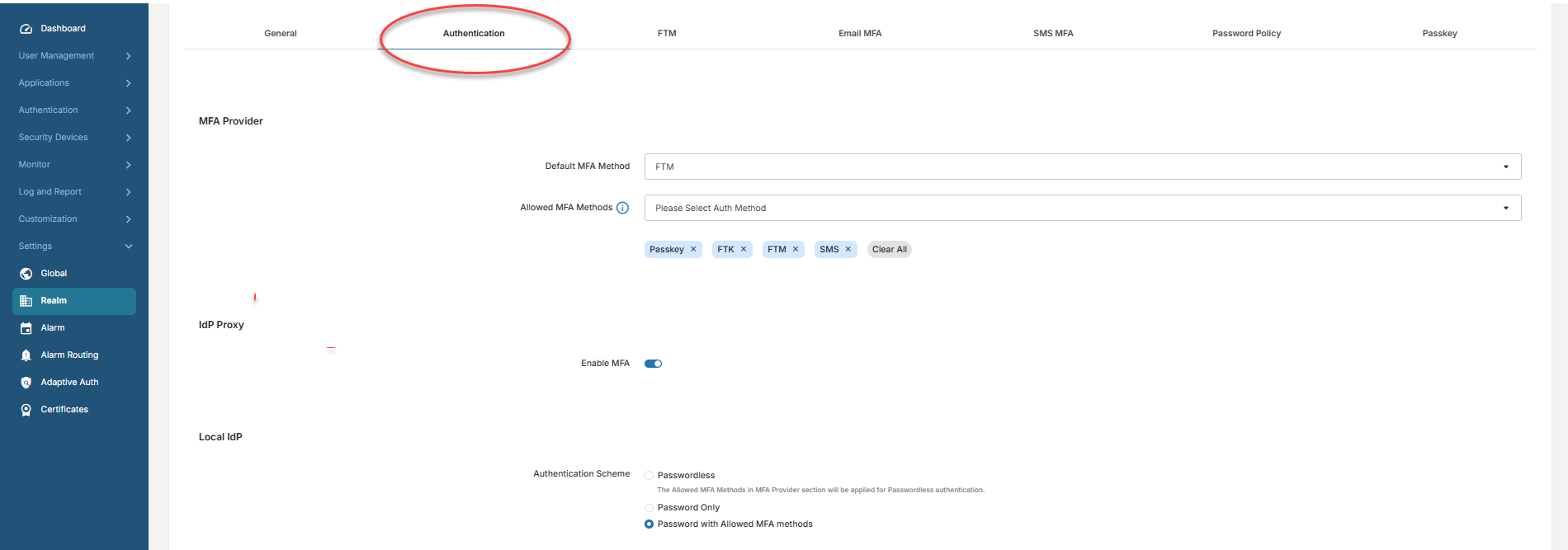
The Settings > Realm > Authentication page has the following three authentication schemes:

Parameter Description

MFA Provider

Default MFA Method

The Default MFA Method that will be assigned by default to all users added in the realm. By default, when a realm is created, FTM is assigned by default as the default MFA method.

Select one of the following as the default MFA method that your FIC uses to authenticate end users:

  • FTM (default)—FIC sends a unique one-time passcode (OTP) to the FortiToken Mobile app on end-users' smart phones.

    Note: This option requires that your end users must have the FortiToken Mobile app installed on their smart phones.

  • SMS—FIC sends an OTP via text message to your end-users' smart phones. Upon receiving the OTP, the end-user must enter it on the log-in page to gain access to the application.

    Note: To use this option, FIC must have the end users' valid smart phone numbers in its database.

  • Email—FIC sends a unique OTP to the end users' email addresses on file. The users then have to manually copy and past the OTP to FIC to gain access to the application (i.e., FGT or FAC).
  • FTK—FIC requires end-users to provide the OTP generated by their FortiToken (hardware token) for MFA.

    Note: To use this option, the FIC admin must first add the serial numbers of the FortiTokens to FIC, and assign them to the end-users. Upon receiving an end-user's username and password, FIC prompts the user for an OTP from the FortiToken device. The user must press the FortiToken to get the OTP, and then manually enters it. See Using hardware tokens. Also, when FTK is set as the MFA method for a realm, you can let FIC automatically assign FTKs to selected users by clicking the Auto-assign FTK button on the Users page. See Managing users.

Allowed MFA Methods

In addition to the Default MFA Method, the admin can set other MFA methods that the user can use to complete the authentication process. This option is applicable only for SSO applications.

Note
  • This feature enables end users of SSO applications to authenticate using MFA methods other than the default setting, based on the configuration made by the administrator.

  • If the Default MFA Method is set to SMS, setting Email to be an allowed MFA method here will let FIC automatically switch to email authentication and send OTP codes by email if the end users are unable to use SMS.

The drop-down menu shows all the MFA methods that you may allow your end users to use. By default, all the options except Email are preselected. If you are satisfied with the default settings, do nothing; otherwise, you can use the tools here to customize your allowed MFA methods.

  • All — Select all allowed options at once.

  • Passkey (preselected) — Select Passkey.

  • FTK (preselected) — Select FTK.

  • FTM (preselected) — Select FTM.

  • SMS (preselected) — Select SMS.

  • Email — Select Email. Refer to the note above.

IdP Proxy

Enable MFA

Turning this toggle switch OFF will by default turn off MFA for all IdP Proxy SSO applications in the realm. The setting can be overridden per SSO application in the realm by using the same Enable MFA option in the Authentication tab of the SSO application. By default, the feature is enabled when a new realm is created.

Local IdP

This section applies only to SSO applications that use FIC’s Local IdP as the user source. It has the following options:

Passwordless

Enables users to sign in without entering a password. The Allowed MFA Methods in MFA Provider section will be applied for Passwordless authentication. This option:

  • Eliminates password-related risks such as password reuse or phishing.

  • Relies fully on secure MFA alternatives.

Password Only

Users authenticate solely using a password, with no additional MFA factors required. Authentication success is determined solely by correct password entry. This option is

  • Simplest authentication method.

  • Least secure as it relies on a single factor.

  • Appropriate only for low-risk environments.

Password with Allowed MFA Methods

Users authenticate using their password and a MFA method defined in the Allowed MFA Methods configuration. This option:

  • Provides strong security by requiring both a knowledge factor (password) and a possession/biometric factor.

  • Is recommended for moderate to high-risk environments.

Authentication scheme

Authentication scheme

This section defines the FIC-supported authentication schemes and how Multi-Factor Authentication (MFA) methods apply to each scheme. These schemes determine how users authenticate and what additional verification steps may be required to access the system.

In its 26.1 release, FortiIdentity Cloud introduces an Authentication tab in realm configuration (Settings > Realm).

The Settings > Realm > Authentication page has the following three authentication schemes:

Parameter Description

MFA Provider

Default MFA Method

The Default MFA Method that will be assigned by default to all users added in the realm. By default, when a realm is created, FTM is assigned by default as the default MFA method.

Select one of the following as the default MFA method that your FIC uses to authenticate end users:

  • FTM (default)—FIC sends a unique one-time passcode (OTP) to the FortiToken Mobile app on end-users' smart phones.

    Note: This option requires that your end users must have the FortiToken Mobile app installed on their smart phones.

  • SMS—FIC sends an OTP via text message to your end-users' smart phones. Upon receiving the OTP, the end-user must enter it on the log-in page to gain access to the application.

    Note: To use this option, FIC must have the end users' valid smart phone numbers in its database.

  • Email—FIC sends a unique OTP to the end users' email addresses on file. The users then have to manually copy and past the OTP to FIC to gain access to the application (i.e., FGT or FAC).
  • FTK—FIC requires end-users to provide the OTP generated by their FortiToken (hardware token) for MFA.

    Note: To use this option, the FIC admin must first add the serial numbers of the FortiTokens to FIC, and assign them to the end-users. Upon receiving an end-user's username and password, FIC prompts the user for an OTP from the FortiToken device. The user must press the FortiToken to get the OTP, and then manually enters it. See Using hardware tokens. Also, when FTK is set as the MFA method for a realm, you can let FIC automatically assign FTKs to selected users by clicking the Auto-assign FTK button on the Users page. See Managing users.

Allowed MFA Methods

In addition to the Default MFA Method, the admin can set other MFA methods that the user can use to complete the authentication process. This option is applicable only for SSO applications.

Note
  • This feature enables end users of SSO applications to authenticate using MFA methods other than the default setting, based on the configuration made by the administrator.

  • If the Default MFA Method is set to SMS, setting Email to be an allowed MFA method here will let FIC automatically switch to email authentication and send OTP codes by email if the end users are unable to use SMS.

The drop-down menu shows all the MFA methods that you may allow your end users to use. By default, all the options except Email are preselected. If you are satisfied with the default settings, do nothing; otherwise, you can use the tools here to customize your allowed MFA methods.

  • All — Select all allowed options at once.

  • Passkey (preselected) — Select Passkey.

  • FTK (preselected) — Select FTK.

  • FTM (preselected) — Select FTM.

  • SMS (preselected) — Select SMS.

  • Email — Select Email. Refer to the note above.

IdP Proxy

Enable MFA

Turning this toggle switch OFF will by default turn off MFA for all IdP Proxy SSO applications in the realm. The setting can be overridden per SSO application in the realm by using the same Enable MFA option in the Authentication tab of the SSO application. By default, the feature is enabled when a new realm is created.

Local IdP

This section applies only to SSO applications that use FIC’s Local IdP as the user source. It has the following options:

Passwordless

Enables users to sign in without entering a password. The Allowed MFA Methods in MFA Provider section will be applied for Passwordless authentication. This option:

  • Eliminates password-related risks such as password reuse or phishing.

  • Relies fully on secure MFA alternatives.

Password Only

Users authenticate solely using a password, with no additional MFA factors required. Authentication success is determined solely by correct password entry. This option is

  • Simplest authentication method.

  • Least secure as it relies on a single factor.

  • Appropriate only for low-risk environments.

Password with Allowed MFA Methods

Users authenticate using their password and a MFA method defined in the Allowed MFA Methods configuration. This option:

  • Provides strong security by requiring both a knowledge factor (password) and a possession/biometric factor.

  • Is recommended for moderate to high-risk environments.