

Support for LDAP/AD user source
FortiIdentity Cloud (FIC) supports LDAP/Active Directory as a user source, allowing organizations to synchronize users and groups directly from their existing directory services. This enhancement simplifies identity management, improves authentication consistency, and enables seamless integration between on‑premises AD environments and FIC’s cloud‑based identity platform.
Configuring FIC/LDAP user source
-
Log into the FIC admin portal, and select Authentication >User Source.
-
Click Add User Source.
-
Under Source Information, make the required entries or selections.
-
For Realm, select the desired realm
-
For Interface, select LDAP.
-
Click Next. The Interface Detail dialog opens.
-
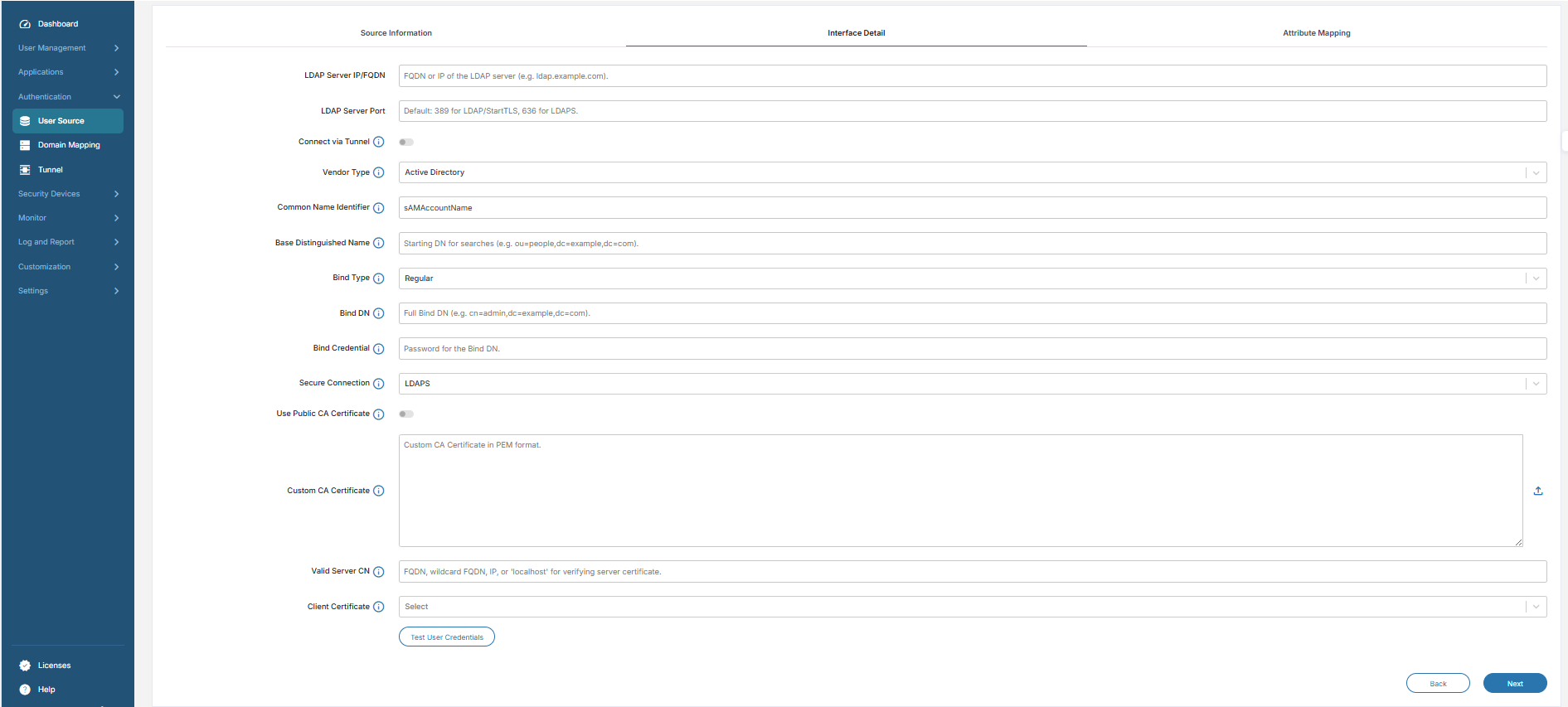
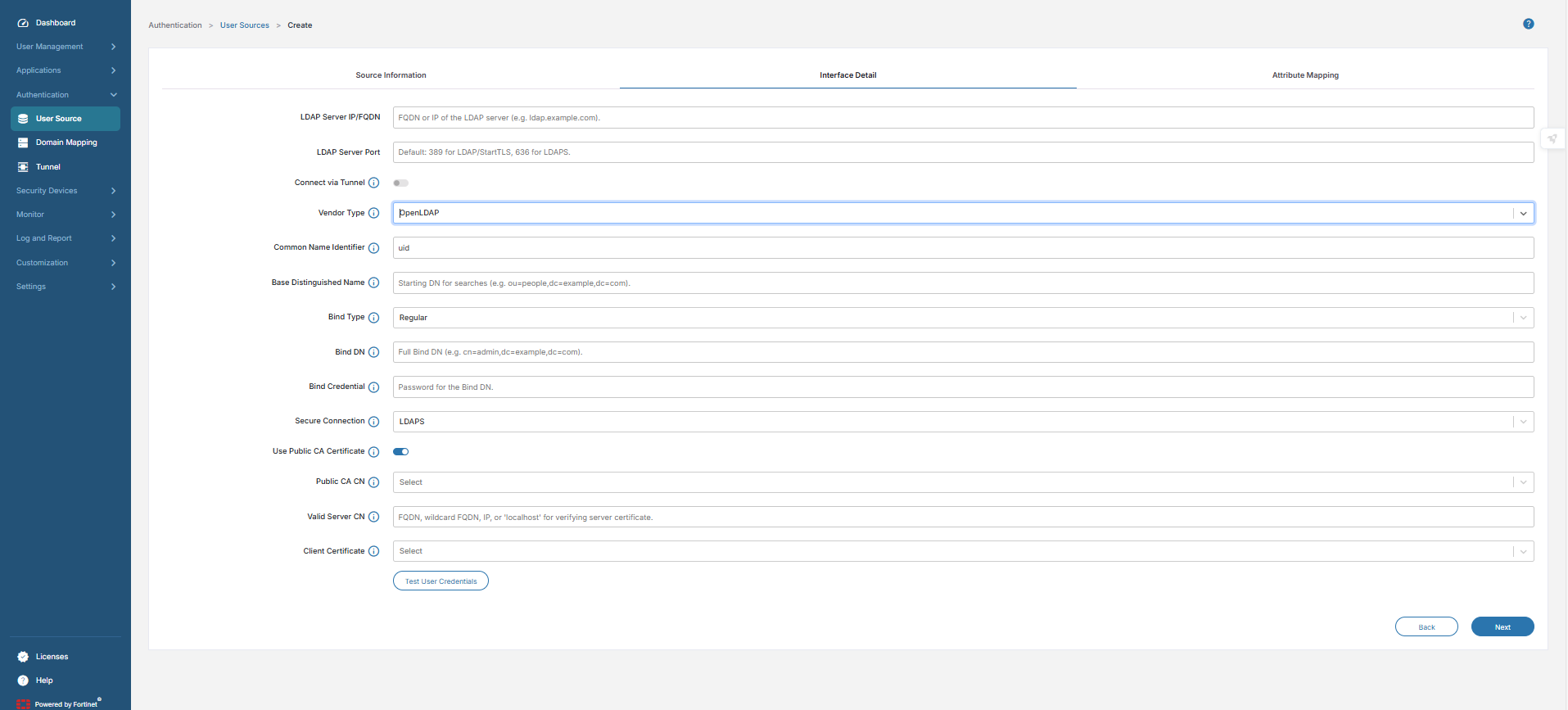
Enter the details of the LDAP server.

-
Bind Credentials are required for Regular Bind authentication.
-
For Simple Bind, FIC may use a Public CA or Custom CA Certificate to validate the LDAP server.
-
Custom CA certificates can be uploaded if a public CA is not available.
-
LDAP/AD authentication methods
The following sections discuss the different LDAP/AD authentication methods for FIC/LDAP user source.
LDAP Regular Bind
|
Description |
The FIC admin configures the LDAP user source by binding to the LDAP server using a distinguished name (DN) and password. This binding allows FIC to retrieve user information and perform required LDAP operations The standard LDAP authentication uses a username (DN) and password. The connection can be over plain LDAP (port 389) or secured via TLS/SSL. |
|
Use case |
It is suitable for internal, trusted networks where encryption is optional. |
|
Notes |
If used without encryption, credentials are sent in plaintext. For secure transmission, consider using StartTLS or LDAPS instead. |
The following table shows a sample configuration.
|
Field |
Description |
Example |
|---|---|---|
|
LDAP Server IP/FQDN |
Target LDAP/AD server address |
10.1.10.10 |
|
LDAP Server Port |
TCP port for LDAP communication |
389 |
|
Vendor Type |
Directory server type |
Active Directory / OpenLDAP |
|
Common Name Identifier |
Attribute used for login |
uid or cn |
|
Base Distinguished Name |
Search base for users |
ou=people, dc=example, dc=com |
|
Bind Type |
Authentication method |
Regular/Simple |
|
Bind DN |
Service account used for lookup |
cn=admin, dc=example, dc=com |
|
Bind Credential |
Password for Bind DN |
******** |
|
Secure Connection |
Type of encryption |
None (plain LDAP) |
|
Custom CA Certificate |
Certificate used to validate LDAP server |
Not required |
|
Connect via Tunnel |
ZTNA tunnel ID used for connection |
ZTNA-LDAP-Tunnel |
|
Public CA Certificate |
Not applicable — no TLS used |
|
LDAPS (LDAP over SSL/TLS)
|
Description |
LDAP over SSL/TLS uses dedicated port 636. It provides encrypted communication for username/password authentication. |
|
Notes: |
The FIC admin configures the server to use the default port 636 or a custom port, installs the server certificate signed by CA, and binds using DN + password over secure channel. |
|
Advantages: |
It is simple to implement if using TLS certificates. The credentials are never sent in plaintext. |
The following table shows a sample configuration.
|
Field |
Description |
Example |
|---|---|---|
|
LDAP Server IP/FQDN |
Target LDAP/AD server address |
10.1.10.10 |
|
LDAP Server Port |
TCP port for LDAP communication |
636 |
|
Vendor Type |
Directory server type |
Active Directory/OpenLDAP |
|
Common Name Identifier |
Attribute used for login |
uid or cn |
|
Base Distinguished Name |
Search base for users |
ou=people, dc=example, dc=com |
|
Bind Type |
Authentication method |
Regular / Simple |
|
Bind DN |
Service account used for lookup |
cn=admin,dc=example,dc=com |
|
Bind Credential |
Password for Bind DN |
******** |
|
Secure Connection |
Type of encryption |
LDAPS (SSL/TLS) |
|
Custom CA Certificate |
Certificate used to validate LDAP server |
Upload CA if not public |
|
Connect via Tunnel |
ZTNA tunnel ID used for connection |
ZTNA-LDAP-Tunnel |
|
Public CA Certificate |
No need to upload cert if signed by public CA |
|
LDAP with StartTLS
|
Description |
Plain LDAP connection is upgraded to TLS using the StartTLS operation. It operates over the standard port 389. |
|
Notes |
The FIC admin configures in the LDAP user to connect the LDAP server on port 389, issues StartTLS command to initiate encryption, and binds with credentials securely over TLS. |
|
Advantages |
There us no need to run separate LDAPS port (636). It is flexible for environments where standard LDAP ports are used. |
The following table shows a sample configuration.
| Field |
Description |
Example |
|---|---|---|
|
LDAP Server IP/FQDN |
Target LDAP/AD server address |
10.1.10.10 |
|
LDAP Server Port |
TCP port for LDAP communication |
389 |
|
Vendor Type |
Directory server type |
Active Directory / OpenLDAP |
|
Common Name Identifier |
Attribute used for login |
uid or cn |
|
Base Distinguished Name |
Search base for users |
ou=people, dc=example, dc=com |
|
Bind Type |
Authentication method |
Regular / Simple |
|
Bind DN |
Service account used for lookup |
cn=admin, dc=example, dc=com |
|
Bind Credential |
Password for Bind DN |
******** |
|
Secure Connection |
Type of encryption |
StartTLS (upgrade to TLS) |
|
Custom CA Certificate |
Certificate used to validate LDAP server |
Upload CA if not public |
|
Connect via Tunnel |
ZTNA tunnel ID used for connection |
ZTNA-LDAP-Tunnel |
|
Public CA Certificate |
No need to upload cert if signed by public CA |
|
LDAP with mTLS (Mutual TLS)
|
Description |
Mutual TLS requires both client and server certificates. It provides two-way authentication in addition to password. |
|
Use Case |
It is used for high-security environments, and ensures both LDAP server and client identity verification. |
|
Notes |
The FIC admin performs the entire certificate configuration and on the LDAP server with trusted CA certificates, issues client certificate for authentication, and binds using DN + password and client certificate over TLS. |
|
Advantages |
It's the strongest authentication mechanism that protects against unauthorized access and man-in-the-middle attacks. |
The following table shows a sample configuration.
|
Field |
Description |
Example |
|---|---|---|
|
LDAP Server IP/FQDN |
Target LDAP/AD server address |
10.1.10.10 |
|
LDAP Server Port |
TCP port for LDAP communication |
636 (or 389 with StartTLS + mTLS) |
|
Vendor Type |
Directory server type |
Active Directory / OpenLDAP |
|
Common Name Identifier |
Attribute used for login |
uid or cn |
|
Base Distinguished Name |
Search base for users |
ou=people, dc=example, dc=com |
|
Bind Type |
Authentication method |
Regular / Simple |
|
Bind DN |
Service account used for lookup |
cn=admin, dc=example, dc=com |
|
Bind Credential |
Password for Bind DN |
******** |
|
Secure Connection |
Type of encryption |
Mutual TLS (client + server certs) |
|
Custom CA Certificate |
Certificate used to validate LDAP server |
Upload CA if not public |
|
Client Certificate |
Certificate used to authenticate client |
Upload client cert + private key |
|
Connect via Tunnel |
ZTNA tunnel ID used for connection |
ZTNA-LDAP-Tunnel |
|
Public CA Certificate |
No need to upload server cert if signed by public CA. But, Client cert must still be uploaded manually |
|
ZTNA Tunnel support
All of the above methods are supported with or without ZTNA tunnel.
|
With ZTNA Proxy Tunnel |
Authentication and user synchronization traffic is encapsulated within a secure Zero Trust Network Access tunnel, adding an extra layer of protection and policy enforcement. |
|
Without ZTNA |
Methods operate directly over the network, relying solely on LDAP security mechanisms:
|
LDAP & AD authentication methods
|
Method |
Port |
Encryption |
Use case |
|---|---|---|---|
|
LDAP Regular Bind |
389 |
Optional |
Internal trusted network, flexible, may be plaintext |
|
LDAPS (LDAP over SSL/TLS) |
636 |
TLS |
Secure authentication with dedicated SSL/TLS port |
|
LDAP with StartTLS |
389 |
TLS |
Secure credentials without using LDAPS port |
|
LDAP with mTLS |
389/636 |
Mutual TLS |
High-security environments, two-way authentication |
Application integration procedures
-
Configure the LDAP user source.
-
Navigate to your SSO or application configuration.
-
Associate the LDAP user source with the desired application.
-
FIC uses this LDAP configuration for user validation.
Authentication flow
-
The end user initiates the login process via the integrated SSO application.
-
FIC references the configured LDAP user source.
-
FIC establishes a secure ZTNA tunnel through FortiGate if it is selected as the user source in FIC.
-
Through this tunnel, FIC sends the LDAP bind request with user credentials.
-
If ZTNA is not required, FIC can directly connect to the LDAP server using the configured method (LDAP, LDAPS, StartTLS, or mTLS).
-
The LDAP server processes and responds to the request.
-
Authentication result is relayed back to the user through FIC.
Summary
|
Component |
Function |
|---|---|
|
FortiGate |
Acts as a ZTNA Tunnel Server for secure LDAP/AD access. |
|
ZTNA Tunnel |
Provides a encrypted path between FIC and LDAP. |
|
FIC |
Authenticates users using LDAP/AD directory. |
|
FIC/Application |
Leverages LDAP user source for SSO authentication. |