
Fortinet white logo
Fortinet white logo

Administration Guide

Defining a preferred source IP for local-out egress interfaces on SD-WAN members

Defining a preferred source IP for local-out egress interfaces on SD-WAN members

The preferred source IP can be configured on SD-WAN members so that local-out traffic is sourced from that IP. In the following example, two SD-WAN members (port5 and port6) will use loopback1 and loopback2 as sources instead of their physical interface address. A static route is created for destination 200.0.0.0/24 to use the virtual-wan-link. In turn, the FortiGate will create two ECMP routes to the member gateways and source the traffic from the loopback IPs.
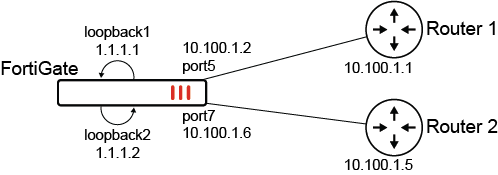
To configure preferred source IPs for SD-WAN members:
  1. Configure the SD-WAN members and other settings:

    config system sdwan
        set status enable
        config zone
            edit "virtual-wan-link"
            next
        end
        config members
            edit 1
                set interface "port5"
                set gateway 10.100.1.1
                set preferred-source 1.1.1.1
                set source 1.1.1.1
            next
            edit 2
                set interface "port7"
                set gateway 10.100.1.5
                set preferred-source 1.1.1.2
                set source 1.1.1.2
            next
        end
    end

    Note

    In the SD-WAN config members settings, configuring the source for the health check probes is still required. SD-WAN adds dedicated kernel routes (proto=17) for the health checks using the interface IP or source IP when specified. To view the kernel routes, use diagnose ip route list.

  2. Configure the static route:

    config router static
        edit 2000
            set dst 200.0.0.0 255.255.255.0
            set distance 1
            set sdwan-zone "virtual-wan-link"
        next
    end
To verify the configuration:
  1. Verify the kernel routing table for 200.0.0.0/24:

    # get router info kernel | grep -A 2 200.0.0.0/24
    tab=254 vf=0 scope=0 type=1 proto=11 prio=1 0.0.0.0/0.0.0.0/0->200.0.0.0/24 pref=0.0.0.0
            gwy=10.100.1.1 flag=14 hops=255 oif=13(port5) pref=1.1.1.1
            gwy=10.100.1.5 flag=14 hops=254 oif=15(port7) pref=1.1.1.2
  2. Verify the routing table for 200.0.0.0/24:

    # get router info routing-table details 200.0.0.0/24
    Routing table for VRF=0
    Routing entry for 200.0.0.0/24
      Known via "static", distance 1, metric 0, best
      * vrf 0 10.100.1.1, via port5, prefsrc 1.1.1.1
      * vrf 0 10.100.1.5, via port7, prefsrc 1.1.1.2
  3. Run a sniffer trace after some traffic passes.

    1. When traffic leaves port5:

      # diagnose sniffer packet any "host 200.0.0.1" 4
      interfaces=[any]
      filters=[host 200.0.0.1]
      6.592488 port5 out 1.1.1.1 -> 200.0.0.1: icmp: echo request
      7.592516 port5 out 1.1.1.1 -> 200.0.0.1: icmp: echo request
      8.592532 port5 out 1.1.1.1 -> 200.0.0.1: icmp: echo request
    2. When traffic leaves port7:

      # diagnose sniffer packet any "host 200.0.0.1" 4
      interfaces=[any]
      filters=[host 200.0.0.1]
      75.664173 port7 out 1.1.1.2 -> 200.0.0.1: icmp: echo request
      76.664194 port7 out 1.1.1.2 -> 200.0.0.1: icmp: echo request
      

    Traffic exiting each interface is sourced from the corresponding loopback IP.

Note

Individual source IP commands, such as FortiManager source IP and FortiAnalyzer source IP, take precedence over these preferred-source configurations.

Defining a preferred source IP for local-out egress interfaces on SD-WAN members

Defining a preferred source IP for local-out egress interfaces on SD-WAN members

The preferred source IP can be configured on SD-WAN members so that local-out traffic is sourced from that IP. In the following example, two SD-WAN members (port5 and port6) will use loopback1 and loopback2 as sources instead of their physical interface address. A static route is created for destination 200.0.0.0/24 to use the virtual-wan-link. In turn, the FortiGate will create two ECMP routes to the member gateways and source the traffic from the loopback IPs.

To configure preferred source IPs for SD-WAN members:
  1. Configure the SD-WAN members and other settings:

    config system sdwan
        set status enable
        config zone
            edit "virtual-wan-link"
            next
        end
        config members
            edit 1
                set interface "port5"
                set gateway 10.100.1.1
                set preferred-source 1.1.1.1
                set source 1.1.1.1
            next
            edit 2
                set interface "port7"
                set gateway 10.100.1.5
                set preferred-source 1.1.1.2
                set source 1.1.1.2
            next
        end
    end

    Note

    In the SD-WAN config members settings, configuring the source for the health check probes is still required. SD-WAN adds dedicated kernel routes (proto=17) for the health checks using the interface IP or source IP when specified. To view the kernel routes, use diagnose ip route list.

  2. Configure the static route:

    config router static
        edit 2000
            set dst 200.0.0.0 255.255.255.0
            set distance 1
            set sdwan-zone "virtual-wan-link"
        next
    end
To verify the configuration:
  1. Verify the kernel routing table for 200.0.0.0/24:

    # get router info kernel | grep -A 2 200.0.0.0/24
    tab=254 vf=0 scope=0 type=1 proto=11 prio=1 0.0.0.0/0.0.0.0/0->200.0.0.0/24 pref=0.0.0.0
            gwy=10.100.1.1 flag=14 hops=255 oif=13(port5) pref=1.1.1.1
            gwy=10.100.1.5 flag=14 hops=254 oif=15(port7) pref=1.1.1.2
  2. Verify the routing table for 200.0.0.0/24:

    # get router info routing-table details 200.0.0.0/24
    Routing table for VRF=0
    Routing entry for 200.0.0.0/24
      Known via "static", distance 1, metric 0, best
      * vrf 0 10.100.1.1, via port5, prefsrc 1.1.1.1
      * vrf 0 10.100.1.5, via port7, prefsrc 1.1.1.2
  3. Run a sniffer trace after some traffic passes.

    1. When traffic leaves port5:

      # diagnose sniffer packet any "host 200.0.0.1" 4
      interfaces=[any]
      filters=[host 200.0.0.1]
      6.592488 port5 out 1.1.1.1 -> 200.0.0.1: icmp: echo request
      7.592516 port5 out 1.1.1.1 -> 200.0.0.1: icmp: echo request
      8.592532 port5 out 1.1.1.1 -> 200.0.0.1: icmp: echo request
    2. When traffic leaves port7:

      # diagnose sniffer packet any "host 200.0.0.1" 4
      interfaces=[any]
      filters=[host 200.0.0.1]
      75.664173 port7 out 1.1.1.2 -> 200.0.0.1: icmp: echo request
      76.664194 port7 out 1.1.1.2 -> 200.0.0.1: icmp: echo request
      

    Traffic exiting each interface is sourced from the corresponding loopback IP.

Note

Individual source IP commands, such as FortiManager source IP and FortiAnalyzer source IP, take precedence over these preferred-source configurations.