

Single-domain VRRP example
This example consists of a VRRP domain with two FortiGates that connect an internal network to the internet. The FortiGate port2 interfaces connect to the internal network, and a VRRP virtual router is added to each port2 interface with VRRP virtual MAC addresses enabled. The internal network default route is 10.31.101.120. Each FortiGate port2 interface has an IP address that is different from the virtual router IP address. Since vrrp-virtual-mac is enabled, upon failover, the new primary VRRP router will use the same VMAC as the previous router.
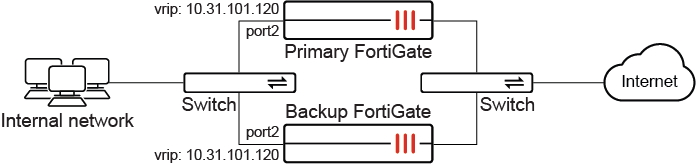
To configure the primary FortiGate:
config system interface
    edit port2
        set vrrp-virtual-mac enable
        config vrrp
            edit 5
                set vrip 10.31.101.120
                set priority 255
            next
        end
    next
end
To configure the backup FortiGate:
config system interface
    edit port2
        set vrrp-virtual-mac enable
        config vrrp
            edit 5
                set vrip 10.31.101.120
                set priority 50
            next
        end
    next
end